

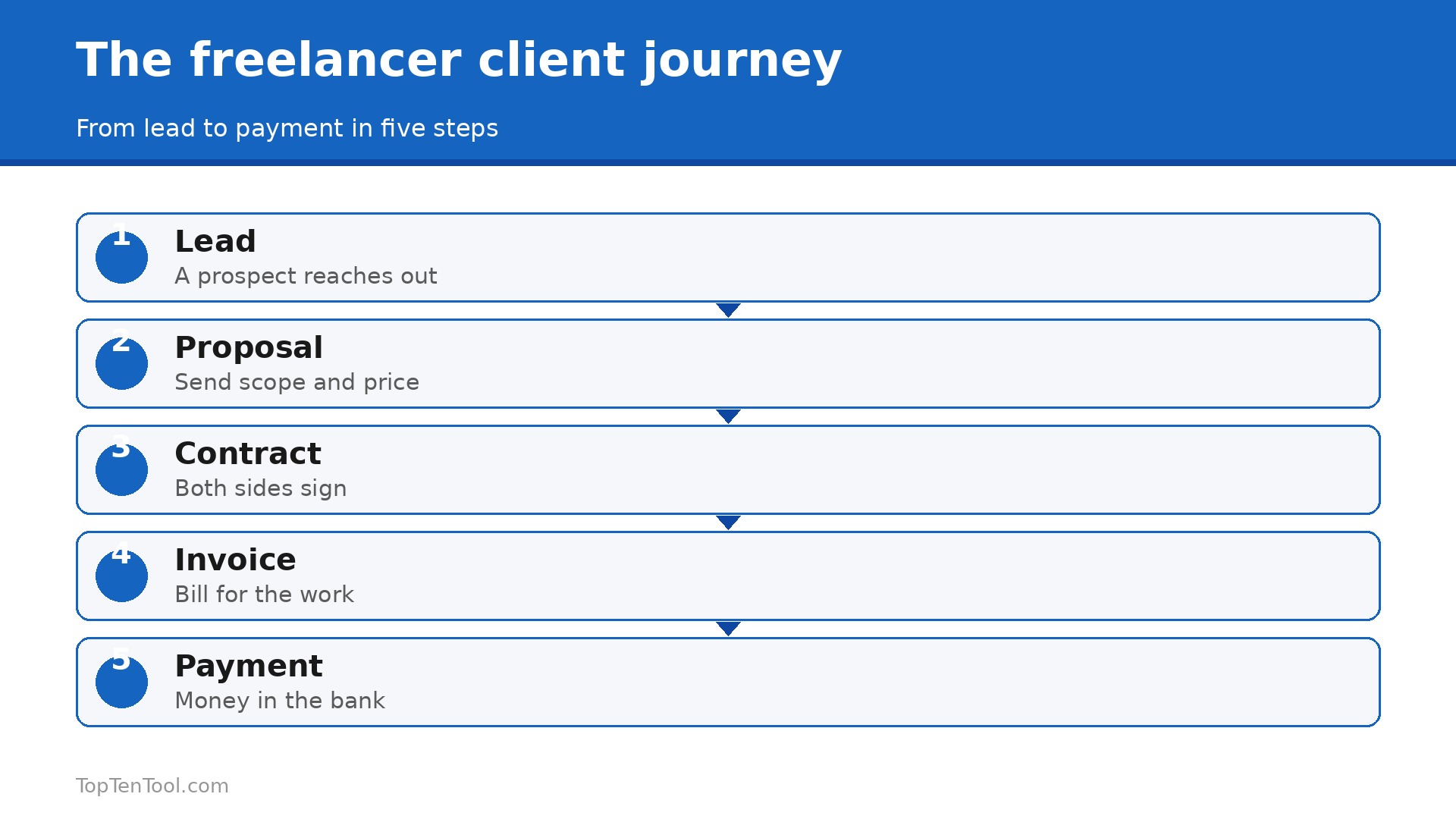
A freelancer does not lose clients because the work is bad. The work is lost in the gaps, in the follow up that never happened, the proposal that sat unsent, and the invoice that went out a week late. The best CRM software for freelancers closes those gaps by keeping every client, deal and deadline in one place that a single person can actually maintain. Our research compared vendor pricing pages in November 2026, and the range runs from free to $35 a month for the tools a solo business really needs.
Freelancers need a different CRM from a sales team. You do not need territory management or a pipeline with twelve stages. You need to know who to follow up with today, which proposal is waiting, and who owes you money. The tool that answers those three questions in two minutes beats the one that takes an hour to configure.
This guide compares ten tools on real prices, client portals, contracts and invoicing, and it ends with a pick for each common situation. Start with the comparison table, then read the reviews that match how you sell.
The Shortlist in Brief
The table below shows the starting price of each tool, who it suits best, and the one thing to watch. Prices are monthly list prices on annual billing unless noted. Free plans are marked where they exist. Use the table to shortlist the best CRM software for freelancers options that fit your budget before reading the full reviews.
| Tool | Starting price | Best for | Watch out |
|---|---|---|---|
| HoneyBook | $29 a month billed annually | Creative freelancers who need proposals to payment | US and Canada only |
| Dubsado | $35 a month, $335 a year | Custom branded client workflows | Needs 4 to 8 hours to set up properly |
| HubSpot CRM | Free | A real sales pipeline at zero cost | No client portal or proposals on the free plan |
| Bonsai | $21 a month billed monthly | Contracts, invoicing and tax tools in one | Interface is less polished than HoneyBook |
| Pipedrive | $14 per seat a month on annual billing | Freelancers who plan to hire | No client portal or invoicing built in |
| Zoho CRM | $14 per user a month | Affordable customisable CRM | Setup takes time and the interface is busy |
| Moxie | $20 a month | Simple all in one for international freelancers | Smaller feature set than HoneyBook |
| Notion | Free, Plus from $10 a month | DIY client tracking for builders | You build the CRM yourself, nothing is ready made |
| SuiteDash | $19 a month | Flat priced white label client portal | Less known, with fewer templates |
| monday CRM | $12 per seat a month | Visual boards for client work | Costs rise with seats and add ons |
How We Compared These Freelancer CRMs
We judged each tool on five things that decide whether a freelancer keeps using it. First, the real monthly cost for one person, including seat minimums that can double the bill. Second, the client workflow, from lead capture through proposal, contract, invoice and payment, because a freelancer CRM should cover the whole job, not just contacts. Third, the client portal, which lets clients see proposals, sign contracts and pay without endless email. Fourth, automation, including reminders, follow ups and workflow templates that save hours each week. Fifth, ease of setup, because a tool that needs eight hours to configure will be abandoned.
We gave extra credit to tools built for solo professionals and marked the ones that only serve the US and Canada. The best CRM software for freelancers is the one that runs the whole client journey without a team to maintain it.
The 10 Best CRM Tools for Freelancers Reviewed
1. HoneyBook
Starting price $29 a month billed annually. Best for Creative freelancers who need proposals to payment. Watch out US and Canada only.
HoneyBook is the most polished all in one for creative freelancers, and it shows in the flow from lead to payment. It combines client communication, proposals, contracts, invoicing, scheduling and a client portal in one interface, so a photographer or designer can book a client, send a contract and get paid without leaving the tool. Starter costs $29 a month billed annually and includes unlimited clients and projects, invoices and payments, proposals and contracts, a client portal and HoneyBook AI. Essentials at $49 adds automations and a scheduler.
The honest catch is geography. HoneyBook serves the US and Canada only, so international freelancers need Moxie or Bonsai instead. The payment processing fee of 2.9 percent plus 25 cents per transaction also adds up on large invoices. It remains the category leader for creative freelancers in its markets.
In practice, HoneyBook earns its place when creative freelancers who need proposals to payment. The main risk is uS and Canada only, so test that specific limit during your trial before you commit.
Pick it when you are a creative freelancer in the US or Canada. Skip it when you work internationally or need a pure sales pipeline.
2. Dubsado
Starting price $35 a month, $335 a year. Best for Custom branded client workflows. Watch out Needs 4 to 8 hours to set up properly.
Dubsado is the tinkerer choice, with the deepest workflow customisation on this list. You can build lead capture forms, scheduling, proposals, contracts with e-sign, invoices with payment plans, automated workflows, questionnaires and a branded client portal, all shaped to your exact process. Starter costs $35 a month or $335 a year, with unlimited clients, and Premier at $55 a month adds scheduling and automated workflows.
The depth is also the cost. Expect to invest 4 to 8 hours in initial setup, and the interface is less polished than HoneyBook. Pricing is not published on the homepage, so you start a trial to see plans. Dubsado suits freelancers with a repeatable process who want every step branded their way.
In practice, Dubsado earns its place when custom branded client workflows. The main risk is needs 4 to 8 hours to set up properly, so test that specific limit during your trial before you commit.
Pick it when you want every step of your client process customised. Skip it when you want to be up and running in an afternoon.
3. HubSpot CRM
Starting price Free. Best for A real sales pipeline at zero cost. Watch out No client portal or proposals on the free plan.
HubSpot free CRM is genuinely free, not a trial, with contact management for up to 1,000 contacts, deal tracking, email integration and basic reporting, for up to 2 users. It is the only truly free option on this list, and the data model connects to marketing, sales and service hubs when you are ready to grow. For a freelancer who sells retainers or B2B services and needs a real pipeline, HubSpot free is the cheapest serious starting point.
HubSpot free has no client portal, no proposals and no contracts, so creative freelancers will need another tool for those jobs. Paid plans rise fast, with Professional at $100 per seat. It earns its place as a pipeline tool, not as an all in one client manager.
In practice, HubSpot CRM earns its place when a real sales pipeline at zero cost. The main risk is no client portal or proposals on the free plan, so test that specific limit during your trial before you commit.
Pick it when you need a free pipeline for retainer or B2B clients. Skip it when you need proposals, contracts and a client portal.
4. Bonsai
Starting price $21 a month billed monthly. Best for Contracts, invoicing and tax tools in one. Watch out Interface is less polished than HoneyBook.
Bonsai targets freelancers specifically, with contracts, invoicing, time tracking, proposals and tax tools in one account. Starter costs $21 a month billed monthly or $17 on annual billing, and it covers the financial side of freelancing better than most rivals, with expense tracking and tax estimates built in. It suits freelancers who want the business admin handled alongside the client work.
The interface is less polished than HoneyBook, and the workflow customisation is shallower than Dubsado. It is a solid middle ground, strong on finance, good on clients, and priced fairly for what it covers.
In practice, Bonsai earns its place when contracts, invoicing and tax tools in one. The main risk is interface is less polished than HoneyBook, so test that specific limit during your trial before you commit.
Pick it when you want contracts, invoicing and tax help in one tool. Skip it when you need deep workflow customisation.
5. Pipedrive
Starting price $14 per seat a month on annual billing. Best for Freelancers who plan to hire. Watch out No client portal or invoicing built in.
Pipedrive is a visual pipeline tool that suits freelancers who sell B2B services and plan to grow into a small team. Essential starts at $14 per seat a month on annual billing, with a 14 day trial, and the deal board is the clearest on this list. It tracks leads, deals and activities well, and the reporting shows exactly where each deal stands.
Pipedrive has no client portal, no proposals and no invoicing built in, so creative freelancers will need other tools for those jobs. It is a sales CRM, not an all in one client manager. Choose it when the pipeline is the job.
In practice, Pipedrive earns its place when freelancers who plan to hire. The main risk is no client portal or invoicing built in, so test that specific limit during your trial before you commit.
Pick it when you sell B2B services and plan to hire a team. Skip it when you need proposals, contracts and invoicing.
6. Zoho CRM
Starting price $14 per user a month. Best for Affordable customisable CRM. Watch out Setup takes time and the interface is busy.
Zoho CRM is the affordable customisable option, with plans from $14 per user a month and a free tier for up to 3 users. It covers contacts, deals, automation and analytics, and it connects to the whole Zoho ecosystem, including Books for accounting and Social for marketing. For a freelancer who wants a real CRM at a low price and is willing to configure it, Zoho is hard to beat on value.
Setup takes time, the interface is busy, and the learning curve is steeper than HubSpot free. It suits a freelancer who enjoys configuring software, not one who wants to start in an hour.
In practice, Zoho CRM earns its place when affordable customisable CRM. The main risk is setup takes time and the interface is busy, so test that specific limit during your trial before you commit.
Pick it when you want a cheap, customisable CRM and use Zoho tools. Skip it when you want to be running in an hour with no setup.
7. Moxie
Starting price $20 a month. Best for Simple all in one for international freelancers. Watch out Smaller feature set than HoneyBook.
Moxie is built for freelancers and small studios, with CRM, project management, invoicing and time tracking in one simple account. Plans start at $20 a month, and unlike HoneyBook it supports invoicing and payments across borders, which matters for international freelancers. The interface is clean, the learning curve is short, and the price is fair for what it covers.
Moxie has a smaller feature set than HoneyBook or Dubsado, with less workflow customisation and fewer templates. It is a simplicity pick, not a power pick. It suits a freelancer who wants one calm tool for clients, projects and invoices.
In practice, Moxie earns its place when simple all in one for international freelancers. The main risk is smaller feature set than HoneyBook, so test that specific limit during your trial before you commit.
Pick it when you work internationally and want a simple all in one. Skip it when you need deep workflow customisation.
8. Notion
Starting price Free, Plus from $10 a month. Best for DIY client tracking for builders. Watch out You build the CRM yourself, nothing is ready made.
Notion is the flexible DIY option, with a free plan for individuals and Plus from $10 per member a month. You can build a client database, a project tracker, a content calendar and a client hub in one workspace, shaped exactly how you like it. It suits freelancers who enjoy building systems and want one tool for notes, tasks and clients.
Notion gives you building blocks, not a ready made CRM. There are no built in proposals, contracts, invoices or payment processing, so you will pair it with other tools. It is a tracker, not a client manager. Choose it when you love building, not when you want to start today.
In practice, Notion earns its place when dIY client tracking for builders. The main risk is you build the CRM yourself, nothing is ready made, so test that specific limit during your trial before you commit.
Pick it when you enjoy building your own system and want one workspace. Skip it when you need proposals, contracts and payments ready made.
9. SuiteDash
Starting price $19 a month. Best for Flat priced white label client portal. Watch out Less known, with fewer templates.
SuiteDash is the flat priced white label option, from $19 a month with unlimited clients and staff. It bundles a client portal, proposals, invoices, project management and a helpdesk, all brandable with your logo and colours. For a freelancer who wants clients to see a polished portal without paying per seat, SuiteDash is the best value on this list.
SuiteDash is less known than HoneyBook or Dubsado, with fewer templates and a smaller community. The interface is functional rather than beautiful. It suits a freelancer who values a white label portal and a flat price over brand polish.
In practice, SuiteDash earns its place when flat priced white label client portal. The main risk is less known, with fewer templates, so test that specific limit during your trial before you commit.
Pick it when you want a white label client portal at a flat price. Skip it when you want the most polished templates and community.
10. monday CRM
Starting price $12 per seat a month. Best for Visual boards for client work. Watch out Costs rise with seats and add ons.
monday CRM is the visual option, with boards, timelines and automations that suit freelancers who think in columns and colours. Basic starts at $12 per seat a month, and the platform covers contacts, deals, activities and reporting in a clean, visual way. It connects to monday work management, so a freelancer can run clients and projects in one place.
Costs rise with seats and add ons, and the CRM features are shallower than Pipedrive or HubSpot for a pure sales pipeline. It suits a visual thinker who already likes monday, not a freelancer who needs the deepest CRM.
In practice, monday CRM earns its place when visual boards for client work. The main risk is costs rise with seats and add ons, so test that specific limit during your trial before you commit.
Pick it when you think in boards and already like monday. Skip it when you need the deepest sales pipeline for the lowest price.
Pick by Priority
The right pick depends on how you sell, where you live, and whether you need proposals or a pipeline most. Use this table as a shortcut, then read the full review of the tool it points to. Every pick below was judged against the best CRM software for freelancers criteria set out in this guide.
| Job to be done | Best pick | Why it wins |
|---|---|---|
| Creative freelancer, US or Canada | HoneyBook | Proposals to payment in one flow |
| Custom workflows, any process | Dubsado | Deepest customisation, $35 a month |
| Free pipeline, zero budget | HubSpot CRM | Free for up to 2 users |
| Finance plus clients | Bonsai | Contracts, invoicing and tax tools |
| B2B retainers, plan to hire | Pipedrive | Clearest deal board, $14 a seat |
| International, simple all in one | Moxie | $20 a month, cross border invoicing |
| White label portal, flat price | SuiteDash | $19 a month, unlimited clients |
| DIY builder, one workspace | Notion | Free, build it your way |
How to Choose the Best CRM Software for Freelancers
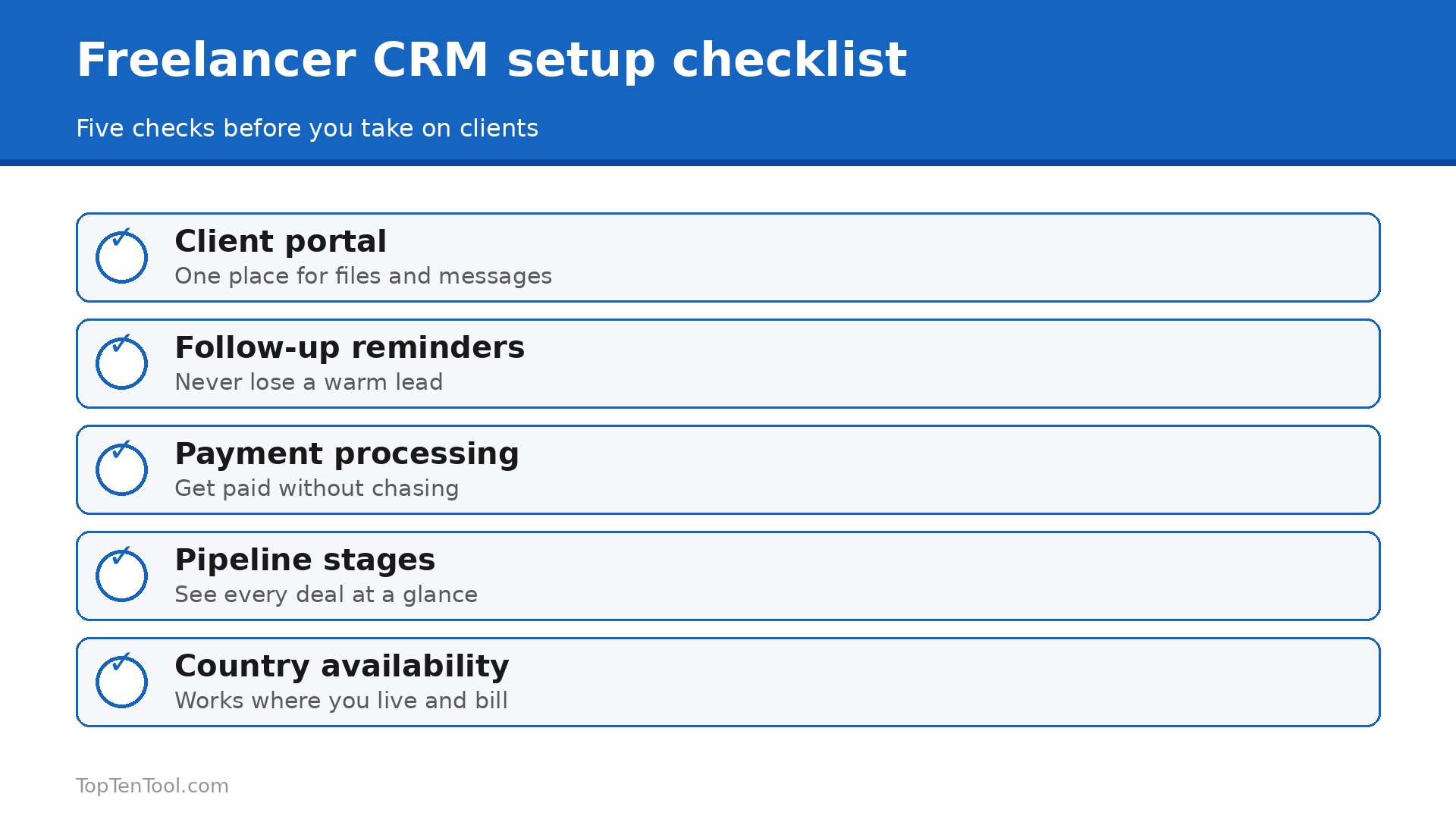
Start with how you sell, because that decides whether you need an all in one or a pipeline. Creative freelancers who book projects need proposals, contracts and a client portal, so HoneyBook, Dubsado or Moxie fit. Consultants and marketers who sell retainers need deal tracking and follow up reminders, so HubSpot free, Pipedrive or Zoho fit. Pick the wrong type and you will pay for features you never use while missing the ones you need every day. The best CRM software for freelancers is the one that matches how you actually win and deliver work.
Next, check where you live. HoneyBook serves the US and Canada only, so international freelancers should cross it off first and look at Moxie, Bonsai or Zoho instead. Then check the seat minimum, because a tool that advertises $14 a seat but requires two seats costs $28, and that gap matters on a freelancer budget.
Then test the client portal with a real client, because that is where the tool earns its keep. Send a proposal, get a signature and take a payment, and see how long it takes. Finally, count the hours you will save, not the features you will get. A tool that saves five hours a week on admin is worth $30 a month. A tool with fifty features you never open is not. Keep this checklist beside you while you compare best CRM software for freelancers options, and the right choice will be obvious by the end.
The Real Monthly Cost for One Freelancer
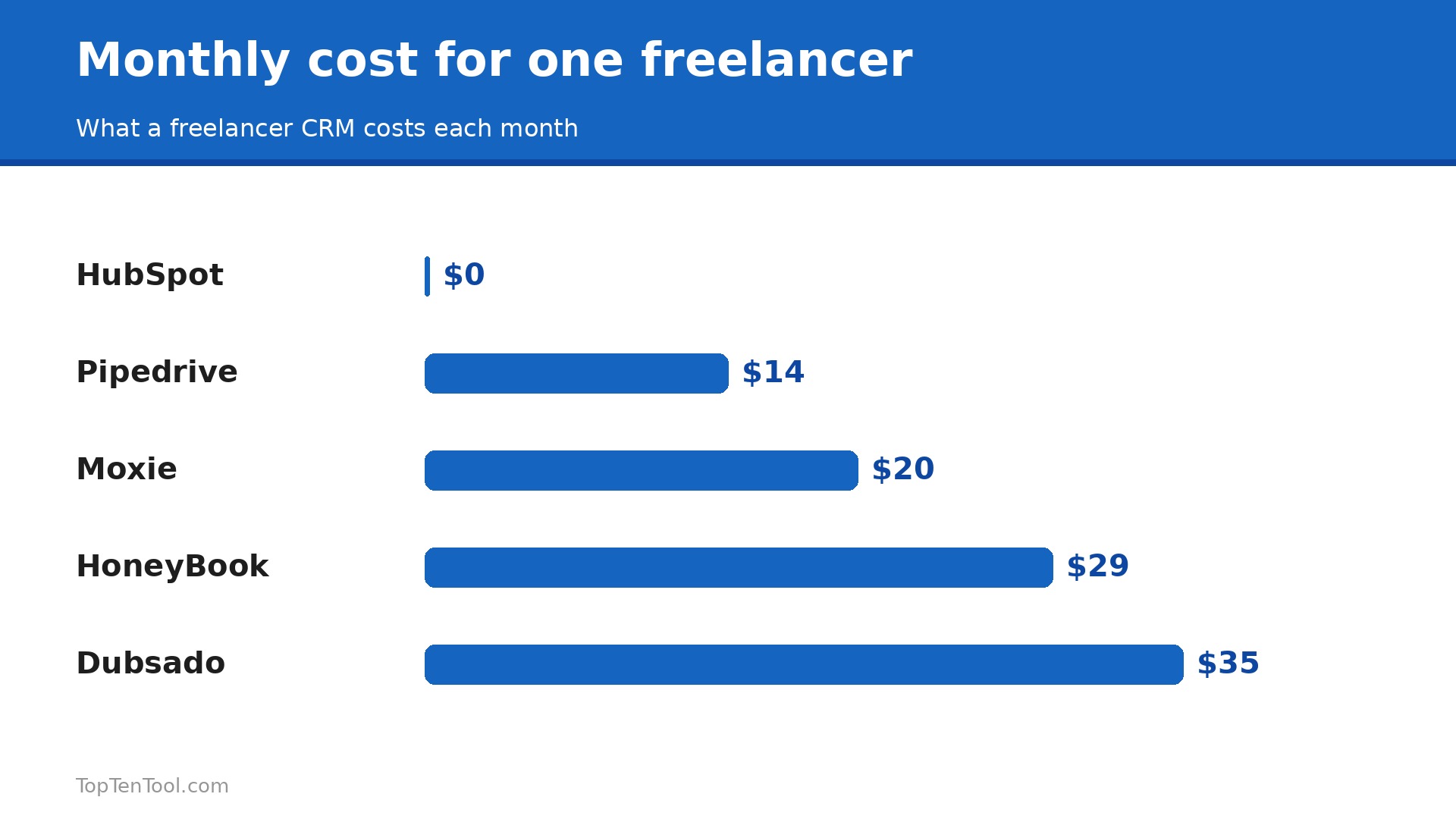
The headline price hides the details, so run the numbers for one person. HoneyBook Starter is $29 a month billed annually, Dubsado Starter is $35, Bonsai is $21 monthly or $17 annually, Pipedrive Essential is $14, Zoho CRM is $14, Moxie is $20, SuiteDash is $19, and HubSpot CRM is $0. Add payment processing next, because HoneyBook charges 2.9 percent plus 25 cents per transaction, which adds about $29 on every $1,000 invoiced. Add the cost of a second seat if you hire help, and the cost of the next tier if you need automations.
Budget a full quarter, and include the time to set the tool up, because Dubsado needs 4 to 8 hours while HoneyBook and Moxie take an afternoon.
Five Mistakes That Make a Freelancer CRM Fail
The most common mistake is buying a sales team CRM and using it as a contact list, which means the pipeline stays empty and the tool gets abandoned. The second is skipping the client portal, which forces every proposal and invoice through email and slows payment. The third is never logging follow ups, so warm leads go cold while you are busy delivering work. The fourth is having twelve pipeline stages when three would do, which makes the board a chore to maintain. The fifth is choosing a tool that does not work in your country, which is why HoneyBook is the wrong pick for an international freelancer.
Fix these five and a simple CRM will pay for itself in the first month.
A 30 Day Setup Plan for One Freelancer
Week one is about the pipeline, not the software. Write down every live lead, every proposal waiting for an answer, and every invoice unpaid, then put them into the CRM in that order. Do not import five years of old contacts on day one, because a CRM full of dead leads is a chore to open. Start with the twenty people who matter right now, and add the rest later when you need them.
Week two is about the client journey. Build one proposal template, one contract template and one invoice template, and send a real proposal through the tool to a real client. Watch how long it takes, fix the friction you hit, and save the templates. If the tool cannot send a proposal, get a signature and take a payment without leaving the app, you have the wrong tool for creative work, and it is better to learn that in week two than in month six.
Week three is about automation. Set up one follow up reminder for proposals sent three days ago, one reminder for invoices overdue by seven days, and one welcome email for new enquiries. Three automations are enough to start, and each one saves an hour a week once it runs. Week four is about review. Open the pipeline every Friday, move every deal to its honest stage, and write down the three follow ups for Monday morning. By day 30 the CRM is not a database, it is a habit, and that habit is what gets you paid faster.
Where We Landed
For most freelancers, the smart start is HoneyBook if you are a creative in the US or Canada, and Moxie or Bonsai if you work internationally. HubSpot free is the pick when you need a real pipeline at zero cost, and Dubsado is the pick when you want every step customised to your process. Pipedrive suits B2B sellers who plan to hire, and SuiteDash suits anyone who wants a white label portal at a flat price. The best CRM software for freelancers is the one that runs your whole client journey without a team to maintain it, so choose the tool that matches how you sell, test it with a real client, and upgrade only when the work proves it.
That is the best CRM software for freelancers shortlist we would hand to a friend starting today.
Frequently Asked Questions
What is the best CRM for freelancers?
It depends on how you sell. HoneyBook is best for creative freelancers in the US and Canada, Dubsado is best for custom workflows, HubSpot free is best for a zero cost pipeline, and Moxie is best for international freelancers who want a simple all in one. Pick the tool that matches your work, not the one with the longest feature list.
Is there a free CRM for freelancers?
Yes. HubSpot CRM is free for up to 2 users, with contacts, deals and reporting. Zoho CRM has a free tier for up to 3 users, and Notion is free for individuals. Free plans lack client portals and proposals, so creative freelancers usually need a paid all in one such as HoneyBook or Moxie.
How much does a freelancer CRM cost?
Most freelancers pay $0 to $35 a month. HubSpot is free, Pipedrive and Zoho start at $14, SuiteDash is $19, Moxie is $20, Bonsai is $21, HoneyBook is $29 and Dubsado is $35. Add payment processing fees of about 2.9 percent per transaction, and check for seat minimums that can double the bill.
Do freelancers need a CRM, or is a spreadsheet enough?
A spreadsheet is enough for five clients, but it breaks when you have twenty, because follow ups, proposals and invoices live in different places. A CRM keeps every client, deal and deadline in one place, reminds you to follow up, and lets clients sign and pay in a portal. The time saved usually pays for the tool in the first month.
What is the difference between HoneyBook and Dubsado?
HoneyBook is more polished and faster to set up, with a clear path from proposal to payment, but it serves the US and Canada only. Dubsado is more customisable, with deeper workflows and forms, but it needs 4 to 8 hours to configure. Choose HoneyBook for polish and speed, Dubsado for control.
Can a CRM help a freelancer get paid faster?
Yes. A CRM with a client portal lets a client sign a contract and pay the invoice in the same place, with automated reminders for overdue payments. Freelancers who send invoices through a portal with reminders typically get paid days faster than those who email a PDF and hope for the best.