
A professional book cover from a specialist designer runs 300 to 800 dollars in 2026. A Canva Pro subscription costs 120 dollars for the year. That gap is the whole story in this category, because most authors do not need a 500 dollar cover for their first ebook. They need a cover that looks professional, reads clearly at thumbnail size and exports in the right dimensions for Amazon, print and social. The best book cover makers do that job without a design degree, with templates built for books, typography that works at small size and print sizes that match the publisher requirements.
The category splits in a useful way. Template tools like Canva and BookBrush are fastest for a first cover. Free tools like KDP Cover Creator, GIMP and Photopea cost nothing but need more skill. AI tools like Midjourney make base imagery that still needs real type added in another tool. This guide compares ten tools on published prices where they exist, the job each one does best and the catch that only shows up after you export. Start with the shortlist, then read the reviews that match the book you are actually publishing.
The Quick Shortlist
The table below matches each common cover job to the single tool that handles it best. Use it to narrow the best book cover makers to two or three candidates before you read the full reviews. Prices are monthly list prices unless noted.
| Job | Best tool | Why it wins |
|---|---|---|
| First cover for a new author | Canva | Pro 15 dollars a month, widest template library |
| Fiction series with consistent branding | BookBrush | Plus 9 dollars a month, genre templates |
| Quick cover with Adobe fonts | Adobe Express | Premium 9.99 dollars a month, free plan generous |
| Amazon only book, no design skill | KDP Cover Creator | Free, built for Amazon sizes |
| Real book to retailers, free | Reedsy Book Editor | Free, professional typesetting |
| Photoshop style editing for 0 dollars | GIMP | Free, full image editing |
| Photoshop style editing in a browser | Photopea | Free, no install needed |
| AI base imagery for a cover | Midjourney | Basic 10 dollars a month |
| Covers plus marketing graphics | Visme | Free plan, visual content suite |
| Mockups and 3D cover renders | Placeit | From 14.95 dollars a month |
How We Judged the Shortlist
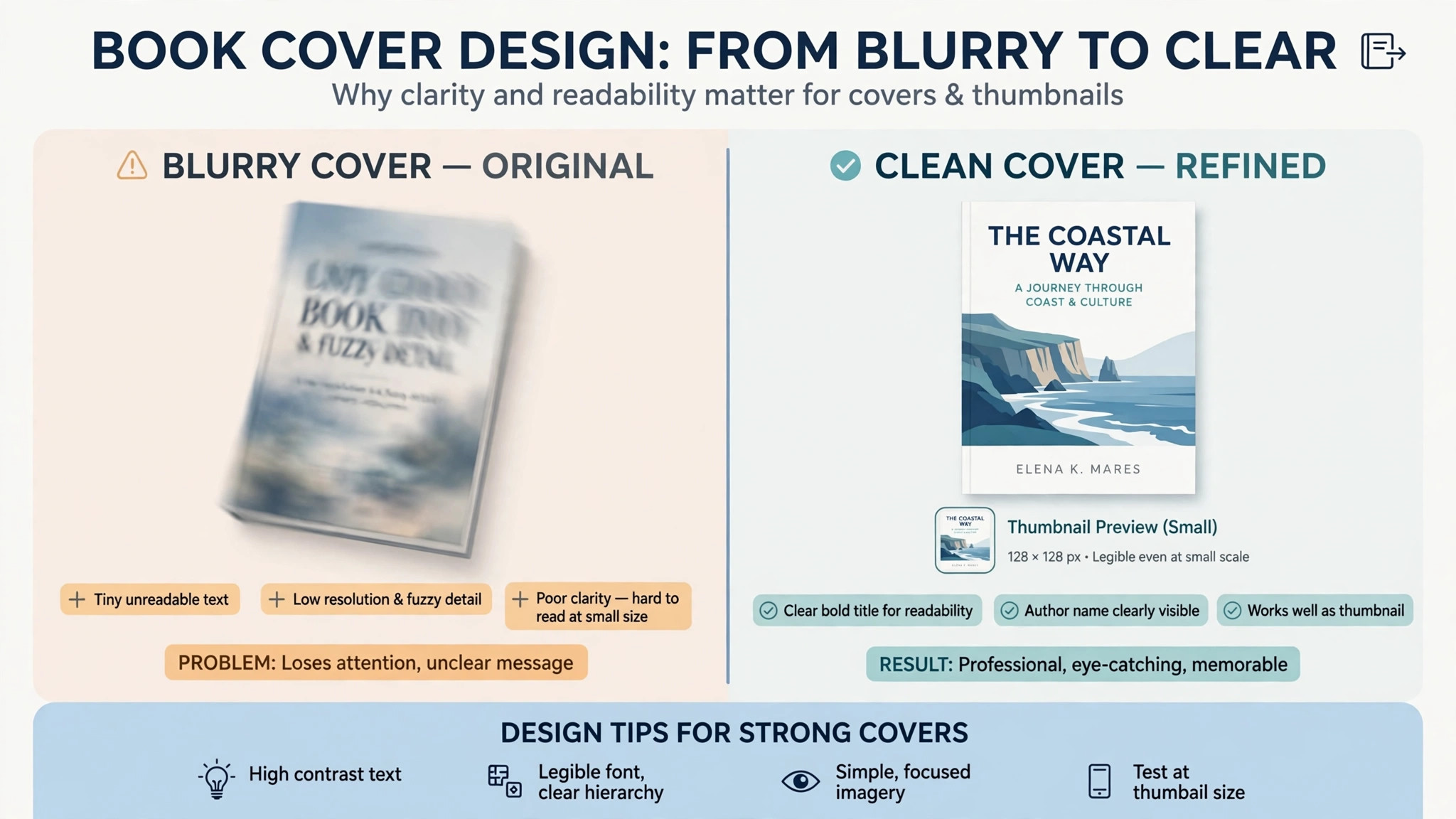
A tool earned a place here only if it does a real book cover job in 2026, not if it added a book template to a generic design app. The best book cover makers were judged on five things that decide whether an author keeps using it after the first book.
First, the template library, from genre specific covers to series branding, because a romance cover and a business cover are different jobs. Second, typography, from font choice to title readability at thumbnail size, because a cover that cannot be read at 100 pixels wide will not sell. Third, print sizes, from ebook front covers to full print wraps with spine and back, because a cover that only works as an ebook front is half a cover.
Fourth, whether the price is published or hidden, including the cost of premium elements that sit behind a paywall. Fifth, the catch, from popular templates reused across thousands of covers to AI text that comes out as nonsense letters.
| Check before you buy | What to ask | Why it matters |
|---|---|---|
| Genre templates | Fiction, nonfiction, or both | Genre readers judge a cover in seconds |
| Typography | Title readable at thumbnail size | Most buyers see the thumbnail first |
| Print wrap | Full wrap with spine and back | Print needs more than a front cover |
| Export quality | 300 DPI and the right dimensions | Low resolution prints badly |
| Premium elements | Which templates and images cost extra | Premium costs add up across a series |
| Ownership | Can you use the cover commercially | A cover you cannot sell with is useless |
The 10 Tools, Reviewed One by One
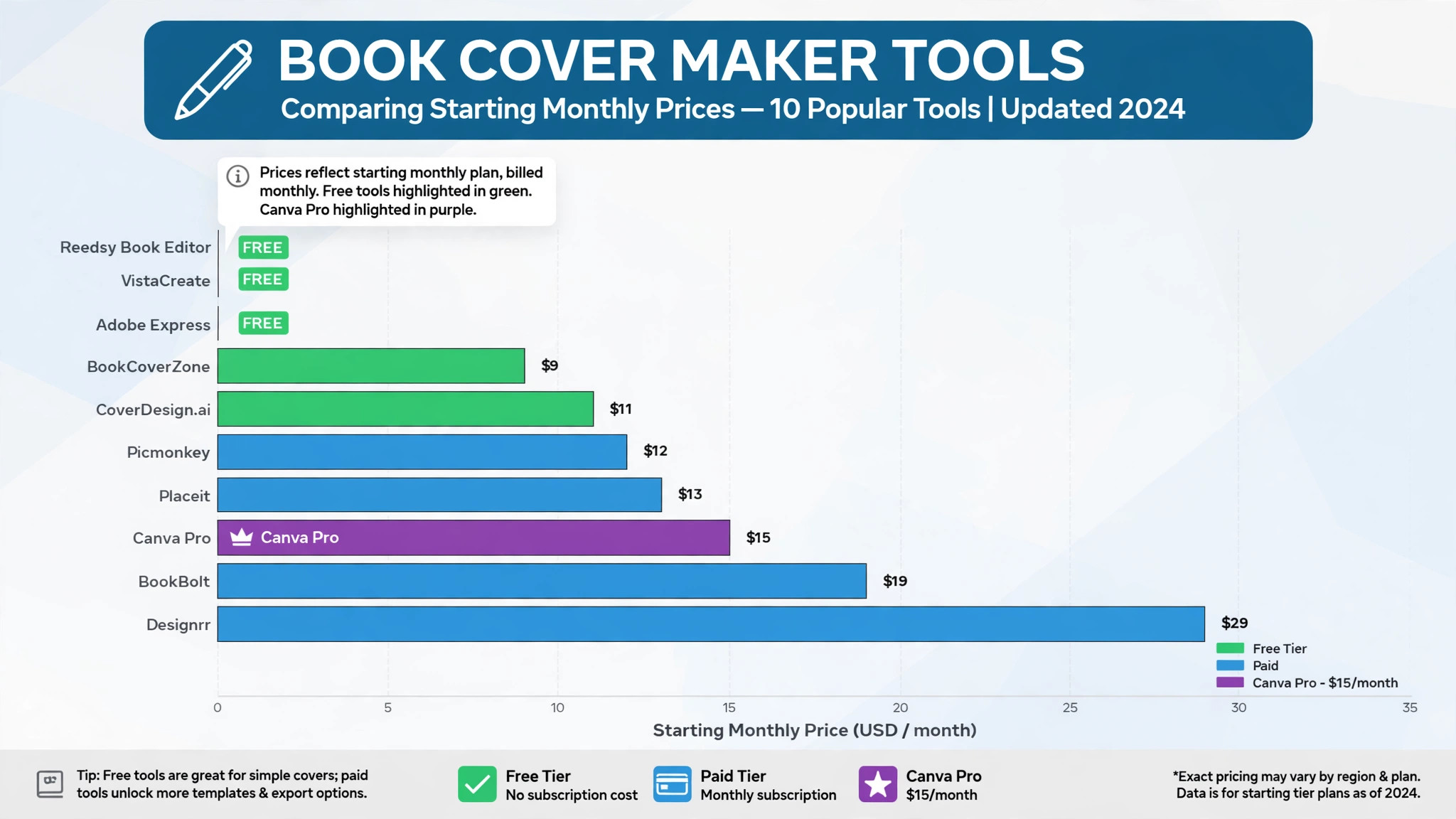
The reviews below follow the same shape for every tool, starting price first, then the job it does best and the catch to check before you publish. The best book cover makers in this list range from free to 15 dollars a month, so read the price line as carefully as the feature list.
1. Canva
Starting price Free, Pro 15 dollars a month or 120 dollars a year. Best for First cover for a new author. Watch out Popular templates get reused across thousands of covers, so customise before you publish.
Canva is where most self published authors start, and its free plan is genuinely usable. The drag and drop editor, a large library of free templates and stock elements, 5 GB of storage and downloads in JPG, PNG and PDF cover the first book without paying. Pro at 15 dollars a month or 120 dollars a year adds premium templates, background removal, brand kits and more stock, and it is the fastest route to a design that sells for most digital creators publishing an ebook in 2026.
The strength is the breadth. More than a million and a half templates, a limited monthly AI allowance on the free tier and a full design suite beside the cover tool mean an author can make the cover, the social graphics and the lead magnet in one account. The free tier is sufficient for most brand covers, and Pro is only needed when the free limits start to bite.
The catch is originality. Popular templates get reused across thousands of covers, so a cover made from a popular template can look like every other book in the genre. Change the image, the fonts and the colours, and the cover will stand out. For a first time author, Canva Pro is the fastest pick. For a series author, BookBrush may be better.
2. BookBrush
Starting price Plus 9 dollars a month or 99 dollars a year. Best for Fiction series with consistent branding. Watch out Weaker for non book graphics like social ads, so a business author may need a second tool.
BookBrush is the fiction author pick, at 9 dollars a month for Plus or 99 dollars a year, and it beats Canva on genre templates for a series. If you publish more than four ebooks a year or need consistent series branding, BookBrush is the tool that keeps the series looking like a series, with templates built for fiction genres rather than generic design.
The strength is the series workflow. A three book series needs the same fonts, the same layout and the same feel across all three covers, and BookBrush is built for that job. The genre templates are stronger than Canva for fiction, with romance, fantasy, thriller and mystery covers that look like the genre readers expect.
The catch is the scope. BookBrush is weaker for non book graphics like social ads, so an author who also needs marketing graphics will still need Canva or Adobe Express beside it. For a fiction author running a series, it is the best value on this list. For a nonfiction author, Canva is broader.
3. Adobe Express
Starting price Free, Premium 9.99 dollars a month. Best for Quick cover with Adobe fonts. Watch out Fewer book specific templates than Canva or BookBrush.
Adobe Express is Adobe answer to Canva, a browser and mobile editor built around templates. Its free plan costs 0 dollars and includes more than 100,000 templates, 5 GB of cloud storage and a daily allowance of free generative AI uses. Premium costs 9.99 dollars a month and adds more templates, brand kits and generative credits.
The strength is the Adobe fonts and stock. A cover made in Adobe Express can use Adobe Fonts and Adobe Stock assets, which gives it a different look from a Canva cover. The free plan is generous enough for a cover, a lead magnet or the social graphics that promote the book, and Premium is included with a Creative Cloud plan an author may already pay for.
The catch is the template depth. The book specific template library is thinner than Canva or BookBrush, and outside the Adobe ecosystem it has no real advantage. For a creator already inside Adobe, it is the obvious pick. For a first time author, Canva is broader.
4. KDP Cover Creator
Starting price Free. Best for Amazon only book, no design skill. Watch out Amazon only, so a book sold elsewhere needs a different cover.
KDP Cover Creator is Amazon own cover tool, free for authors publishing through Kindle Direct Publishing. It is built for Amazon sizes, with a simple editor that lets an author upload an image, add a title and an author name, and export a cover that fits Amazon requirements without measuring anything.
The strength is the fit. A cover made in KDP Cover Creator will fit Amazon, because the tool is built by Amazon for Amazon. An author who only sells on Amazon and has no design skill can make a usable cover in an afternoon, without learning a design tool or paying a designer.
The catch is the scope. It is Amazon only, and a book sold on other retailers, in print or as a lead magnet needs a different cover. The design options are basic, so a cover made here will look simple beside a Canva cover. Use it for a first Amazon book, and move to Canva when the book needs a cover that sells elsewhere too.
5. Reedsy Book Editor
Starting price Free. Best for Real book to retailers, free. Watch out It is a book editor first, so the cover tool is part of a larger publishing workflow.
Reedsy Book Editor is a free tool for authors publishing real books to retailers, with professional typesetting and a cover workflow beside the interior. It suits an author who wants the whole book, interior and cover, to look professional without paying for a designer or a typesetter.
The strength is the publishing workflow. An author can write, format and export a book that is ready for retailers, with a cover that matches the interior. That end to end flow is rare for a free tool, and it saves the author from stitching together three separate apps.
The catch is that the cover tool is not as deep as Canva or BookBrush, and an author who wants a highly designed cover will still need a design tool. Use Reedsy for the book, and Canva for the cover, if the cover needs more design than Reedsy offers.
6. GIMP
Starting price Free. Best for Photoshop style editing for 0 dollars. Watch out The learning curve is steep, so a first time author should budget a weekend to learn it.
GIMP is a free, open source image editor with Photoshop style tools, built for an author who wants full control over a cover without paying for Photoshop. Layers, masks, filters and text tools are all included, and the tool can export in the right dimensions and resolution for print and ebook.
The strength is the control. An author who knows image editing can make a cover that looks exactly like the vision, with no template limits and no premium paywall. That freedom is why experienced authors keep GIMP beside Canva, using Canva for speed and GIMP for the covers that need custom work.
The catch is the learning curve. GIMP is not a template tool, and a first time author will spend a weekend learning it before making a usable cover. For an author with design skill, it is the best free pick. For a first time author, Canva is faster.
7. Photopea
Starting price Free. Best for Photoshop style editing in a browser. Watch out Browser only, so a large print file needs a stable connection and a powerful computer.
Photopea is a free, browser based image editor that works like Photoshop, with layers, masks and text tools in a web app that needs no install. An author can open it, upload an image, add a title and export a cover without downloading anything.
The strength is the access. A browser tool works on any computer, which suits an author who moves between machines or who does not want to install software. The Photoshop style interface means an author who knows Photoshop can use Photopea without learning a new tool.
The catch is the browser limit. A large print wrap file needs a stable connection and a powerful computer, and the free plan includes ads. For an ebook cover, Photopea is the simplest free route to a professional result. For a print wrap, a desktop tool like GIMP may be more reliable.
8. Midjourney
Starting price Basic 10 dollars a month. Best for AI base imagery for a cover. Watch out Text comes out as nonsense letters, so you must add real type in Canva or Photoshop.
Midjourney is the AI imagery pick, at 10 dollars a month for Basic, and it makes base imagery that a cover designer can finish in another tool. A fantasy cover with a castle, a romance cover with a landscape or a thriller cover with a moody scene can start as a Midjourney image, then get real typography added in Canva.
The strength is the imagery. AI generated art can look like a commissioned illustration for a fraction of the cost, and an author who needs a unique cover image will find Midjourney faster than a stock search. The tool is best for the image, not for the whole cover.
The catch is the text. Midjourney text comes out as nonsense letters, so an author must add the real title and author name in Canva or Photoshop after generating the image. Use Midjourney for the art, and Canva for the type, and the cover will look professional.
9. Visme
Starting price Free, paid plans available. Best for Covers plus marketing graphics. Watch out The cover tool is one part of a visual content suite, so the price covers more than covers.
Visme is a visual content suite with a free plan and paid plans, built for an author who needs covers plus marketing graphics in one place. The cover tool sits beside presentations, infographics and social graphics, so a book launch can be designed in one account.
The strength is the suite. An author who launches a book needs a cover, a social banner, a presentation and a lead magnet, and Visme covers all of them without a separate tool for each. That breadth suits a small publisher or an author with a marketing plan.
The catch is the depth. The cover specific templates are thinner than Canva or BookBrush, and a fiction author will find the genre templates weaker. For a nonfiction author with a marketing plan, Visme is a good pick. For a fiction series, BookBrush is better.
10. Placeit
Starting price From 14.95 dollars a month. Best for Mockups and 3D cover renders. Watch out The strength is mockups, so a business author should check the cover templates before paying.
Placeit is an Envato tool for mockups and 3D cover renders, at 14.95 dollars a month, built for an author who wants to show the cover as a real book. A 3D render of the cover on a bookshelf, in a hand or on a desk makes a social post look professional, and Placeit does that job well.
The strength is the mockup. A cover that looks flat in a JPG looks like a real book in a Placeit mockup, and that matters for social posts, ads and a book launch page. The tool also offers cover templates, so an author can make the cover and the mockup in one place.
The catch is the price. At 14.95 dollars a month, Placeit is the most expensive tool on this list for a cover maker, and a business author should check whether the cover templates are strong enough to justify the price. Use it for mockups, and Canva for the cover, if the budget is tight.
Side by Side Comparison
The table below puts the shortlist side by side on price, best job and free plan, so you can compare the published prices against each other at a glance.
| Tool | Starting price | Best for | Free plan |
|---|---|---|---|
| Canva | Free, Pro 15 dollars a month | First cover for a new author | Yes |
| BookBrush | Plus 9 dollars a month | Fiction series branding | No |
| Adobe Express | Free, Premium 9.99 dollars a month | Quick cover with Adobe fonts | Yes |
| KDP Cover Creator | Free | Amazon only book | Yes |
| Reedsy Book Editor | Free | Real book to retailers | Yes |
| GIMP | Free | Photoshop style editing | Yes |
| Photopea | Free | Browser image editing | Yes |
| Midjourney | Basic 10 dollars a month | AI base imagery | No |
| Visme | Free, paid plans available | Covers plus marketing graphics | Yes |
| Placeit | From 14.95 dollars a month | Mockups and 3D renders | No |
How to Pick the Right Tool from the Best Book Cover Makers
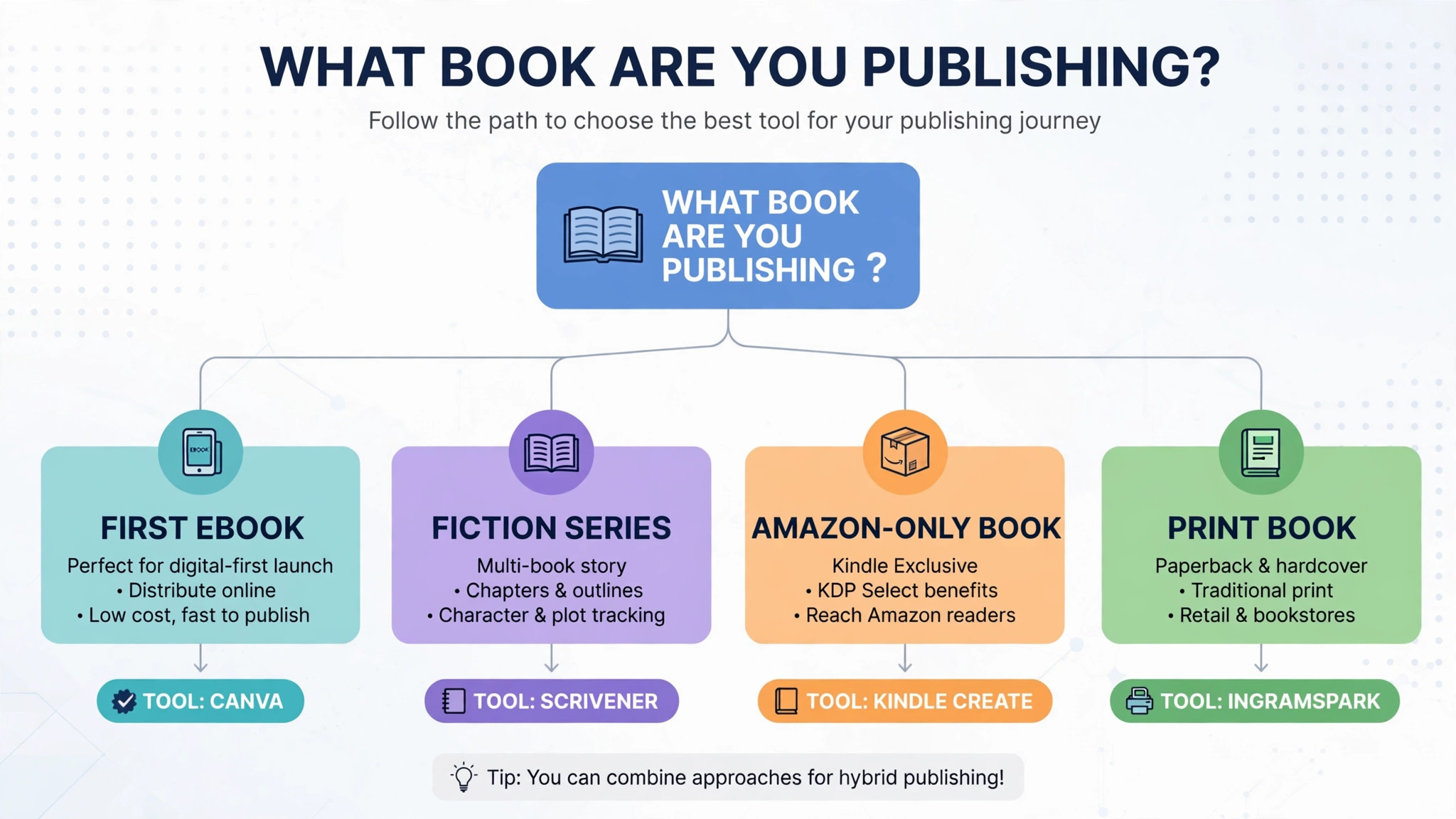
The right pick starts from the book, not from the tool. A first time author with an ebook should buy Canva Pro, because the template library and the speed decide whether the cover gets made this week. A fiction author with a series should buy BookBrush, because genre templates and series branding decide whether the books look like they belong together. An author who only sells on Amazon should use KDP Cover Creator free, because the fit is guaranteed and the price is zero.
Budget the full bill, not the headline price. The table below shows what an author actually pays in year one for the most common combinations, using published starting prices. Premium elements are the line that surprises buyers, so check which templates and images cost extra before you build a series on them.
| Stack for one author | Monthly cost | What it covers |
|---|---|---|
| Canva Pro, annual | 10 dollars a month equivalent | Covers, social graphics and lead magnets |
| BookBrush Plus, annual | 8.25 dollars a month equivalent | Fiction series covers and branding |
| Adobe Express Premium | 9.99 dollars | Covers with Adobe fonts and stock |
| Midjourney Basic plus Canva free | 10 dollars | AI imagery plus cover typography |
| GIMP plus Photopea | Free | Full image editing for 0 dollars |
Getting the Print Dimensions Right
A cover that looks perfect on screen can print badly, and the reason is almost always dimensions. An ebook front cover is a single image, usually 1,600 by 2,560 pixels for Amazon, and it only needs to look right at thumbnail size. A print cover is a full wrap, with a front, a spine and a back, plus bleed around the edges, and the spine width depends on the page count and the paper type. A book with 200 pages has a thinner spine than a book with 400 pages, so a wrap made for one page count will not fit the other.
Start by checking the publisher requirements before you design anything. Amazon KDP, IngramSpark and other print services each publish a template calculator that asks for the trim size, the page count and the paper type, then gives the exact dimensions for the full wrap. Download that template, open it in your cover tool and design inside the guides, keeping the title and the author name well inside the safe area. Text that sits too close to the edge can be trimmed in printing, and a title that crosses the spine fold will look broken on the shelf.
Export at 300 DPI, in PDF for print and in JPG or PNG for ebook, and order a proof copy before you publish. A proof copy costs a few dollars and shows the colours, the spine width and the text placement exactly as a buyer will see them. Check the proof in daylight, check the spine from the side and check the back cover text for typos. A cover that passes the proof check will sell. A cover that skips it is a gamble, and the gamble usually loses.
Frequently Asked Questions
What is the cheapest good book cover maker to start with
Canva free is the cheapest good entry with real cover templates behind it, because it costs nothing and exports in JPG, PNG and PDF. Adobe Express free is the cheapest way into Adobe fonts and stock, with no watermark on exports. For a paid tool, BookBrush Plus at 9 dollars a month is the cheapest published design tool price on this list. Start with the book that needs a cover this week, not with the cheapest tool overall.
Why do popular Canva templates look the same
Popular Canva templates look the same because thousands of authors use the same template with the same image and the same fonts. A cover made from a popular template can look like every other book in the genre, which hurts sales. The best book cover makers in this guide list the template risk beside the price, so you can see which tools need customisation. Change the image, the fonts and the colours, and the cover will stand out.
Which book cover maker is best for a print book
Canva Pro suits a print book that needs a full wrap with spine and back, with manual setup for the print dimensions. Reedsy Book Editor suits a print book that needs professional typesetting beside the cover, with a free workflow for the whole book. GIMP suits a print book that needs full control over resolution and dimensions, with 300 DPI export. Trial the print export with a real proof copy before you publish, because a cover that looks right on screen can print badly.
How much should an author budget for a book cover in year one
A realistic year one budget is 0 to 10 dollars a month for a template tool, and 300 to 800 dollars for a single cover from a specialist designer. Most authors will spend less on a cover tool than on a designer, because the tools are cheap and the free tiers are generous. The best book cover makers are not the cheapest ones on the list. They are the ones that make a cover that reads clearly at thumbnail size, exports in the right dimensions and looks like the genre readers expect.
Should I hire a designer or use a cover maker?
It depends on the book and the budget. A realistic year one budget in this guide is 0 to 10 dollars a month for a template tool, against 300 to 800 dollars for a single cover from a specialist designer. The best book cover makers are the ones that make a cover that reads clearly at thumbnail size, exports in the right dimensions and looks like the genre readers expect.
Canva Pro at 15 dollars a month or 120 dollars a year is the fastest route to that for most authors. Hire a designer for a series lead or a print book that needs a full wrap, and use a tool for an ebook or a series backlist. Either way, order a proof copy before you publish, because a cover that passes the proof check will sell, and a cover that skips it is a gamble.
Our Verdict
If you buy one tool this quarter, buy Canva Pro. At 15 dollars a month or 120 dollars a year, it is the fastest route to a cover that sells for most authors, with the widest template library, a free tier that is genuinely usable and a design suite that covers the social graphics and the lead magnet beside the cover. The best book cover makers earn their keep by making a cover that reads at thumbnail size and prints cleanly, and Canva does both from the first week, whether the win is a first ebook that looks professional or a series that looks like it belongs together.
Whatever you pick, start with the book, make the cover fast, and check it at thumbnail size before you publish. The best book cover makers on this list all work. The difference is whether the tool matches the book you are actually publishing, and whether you measure the return in sales and reviews rather than in features used.