
Email still earns more per dollar than any other channel a small business owns, yet most owners pick their tool on price alone and regret it a year later when the list has grown and the bill has tripled. The best email marketing software for small business is the one that fits how you actually send, whether that is a weekly newsletter, a welcome series for new subscribers, or abandoned cart emails for a store. Our research compared vendor pricing pages in November 2026, and the differences are bigger than the headline prices suggest.
The single most important choice is the pricing model. Some tools charge by contacts, so your bill rises every time your list grows, even if you email rarely. Others charge by emails sent, so a large list that hears from you once a month stays cheap. A third group charges by active profiles, which sits somewhere in between. Pick the wrong model and you can pay three times more for the same sends.
This guide compares twelve tools on real prices, free plan limits, automation depth and deliverability, and it ends with a pick for each common situation. Start with the comparison table, then read the reviews that match your list size and sending habits.
The Quick Summary
The table below shows the starting price of each tool, who it suits best, and the one thing to watch. Prices are monthly list prices, and free plans are marked where they exist. Check your list size against the price before you fall for a low headline number. Use the table to shortlist the best email marketing software for small business options that fit your budget before reading the full reviews.
| Tool | Starting price | Best for | Watch out |
|---|---|---|---|
| Mailchimp | $13 a month for 500 contacts | Familiar all in one suite | Bill climbs fast as the list grows, about $75 at 5,000 contacts |
| Brevo | $9 a month for 5,000 emails | Large lists emailed infrequently | Automation depth is lighter than ActiveCampaign |
| MailerLite | $12 a month | Best value with automations included | Free plan now caps at 250 subscribers |
| Kit | $33 a month billed annually for 1,000 subscribers | Creators selling courses and products | Expensive if your business is not built on a newsletter |
| ActiveCampaign | $15 a month | Deepest automation for growing teams | Price rises fast with contacts and add ons |
| GetResponse | $19 a month | Email plus webinars and funnels | Interface feels busy compared with simpler rivals |
| Constant Contact | $12 a month | Phone support and events | Automation is basic for the price |
| AWeber | $15 a month | Simple newsletters with good support | Automation lags behind newer rivals |
| Moosend | $9 a month | Low cost automation for small lists | Smaller template library and fewer integrations |
| Omnisend | $16 a month | Ecommerce email and SMS in one place | Best features need the Standard plan and up |
| beehiiv | Free to 2,500 subscribers, Scale from $49 a month | Newsletters that earn from ads and paid subs | Expensive once the list grows past the free tier |
| HubSpot Marketing Hub | Free plan, Starter from $20 a month | Email tied to a full CRM | Costs rise fast as contacts and features grow |
How We Compared These Email Tools
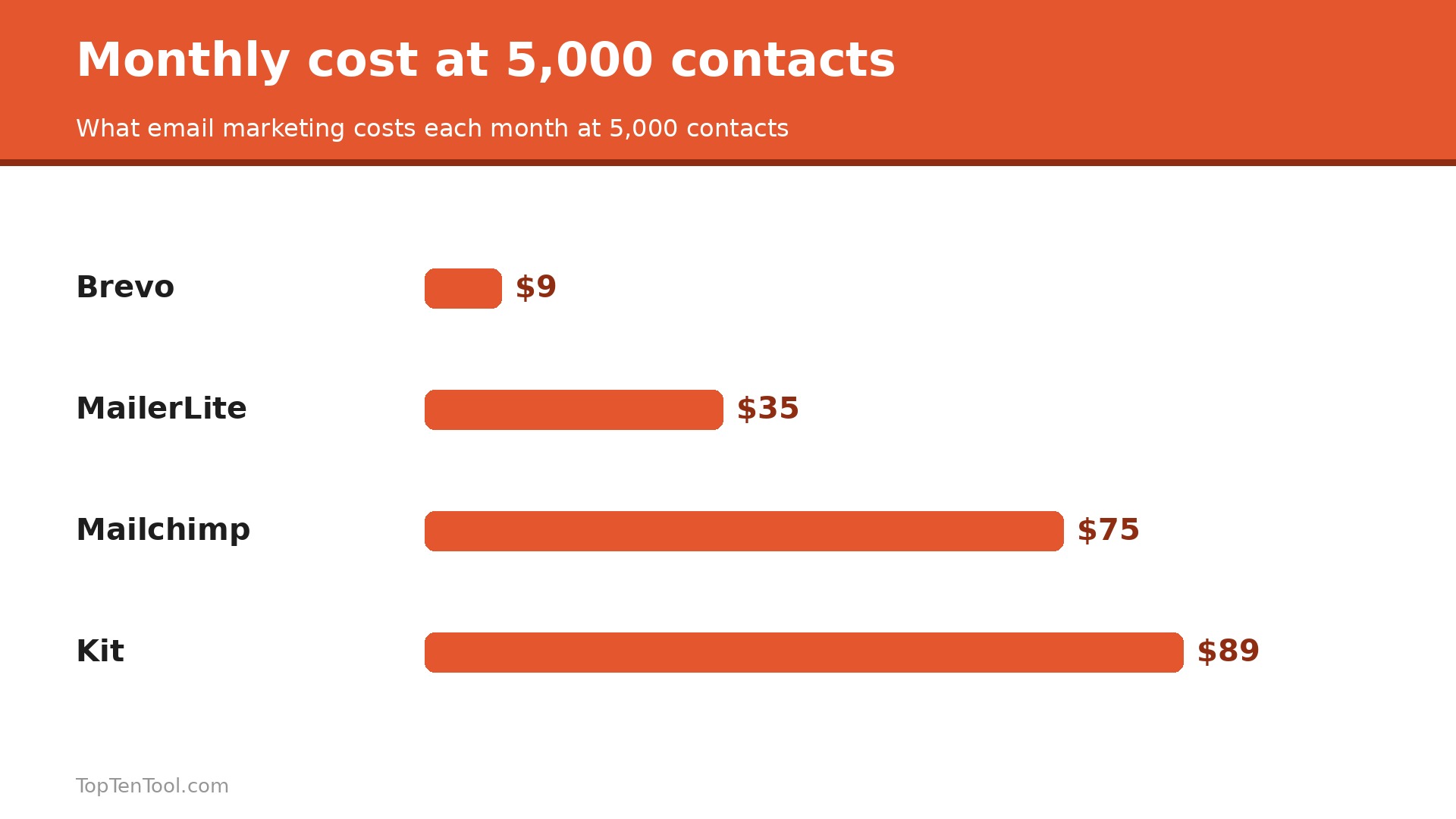
We judged each tool on five things that decide whether a small business stays with it. First, the real cost at 500, 5,000 and 10,000 contacts, because contact based pricing climbs fast and the headline price is rarely the price you pay in a year. Second, the free plan, including how many contacts and sends it actually allows. Third, automation, from a simple welcome email to multi step sequences triggered by purchases and clicks. Fourth, deliverability and templates, because a beautiful email that lands in spam earns nothing. Fifth, how well the tool fits a store, a creator or a service business, since those three need different features. We also checked which tools publish prices openly.
The best email marketing software for small business is the one that stays affordable as your list grows and still sends the emails your customers open.
The 12 Best Email Marketing Tools Reviewed
1. Mailchimp
Starting price $13 a month for 500 contacts. Best for Familiar all in one suite. Watch out Bill climbs fast as the list grows, about $75 at 5,000 contacts.
Mailchimp is the default recommendation for a reason. It is easy to start, the templates look good out of the box, and it connects to almost every store, website and CRM a small business might use. Essentials starts at $13 a month for 500 contacts, Standard at $20 adds multi step automation, and the free plan covers 250 contacts and 500 sends a month. Landing pages, a basic CRM and simple automation are included, so a new business can run most of its marketing from one login.
The pricing model is the catch. Because Mailchimp charges by contacts, the bill rises with every subscriber, even those who never open an email, and Essentials reaches about $75 a month at 5,000 contacts. Unsubscribed contacts can count until archived, so list hygiene matters. Mailchimp suits owners who want the biggest ecosystem and are willing to pay for it as the list grows.
In practice, Mailchimp earns its place when familiar all in one suite. The main risk is bill climbs fast as the list grows, about $75 at 5,000 contacts, so test that specific limit during your trial before you commit.
Pick it when you want the most familiar tool with the widest integrations. Skip it when your list is large but you email rarely, because contact pricing will punish you.
2. Brevo
Starting price $9 a month for 5,000 emails. Best for Large lists emailed infrequently. Watch out Automation depth is lighter than ActiveCampaign.
Brevo, formerly Sendinblue, wins on its pricing model. You pay for emails sent, not contacts stored, so a business with a big list and a monthly newsletter pays $9 a month for 5,000 emails while contact based rivals charge for every subscriber. The free plan allows 300 emails a day with unlimited contacts, which is the most generous free tier on this list. Starter is $9 a month, and SMS and WhatsApp can be added in the same account.
Brevo templates and automation are good but not the deepest, and the interface feels less polished than Mailchimp or MailerLite. Businesses that need complex branching journeys or advanced ecommerce triggers may outgrow it. For a small business with a large list and modest sending, Brevo is the cheapest serious option.
In practice, Brevo earns its place when large lists emailed infrequently. The main risk is automation depth is lighter than ActiveCampaign, so test that specific limit during your trial before you commit.
Pick it when you have a big list and send once or twice a month. Skip it when you need deep multi step automation with complex branching.
3. MailerLite
Starting price $12 a month. Best for Best value with automations included. Watch out Free plan now caps at 250 subscribers.
MailerLite is the value pick that keeps winning comparisons. The free plan covers 250 subscribers and 2,500 emails a month, and the paid Comfort plan from $12 a month adds automations, landing pages and better reporting. The editor is clean, the templates are modern, and the learning curve is shorter than Mailchimp or ActiveCampaign. For a small business that wants automations without a big bill, MailerLite is hard to beat.
The free plan shrank in 2026 to 250 subscribers, so growing lists move to paid sooner than they used to. Advanced features such as multivariate testing and deeper ecommerce automation sit on higher tiers, and the integration list is smaller than Mailchimp. It remains the best balance of price, ease and automation for most small businesses.
In practice, MailerLite earns its place when best value with automations included. The main risk is free plan now caps at 250 subscribers, so test that specific limit during your trial before you commit.
Pick it when you want automations and a clean editor at the lowest paid price. Skip it when you need the widest integration ecosystem available.
4. Kit
Starting price $33 a month billed annually for 1,000 subscribers. Best for Creators selling courses and products. Watch out Expensive if your business is not built on a newsletter.
Kit, formerly ConvertKit, is email for people whose list is the business. Tagging, segments and visual automations are built around selling, so a subscriber who clicks a link gets tagged and enters a pitch sequence without plugins. The free Newsletter plan reaches up to 10,000 subscribers with unlimited broadcasts, which no general platform matches. Paid Creator plans from $33 a month billed annually for 1,000 subscribers add automation sequences, and commerce features sell digital products directly.
Kit is steep for a general small business. Creator scales to about $89 a month at 5,000 subscribers, and the price rises of recent years made the value question sharper. The templates are simpler than Mailchimp, and the tool assumes you sell content or courses. It earns its price only when the newsletter itself is the product.
In practice, Kit earns its place when creators selling courses and products. The main risk is expensive if your business is not built on a newsletter, so test that specific limit during your trial before you commit.
Pick it when you are a creator whose newsletter sells courses or products. Skip it when you run a local service business and just need a monthly newsletter.
5. ActiveCampaign
Starting price $15 a month. Best for Deepest automation for growing teams. Watch out Price rises fast with contacts and add ons.
ActiveCampaign remains the benchmark for automation depth. Multi step journeys, conditional branching, lead scoring, site tracking and CRM features come together in a way no cheaper tool matches. Plans start from $15 a month, and the automation builder is the most flexible on this list. Businesses that sell online courses, run webinars or manage a real sales pipeline get the most from it.
The power comes with a learning curve and a bill that grows with contacts and features. New users can spend weeks building journeys that a simpler tool would handle in an afternoon, and support quality varies by plan. ActiveCampaign suits a business that is ready to invest time in automation and will use the depth every week.
In practice, ActiveCampaign earns its place when deepest automation for growing teams. The main risk is price rises fast with contacts and add ons, so test that specific limit during your trial before you commit.
Pick it when automation is your main reason for buying an email tool. Skip it when you send a simple monthly newsletter and will never build a journey.
6. GetResponse
Starting price $19 a month. Best for Email plus webinars and funnels. Watch out Interface feels busy compared with simpler rivals.
GetResponse bundles email with webinars, landing pages, funnels and a website builder, which suits a small business that wants one login for its whole funnel. Plans start at $19 a month, and the webinar feature alone would cost more as a separate tool. Automation templates cover welcome series, abandoned carts and post purchase follow ups, and the reporting is solid.
The breadth makes the interface busy, and owners who only need email will find simpler tools faster to use. Deliverability is good but not class leading, and the price is higher than Brevo or MailerLite for the same list size. GetResponse earns its place when webinars or funnels are part of the plan.
In practice, GetResponse earns its place when email plus webinars and funnels. The main risk is interface feels busy compared with simpler rivals, so test that specific limit during your trial before you commit.
Pick it when you run webinars or funnels and want them with your email. Skip it when you only need simple email and a clean interface.
7. Constant Contact
Starting price $12 a month. Best for Phone support and events. Watch out Automation is basic for the price.
Constant Contact wins on support. Real people answer the phone, which matters to owners who want help rather than a help article, and the events and surveys features suit nonprofits, clubs and local businesses. Plans start at $12 a month, and the template library is large and easy to use. It is a comfortable, low stress choice for a business that emails a few times a month.
Automation is basic compared with ActiveCampaign or Kit, and the price is not the cheapest once the list grows. The tool is best for straightforward newsletters and event invitations, not for complex ecommerce journeys. It suits owners who value a human on the phone more than advanced features.
In practice, Constant Contact earns its place when phone support and events. The main risk is automation is basic for the price, so test that specific limit during your trial before you commit.
Pick it when you want phone support and simple newsletters. Skip it when you need advanced automation or ecommerce triggers.
8. AWeber
Starting price $15 a month. Best for Simple newsletters with good support. Watch out Automation lags behind newer rivals.
AWeber is one of the oldest email tools still going, and it stays popular with small businesses that want simple, reliable sending. Plans start at $15 a month, the free plan covers a small list, and the template and automation basics are easy to learn. Customer support is responsive, and the tool integrates with the common store and website platforms.
Automation and segmentation lag behind MailerLite and ActiveCampaign, and the interface feels dated next to newer tools. The price is mid range without a standout feature to justify it. AWeber suits owners who value stability and support over the latest automation features.
In practice, AWeber earns its place when simple newsletters with good support. The main risk is automation lags behind newer rivals, so test that specific limit during your trial before you commit.
Pick it when you want a simple, stable tool with responsive support. Skip it when you need modern automation or the lowest price.
9. Moosend
Starting price $9 a month. Best for Low cost automation for small lists. Watch out Smaller template library and fewer integrations.
Moosend is one of the cheapest paid tools on this list, with plans from $9 a month, and it includes automation features that many rivals charge more for. The editor is straightforward, the reporting covers opens, clicks and unsubscribes clearly, and the free trial lets a business test properly. For a small business watching every dollar, Moosend gives real automation at a budget price.
The template library is smaller than Mailchimp, and the integration list is shorter, so some store owners will need workarounds. The brand is less known, which means fewer tutorials and community answers. It is still a strong budget pick when price matters most.
In practice, Moosend earns its place when low cost automation for small lists. The main risk is smaller template library and fewer integrations, so test that specific limit during your trial before you commit.
Pick it when you want automation at the lowest monthly price. Skip it when you need a huge template library or deep store integrations.
10. Omnisend
Starting price $16 a month. Best for Ecommerce email and SMS in one place. Watch out Best features need the Standard plan and up.
Omnisend is built for online stores, and it shows. Email, SMS and push notifications run from one dashboard, with pre built flows for welcome, abandoned cart, browse abandonment and post purchase. Plans start at $16 a month, and the free plan covers a small store. Shopify, WooCommerce and BigCommerce connect deeply, and the reporting ties revenue to each campaign.
Omnisend is overkill for a business that does not sell online, and the best automation features sit on higher tiers. The price is fair for a store but high for a simple newsletter. It earns its place for ecommerce businesses that want email and SMS together.
In practice, Omnisend earns its place when ecommerce email and SMS in one place. The main risk is best features need the Standard plan and up, so test that specific limit during your trial before you commit.
Pick it when you run an online store and want email plus SMS flows. Skip it when you do not sell online and only need a newsletter.
11. beehiiv
Starting price Free to 2,500 subscribers, Scale from $49 a month. Best for Newsletters that earn from ads and paid subs. Watch out Expensive once the list grows past the free tier.
beehiiv is built for newsletters as a business, with a free plan to 2,500 subscribers and unlimited sends, plus a built in ad network and paid subscriptions. The editor is clean, the website and referral program are included, and the analytics show exactly which issues earn money. Scale from $49 a month adds automation, A B testing and more publication tools.
beehiiv is a newsletter platform, not a general email marketing tool, so stores and service businesses will miss CRM and ecommerce features. The jump from free to $49 a month is steep, and the tool assumes the newsletter is the product. It suits writers and creators who monetise their audience directly.
In practice, beehiiv earns its place when newsletters that earn from ads and paid subs. The main risk is expensive once the list grows past the free tier, so test that specific limit during your trial before you commit.
Pick it when your newsletter earns money from ads or paid subscriptions. Skip it when you need CRM, store or service business features.
12. HubSpot Marketing Hub
Starting price Free plan, Starter from $20 a month. Best for Email tied to a full CRM. Watch out Costs rise fast as contacts and features grow.
HubSpot Marketing Hub gives email inside a full CRM, so every open, click and form fill lands on a contact record with history. The free plan covers basic email, and Starter from $20 a month adds automation and better reporting. For a business already using HubSpot CRM, the email tool is the natural next step, and the whole platform scales into sales and service.
HubSpot is the most expensive route on this list once contacts and features grow, and the free email limits are tight. Teams that only need email will pay far less elsewhere. It earns its price when the CRM matters as much as the email itself.
In practice, HubSpot Marketing Hub earns its place when email tied to a full CRM. The main risk is costs rise fast as contacts and features grow, so test that specific limit during your trial before you commit.
Pick it when you already use HubSpot CRM and want email on the same contact records. Skip it when you only need email and will never use the rest of HubSpot.
Finding Your Match
The right pick depends on what you sell, how often you send, and how big your list will be in a year. Use this table as a shortcut, then read the full review of the tool it points to. Every pick below was judged against the best email marketing software for small business criteria set out in this guide.
| Job to be done | Best pick | Why it wins |
|---|---|---|
| Cheapest paid plan | Brevo or Moosend | Both start at $9 a month |
| Large list, rare sends | Brevo | Billed by sends, not contacts |
| Best value with automation | MailerLite | Automations from $12 a month |
| Creators selling products | Kit | Tagging and commerce built in |
| Deepest automation | ActiveCampaign | Best journey builder, from $15 |
| Online store email plus SMS | Omnisend | Pre built cart and welcome flows |
| Newsletter that earns money | beehiiv | Free to 2,500, ad network included |
| Email inside a CRM | HubSpot | Every send lands on a contact record |
How to Choose the Best Email Marketing Software for Small Business
Start by pricing the list you will have in a year, not today. A tool that costs $13 a month at 500 contacts can cost $75 at 5,000, while a send based tool such as Brevo stays near $9 for the same business if it emails monthly. Map your list size at 12 months, then compare the real monthly bill at that size, not the headline price. The best email marketing software for small business is the one that stays affordable as you grow.
Next, match the tool to what you sell. Creators need tagging and commerce, so Kit or beehiiv fit. Stores need cart recovery and SMS, so Omnisend fits. Service businesses need simple newsletters and landing pages, so MailerLite or Mailchimp fit. Automation depth matters only if you will build journeys, so be honest about how much time you will spend in the tool each week.
Then test deliverability with a real send to your own list, not a demo. Check open rates, spam placement and the unsubscribe rate, and clean the list of dead addresses before you judge the tool. Finally, check the free plan limits, because a free plan that caps at 250 contacts forces an upgrade sooner than one that allows 10,000 subscribers, and that timing changes the first year cost by hundreds of dollars. Keep this checklist beside you while you compare best email marketing software for small business options, and the right choice will be obvious by the end.
What Email Marketing Really Costs at Three List Sizes
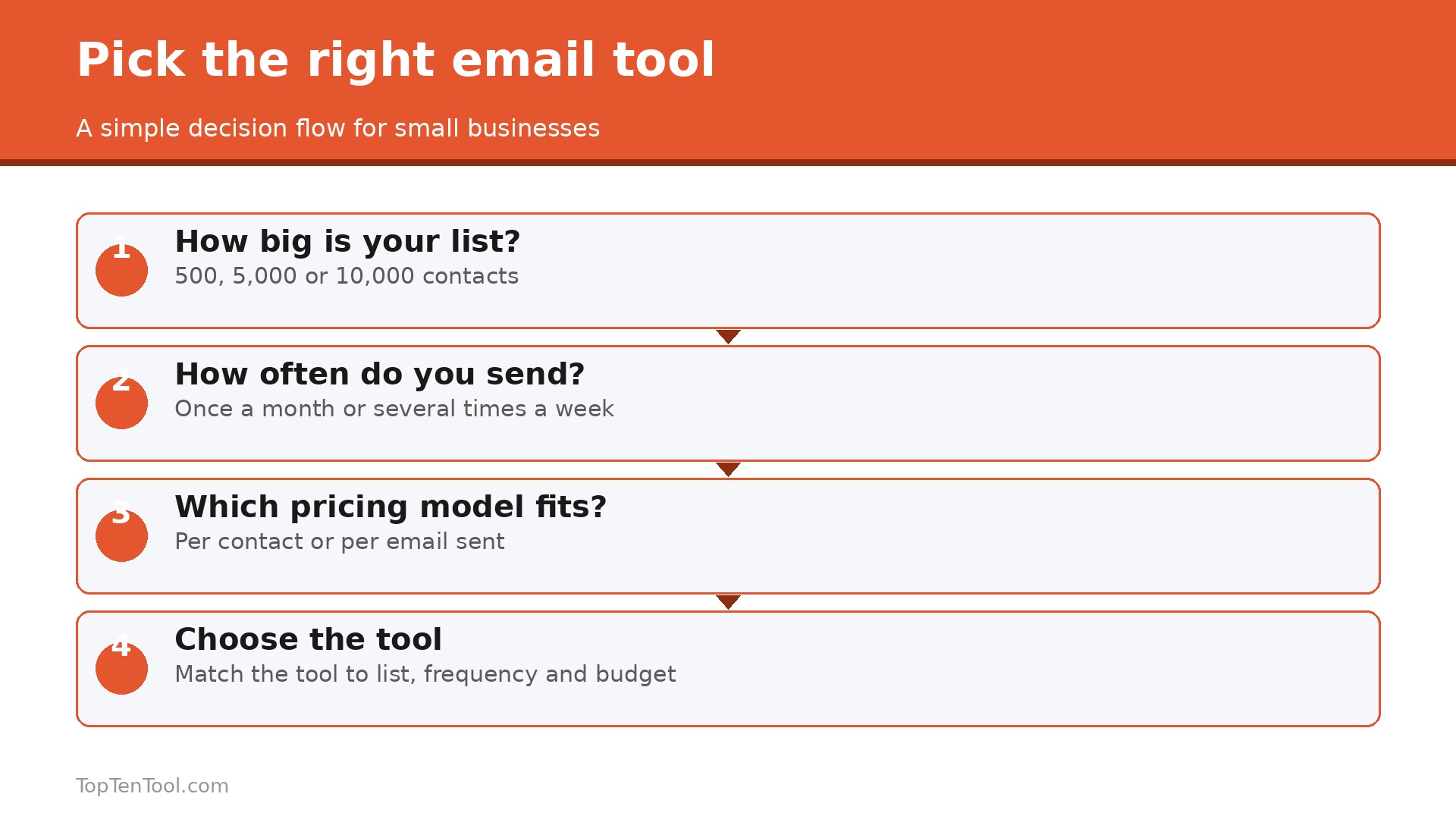
The table in this guide shows starting prices, but the real cost depends on your list. At 500 contacts, Mailchimp Essentials is $13, Brevo Starter is $9, MailerLite is $12 and Kit is free or $33 on a paid plan. At 5,000 contacts, Mailchimp climbs to about $75, Kit to about $89, while Brevo stays near $9 to $18 depending on sends, and MailerLite stays in the $30 to $40 range. At 10,000 contacts, most paid plans land between $110 and $150 a month, while Brevo can still be far cheaper for a business that sends once a month.
Price the list you will have, not the list you have, and remember that unsubscribed contacts can count on some plans until you archive them.
Five Mistakes That Hurt Deliverability
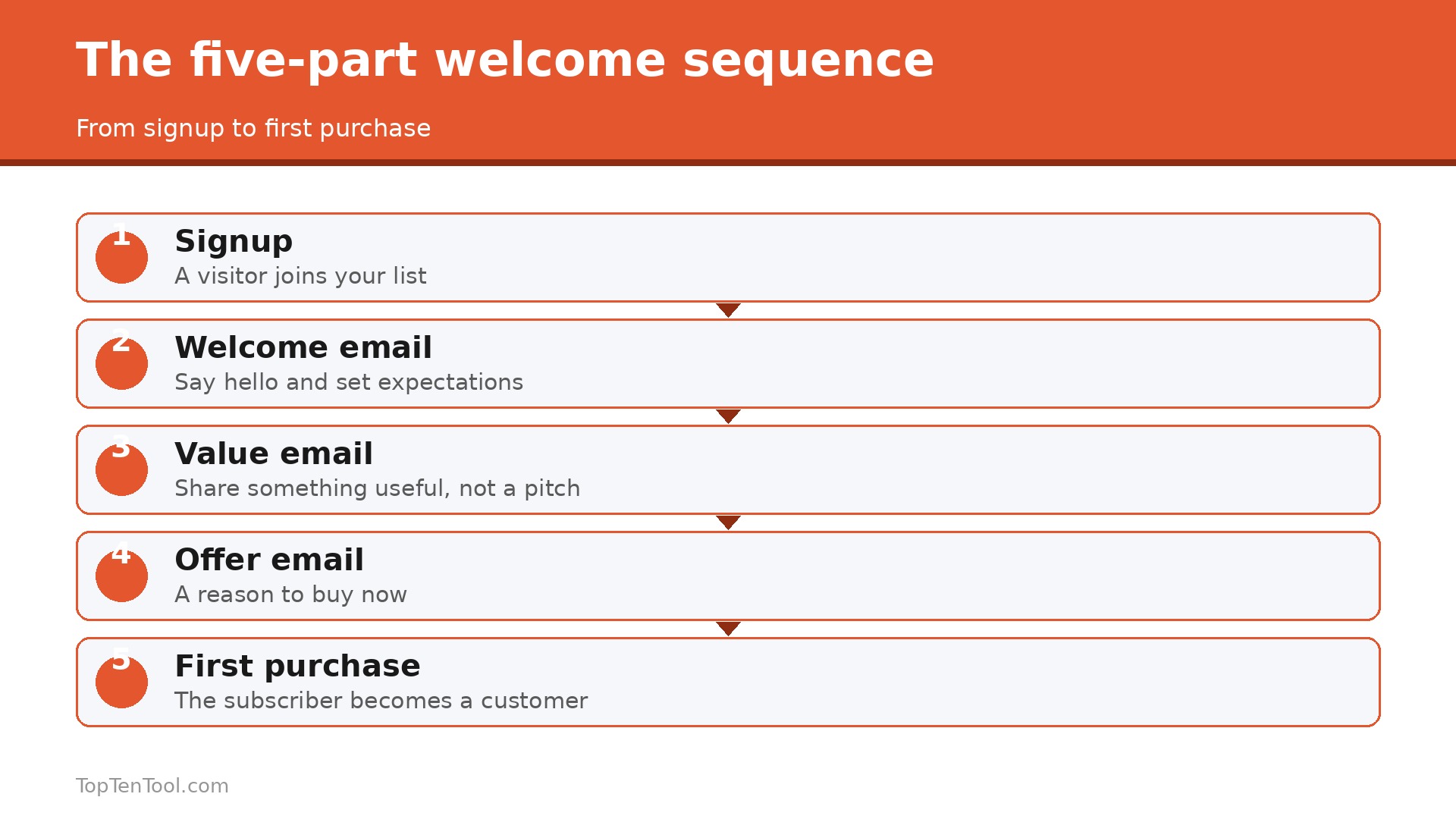
The most common mistake is buying a list, because purchased addresses bounce, complain and damage your sender reputation for months. The second is emailing rarely, then suddenly sending five times in a week, which looks like spam to inbox filters. Send on a steady rhythm instead. The third is skipping list cleaning, so dead addresses drag down open rates. Remove subscribers who have not opened in six months. The fourth is a misleading subject line, which earns one open and many complaints. The fifth is sending image only emails with no plain text, which filters treat with suspicion. Fix these five and most tools will deliver well.
What We Would Pick
For most small businesses, the smart start is MailerLite for value with automation, or Brevo if the list is large and sends are rare. Both keep the first year bill low and upgrade sensibly. Creators should choose Kit, stores should choose Omnisend, and teams that want the deepest automation should choose ActiveCampaign. Mailchimp remains the safe familiar pick, but only if you accept that the bill climbs with the list. The best email marketing software for small business is the one that fits your sending habits and stays affordable at the list size you will reach in a year, so price that future list before you commit.
That is the best email marketing software for small business shortlist we would hand to a friend starting today.
Frequently Asked Questions
What is the cheapest email marketing software for a small business?
Brevo and Moosend start at $9 a month, and MailerLite starts at $12. Brevo is usually cheapest for a large list emailed rarely, because it bills by sends rather than contacts. Free plans from Brevo, Kit and beehiiv cover a real list, so many businesses can start free and pay only when the list grows.
How much does email marketing cost at 5,000 contacts?
It depends on the pricing model. Mailchimp Essentials runs about $75 a month at 5,000 contacts, Kit about $89, and MailerLite roughly $30 to $40. Brevo can cost $9 to $18 for the same list if you send once a month, because it charges by emails sent rather than contacts stored.
Is Mailchimp still the best choice for a small business?
Mailchimp is still a good choice for owners who want the biggest template library and the widest integrations, and who are happy to pay as the list grows. It is not the cheapest, and Brevo or MailerLite usually win on price. Choose Mailchimp for familiarity and ecosystem, not for value.
Which email tool is best for creators?
Kit is the best pick for creators who sell courses, products or paid newsletters, because tagging and commerce are built in. beehiiv suits creators who earn from ads or paid subscriptions. Both offer generous free plans, so a creator can start free and upgrade when the audience pays.
Do I need automation, or is a simple newsletter enough?
A simple newsletter is enough when you send the same message to everyone once or twice a month. Automation earns its price when you need welcome sequences, abandoned cart emails, or different messages for buyers and non buyers. Start simple, and add automation only when a manual send starts taking too much time.
How do I improve email deliverability?
Send only to people who asked to hear from you, clean the list every few months, and keep a steady sending rhythm. Use a clear subject line, include plain text with images, and remove subscribers who have not opened in six months. These habits matter more than the tool you choose.