
A tutor who teaches twenty students a week loses the same hours every week in three places. The schedule lives in a group chat, the invoices go out late, and the progress notes sit in a notebook that nobody reads. The best tutoring management software removes all three, because the schedule, the invoice and the progress record live in one system, and the parent sees the lesson, the payment and the progress without the tutor chasing anyone.
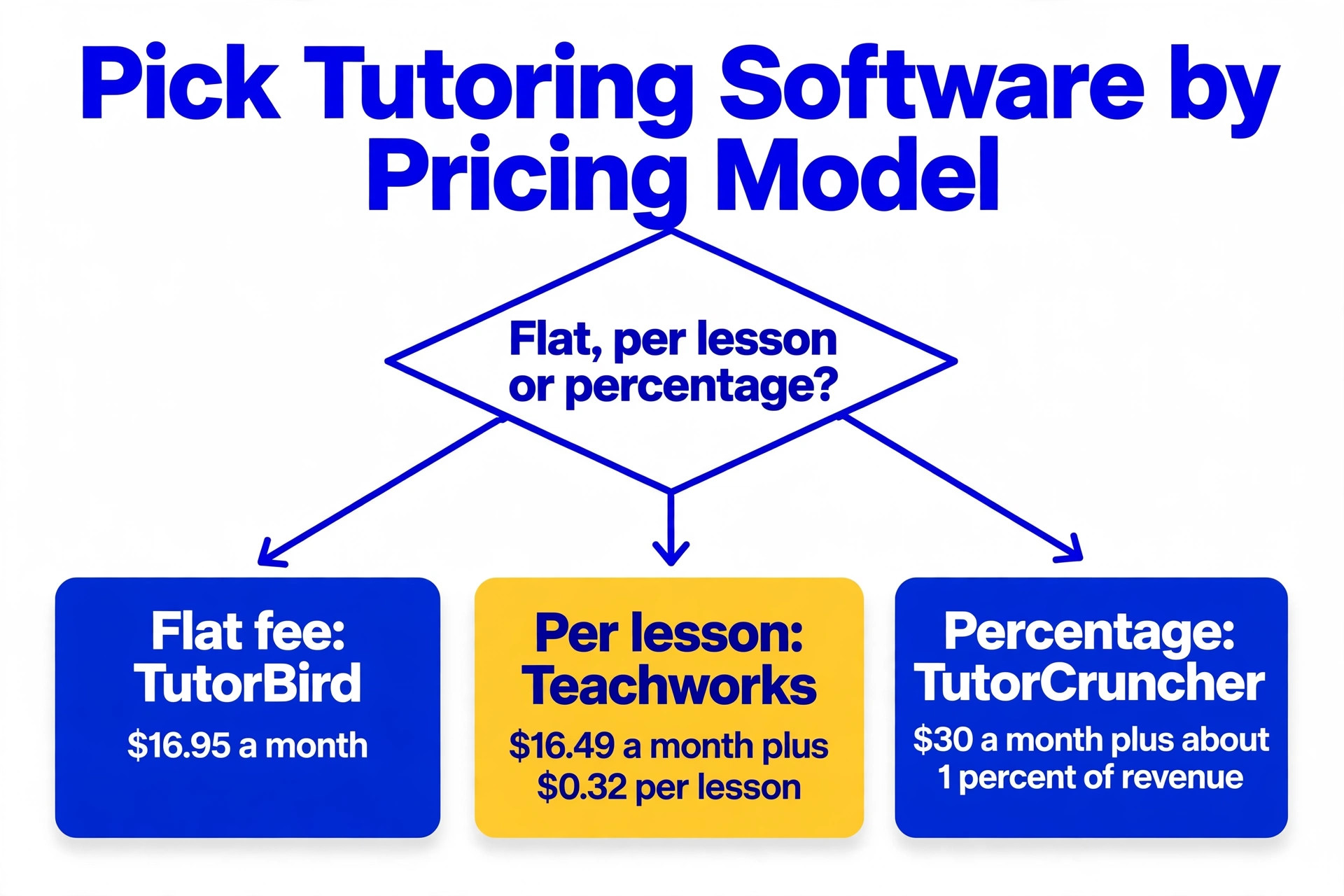
The price spread in this category is wide, and the pricing models are the most confusing in this whole batch. A solo tutor can pay 16.95 dollars a month flat, 16.49 dollars a month plus 32 cents per lesson, 30 dollars a month plus about 1 percent of revenue, or 1 dollar per session, and the cheapest headline is rarely the cheapest bill at real volume. A tutor who teaches 100 lessons a month pays very differently on a per lesson tool than on a flat tool, so the maths has to be done at real volume before anything is bought.
This guide compares ten tools that tutors and tutoring businesses actually use in 2026, with prices checked against vendor pages and current roundups in November 2026. Scheduling, billing, progress tracking and per lesson pricing are all compared, so a tutor can pick the tool that matches the way they teach, whether that is one to one online, a small centre with group classes, or an agency with a pool of tutors.
What to Check Before You Buy Tutoring Software
Start with the pricing model, because it decides the bill more than any feature. Flat subscriptions such as TutorBird at 16.95 dollars a month cost the same whether you teach ten lessons or a hundred. Usage models such as Teachworks at 16.49 dollars a month plus 32 cents per student lesson get more expensive as you teach more, and at 100 lessons a month the lesson charge alone adds 32 dollars. Percentage models such as TutorCruncher at about 1 percent of revenue and Gigpie at a flat 2 percent of collections scale with income, which suits an agency but punishes a tutor whose rates rise. Work out the monthly cost at your real lesson count before you compare the headlines.
Scheduling is the second check, because tutoring is not generic appointment booking. A good system handles recurring weekly slots, group classes with several students, make up lessons, term dates and teacher availability, and it lets parents book and pay without messaging the tutor. A generic calendar tool such as Calendly books a slot, but it does not track packages, attendance or progress, so a tutor who buys it still needs a second tool for the business itself.
Billing and payroll are the third check, and they matter most as the business grows. A solo tutor needs invoicing and online payment. A small centre needs package tracking, so a student who buys ten lessons can see how many are left. An agency needs tutor pay, split payments and payroll, which is where TutorCruncher earns its price. Pick the tool for the business you will have in twelve months, not the business you have today, because switching later means moving every student, every package and every payment record.
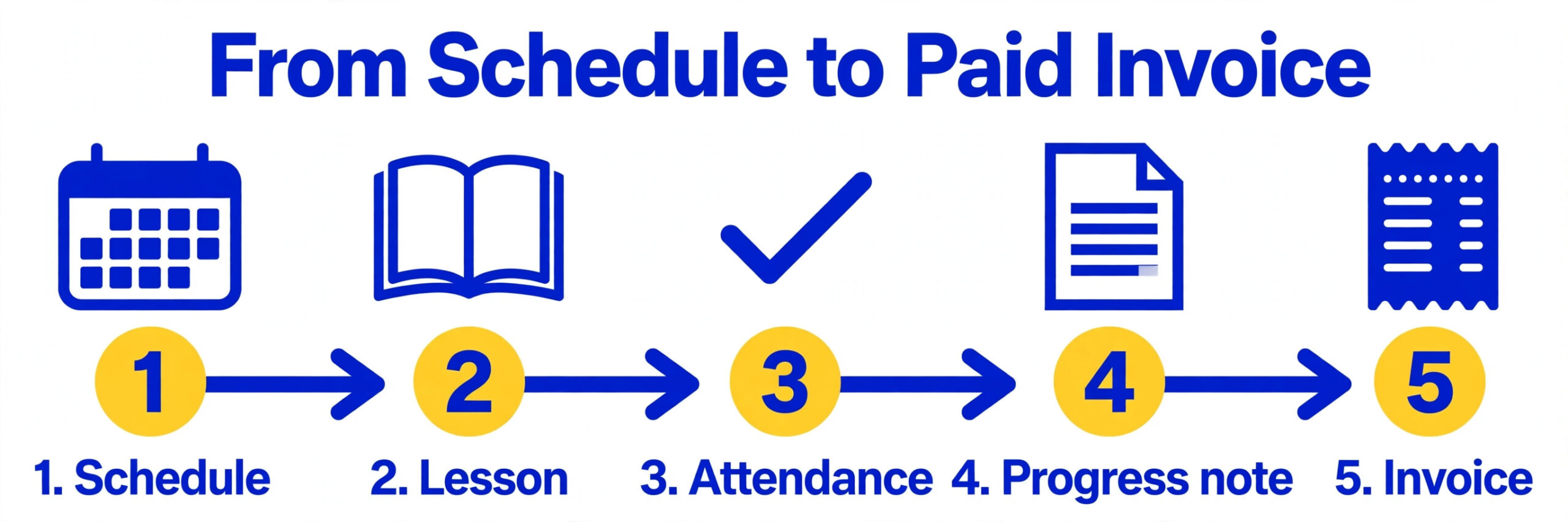
Best Tutoring Management Software in 2026 at a Glance
| Tool | Starting price | Best for | Watch out |
|---|---|---|---|
| TutorBird | 16.95 dollars a month | Solo tutors | No agency payroll |
| Teachworks | 16.49 dollars a month plus 0.32 dollars per lesson | Growing centres | Per lesson charges add up |
| TutorCruncher | 30 dollars a month plus about 1 percent of revenue | Tutoring agencies | Revenue fee on top |
| Classcard | 99 dollars a month | Term based centres | 99 dollars a month |
| Wise | 1 dollar per session | Pay per session | Bill grows with volume |
The first five tools cover the most common shop sizes, and the next five cover the cases where a specialist feature or a lower price changes the answer.
| Tool | Starting price | Best for | Watch out |
|---|---|---|---|
| Oases Online | quote only | Larger businesses | Quote only |
| Acuity Scheduling | 20 dollars a month | Simple booking page | No tutoring features |
| Calendly | free, paid plans from 12 dollars a month | Hourly booking only | Not a tutoring system |
| Tutorbase | 1 percent of each invoice | Variable income | 1 percent of invoices |
| Gigpie | 2 percent of collections | Starting out | 2 percent of collections |
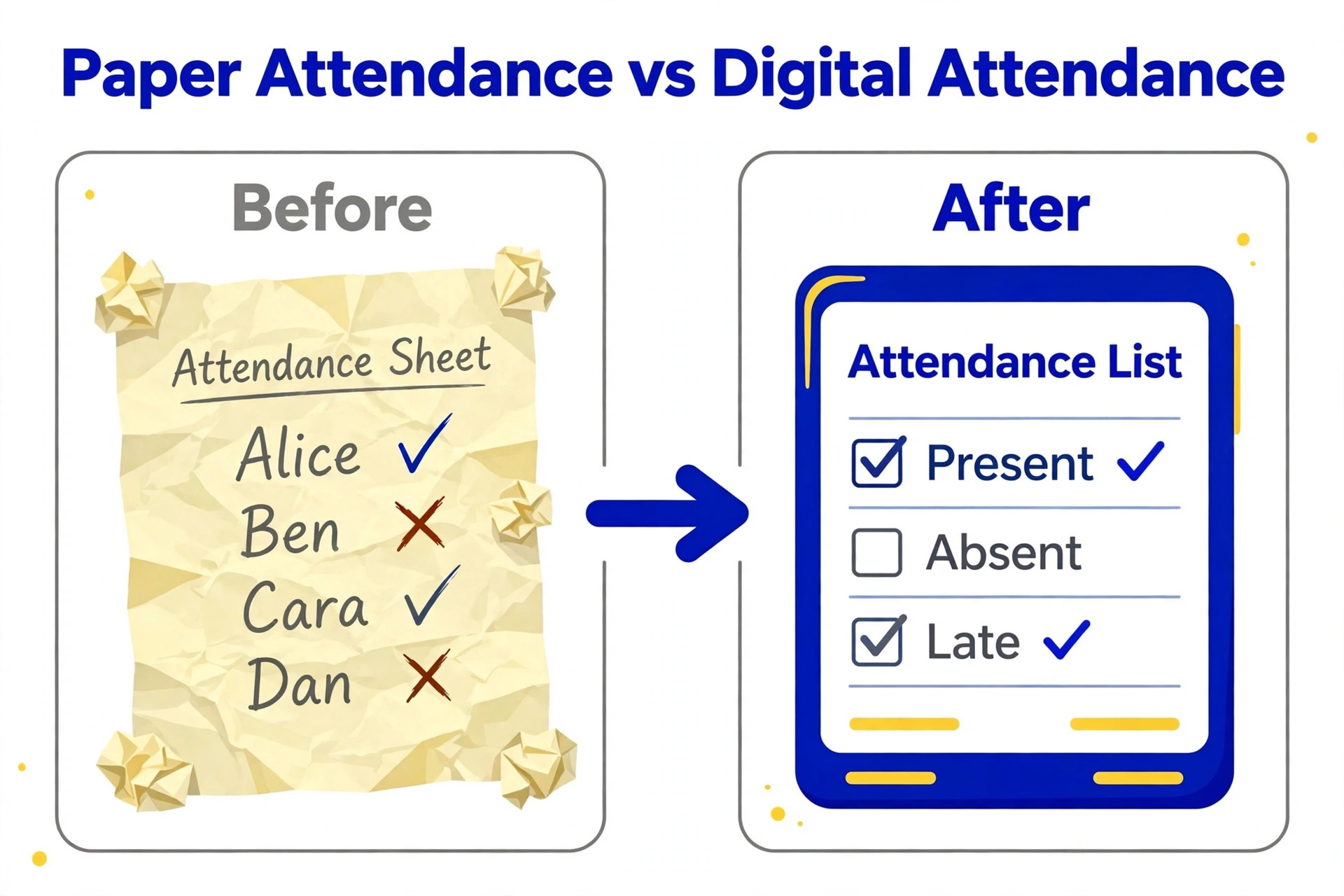
The 10 Tools, Reviewed in Full
The ten tools below are ordered by value for a tutoring business, starting with the strongest solo pick and ending with the general tools that some tutors pair with a specialist.
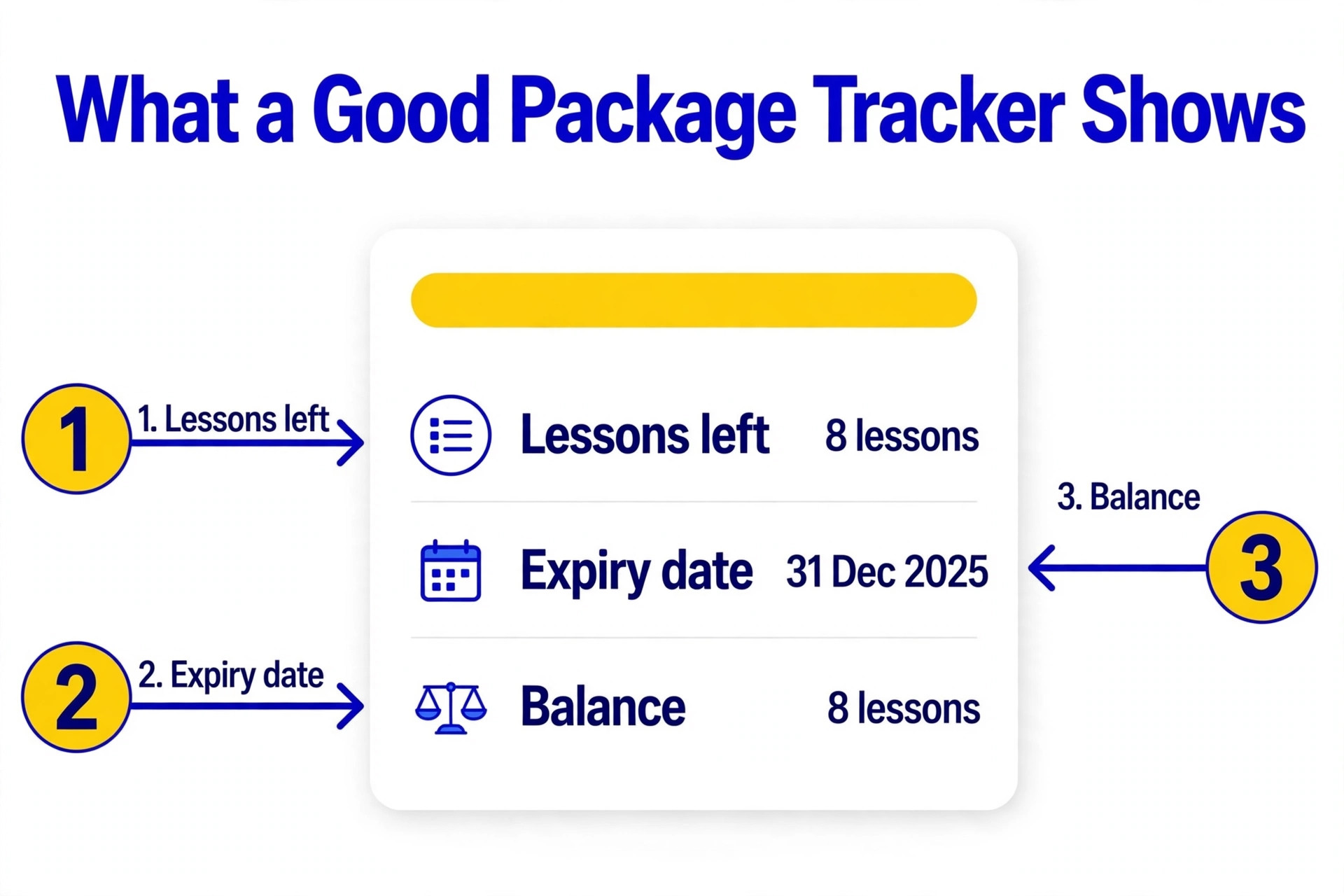
1. TutorBird
TutorBird is the budget pick and a better product than budget usually implies. For 16.95 dollars a month it covers scheduling, invoicing, attendance, lesson notes, assignments, a student and parent portal and reporting, with unlimited students on every plan. It is the tool most solo tutors should start with, because it does the whole admin job for less than the cost of one lesson. The trade off is depth, because it lacks the agency payroll, API access and multi branch features of TutorCruncher, so a growing agency will outgrow it.
Pricing starts at 16.95 dollars a month. TutorBird costs 16.95 dollars a month for one tutor plus 4.95 dollars for each additional tutor or staff member, with unlimited students included and a 30 day free trial. Some listings report a lower single tutor price of 14.95 dollars a month, so confirm the current figure on the pricing page before you budget.
Pick TutorBird when you are a solo tutor or a small business and want the whole admin job for 16.95 dollars a month. Skip it when you run an agency and need payroll, API access or multi branch management.
2. Teachworks
Teachworks is the deeper operations system for a tutoring, language, music or driving school that is growing into a team. It covers scheduling, invoicing, student and family records, teacher wages, communications and reporting, with add ons and integrations for the jobs it does not do natively. The usage pricing suits a low volume start, because the base fee is small, but the per lesson charge adds up as volume rises, and at high volume the Premium tier is the only one that makes sense. It is the best fit for a centre that needs operational depth and can do the maths.
Pricing starts at 16.49 dollars a month plus 0.32 dollars per lesson. Starter costs 16.49 dollars a month plus 0.32 dollars per student lesson. Growth costs 47.99 dollars a month plus 0.189 dollars per lesson, and Premium costs 187.99 dollars a month plus 0.065 dollars per lesson, with unlimited students, teachers and user accounts on every tier. At 100 student lessons a month, the Starter lesson charge alone adds 32 dollars, so the headline price understates the real bill at volume.
Teachworks fits best when you run a tutoring centre that needs teacher wages, multi location management and payroll. It fits worst when you teach high volume on the Starter plan, because the per lesson charge adds up fast.
3. TutorCruncher
TutorCruncher is the agency platform, built for a business that manages a fixed pool of tutors rather than a self service marketplace. It covers scheduling, invoicing and payments, tutor and client management, payroll, split payments, lesson reports and a lead and client pipeline, with an API for the integrations an agency needs. The hybrid pricing of a monthly base plus a revenue fee means the cost scales with the business, which is fair for an agency and expensive for a solo tutor. For a tutor moving toward an agency model, it is the tool to grow into.
Pricing starts at 30 dollars a month plus about 1 percent of revenue. Pay As You Go costs 30 dollars a month plus a revenue fee of roughly 1 percent, with card fees at 3.85 percent. Startup costs 80 dollars a month plus 0.65 percent, and Enterprise costs 240 dollars a month with API access and unlimited support. UK pricing runs 25, 60 and 200 pounds a month, and the revenue fee means the bill grows with the business, which suits an agency but not a solo tutor.
Pick TutorCruncher when you run an agency with a pool of tutors and need payroll, split payments and an API. Skip it when you are a solo tutor, because the revenue fee and the depth are more than you need.
4. Classcard
Classcard is the term based centre tool for a tutoring business that runs recurring group and one to one sessions across a term. It covers scheduling, package tracking, invoicing, attendance and a branded app, with unlimited staff and students on every plan, so the price does not rise as the centre grows. The trade off is price, because 99 dollars a month is five times TutorBird, and a solo tutor does not need the term structure that makes Classcard worth it. For a centre with group classes and term enrolments, it is the best fit here.
Pricing starts at 99 dollars a month. Classcard costs 99 dollars a month, with unlimited staff and students on every plan and a 7 day free trial. It is built for term based tutoring centres running recurring group and one to one sessions, with package tracking and a branded app.
Classcard fits best when you run a term based centre with recurring group classes and package tracking. It fits worst when you are a solo tutor, because the term structure and the price are more than you need.
5. Wise
Wise is the session based option for a tutor who wants to pay only for the sessions that happen. At 1 dollar per confirmed paying session, a tutor who teaches twenty sessions a month pays 20 dollars, and a tutor who teaches a hundred pays 100 dollars, which makes the maths transparent. It covers scheduling, payments, AI summaries and tracking, with a modern interface that suits online tutoring. The trade off is that the bill grows with volume, so a high volume tutor pays more than on a flat tool, and the feature depth is lighter than Teachworks for a centre.
Pricing starts at 1 dollar per session. Wise charges 1 dollar per session, and you pay only for sessions with confirmed paying customers. It includes AI summaries and tracking, and the session based model means a tutor who teaches few sessions pays almost nothing.
Pick Wise when you want to pay only for sessions that happen, with no monthly subscription. Skip it when you teach high volume, because the per session cost passes the flat tools fast.
6. Oases Online
Oases Online is the larger business option for a tutoring company or franchise that needs scheduling, billing, payroll and reporting across several locations. It covers the operational depth that a multi site business needs, with tutor management, student records and financial reporting in one system. The trade off is access, because pricing is quote only and the product is built for a business with the scale to justify a sales process, so a solo tutor or a small centre will get better value from TutorBird or Teachworks.
Pricing starts at quote only. Oases Online does not publish pricing, and the price comes from a quote based on the size of the tutoring business. It is built for larger tutoring businesses and franchises, with scheduling, billing, payroll and reporting across multiple locations.
Oases Online fits best when you run a larger tutoring business or franchise across several locations. It fits worst when you are a solo tutor or a small centre, because the quote only model assumes scale.
7. Acuity Scheduling
Acuity Scheduling is the booking page pick for a solo tutor who just needs clients to book and pay without messaging. It offers a clean booking page, calendar sync, payment collection and reminders, and it integrates with a Squarespace website, which suits a tutor who already has a site. The trade off is depth, because there is no package tracking, no attendance, no progress notes and no tutor payroll, so a tutor who buys Acuity still needs a second tool for the business itself.
Pricing starts at 20 dollars a month. Acuity Scheduling costs from 20 dollars a month billed monthly, as part of Squarespace, with higher tiers for more features. It is a clean booking page that integrates with a website, but it has no tutoring specific features such as package tracking or progress notes.
Pick Acuity Scheduling when you are a solo tutor who just needs a booking page on your website. Skip it when you need package tracking, progress notes or payroll in the same tool.
8. Calendly
Calendly is the simplest booking tool in this list, and it suits a tutor who bills strictly hourly and tracks the business in a spreadsheet. It books the slot, sends the reminder and collects the payment link, with a clean interface that clients already know. The trade off is that it is not a tutoring system, so there is no student record, no package tracking, no attendance and no progress reporting, and a tutor who outgrows the spreadsheet will need to move to TutorBird or Teachworks anyway.
Pricing starts at free, paid plans from 12 dollars a month. Calendly starts free, with paid plans from about 12 dollars a month per user for more features. It books a slot and nothing else, which is fine for a tutor who bills strictly hourly and tracks everything elsewhere.
Calendly fits best when you bill strictly hourly and only need clients to book a slot. It fits worst when you need student records, packages or progress tracking in the same tool.
9. Tutorbase
Tutorbase is the percentage based option for a tutor who wants no monthly subscription at all. At 1 percent of each invoice, a tutor who invoices 2,000 dollars a month pays 20 dollars, and a tutor who invoices 10,000 dollars pays 100 dollars, which makes the cost track income exactly. It covers scheduling, invoicing and student management, with a simple interface that suits a solo tutor. The trade off is that a high earning tutor pays more than the 16.95 dollar flat tools, so the model only wins while income is low or variable.
Pricing starts at 1 percent of each invoice. Tutorbase charges 1 percent of each invoice, with no monthly subscription, so a tutor who invoices little pays little. The percentage model suits a tutor whose income varies month to month, though a high earning tutor pays more than on a flat tool.
Pick Tutorbase when your income varies month to month and you want no subscription. Skip it when you earn well every month, because 1 percent passes the flat tools fast.
10. Gigpie
Gigpie is the newest percentage option in this list, charging a flat 2 percent of what the tutor collects with no monthly subscription. It covers scheduling, invoicing, payments and student management, with a modern interface and a pricing page that is transparent about the model. The trade off is the rate, because 2 percent is twice Tutorbase at 1 percent, so a tutor who invoices 5,000 dollars a month pays 100 dollars against 50 dollars on Tutorbase and 16.95 dollars on TutorBird. For a tutor starting out with low volume, the zero subscription still makes it worth a look.
Pricing starts at 2 percent of collections. Gigpie charges a flat 2 percent of what the tutor collects, with no monthly subscription. It is a newer platform that combines scheduling, billing and student management with a percentage model, which suits a tutor starting out.
Gigpie fits best when you are starting out with low volume and want no subscription. It fits worst when you invoice steadily, because 2 percent is the dearest percentage model here.
Best Pick by Tutor Model
Tutor model decides the answer, because a solo tutor and an agency buy different software. Use the table below as the short version of this guide.
| Job | Pick | Why |
|---|---|---|
| Solo tutor, one to one | TutorBird | 16.95 dollars a month, unlimited students |
| Solo tutor, low volume | Wise | 1 dollar per session, pay only for sessions that happen |
| Small centre, group classes | Classcard | 99 dollars a month, unlimited staff and students |
| Growing centre, payroll | Teachworks | From 16.49 dollars a month plus per lesson charges |
| Agency with tutor pool | TutorCruncher | From 30 dollars a month plus about 1 percent |
What a Tutor Teaching 100 Lessons a Month Actually Pays
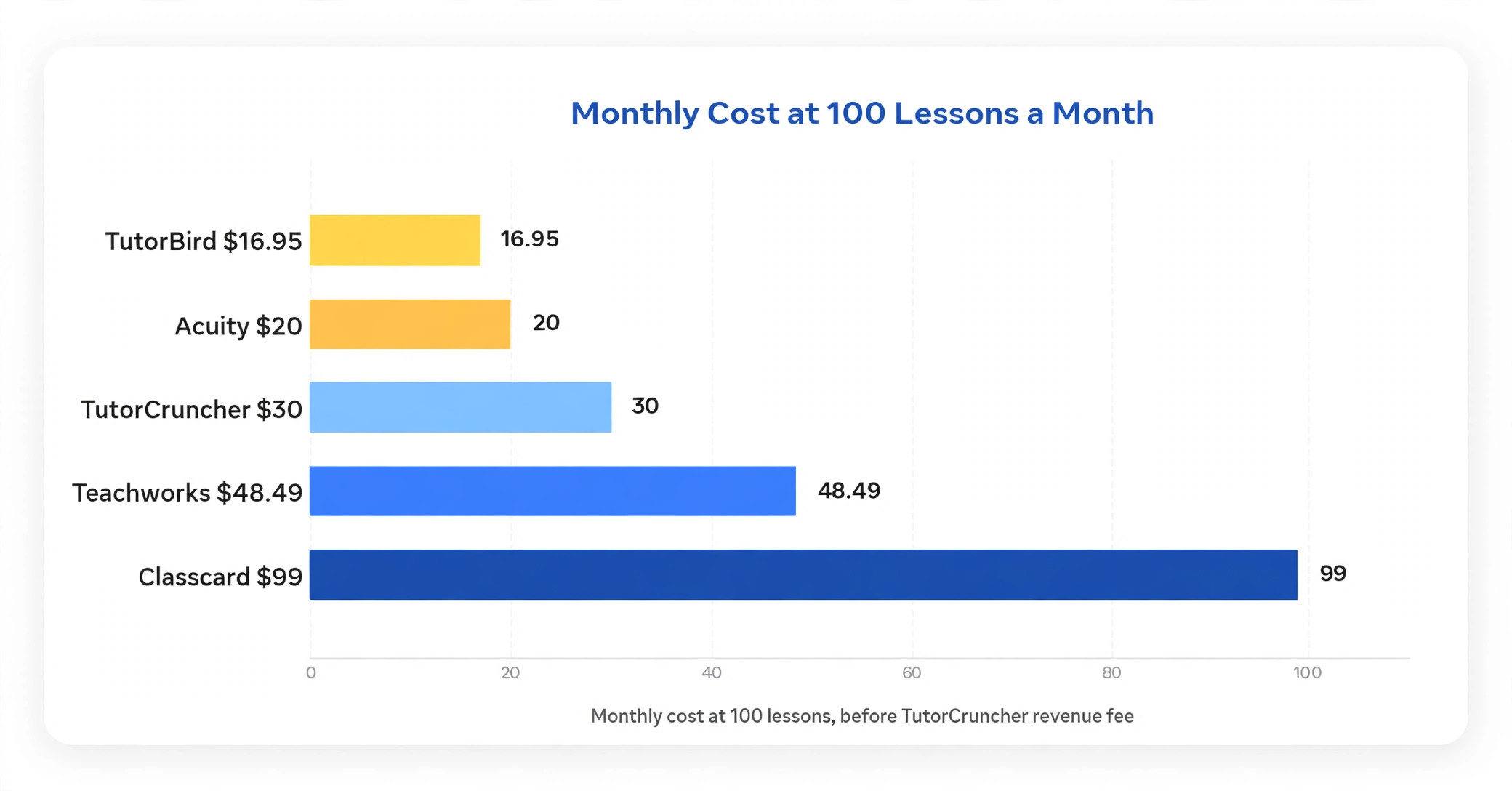
The monthly subscription is only the first line of the bill, because the pricing model decides the real cost at volume. The table below shows the monthly cost for a tutor teaching 100 student lessons a month. TutorBird costs 16.95 dollars, Tutorbase costs about 1 percent of invoices, Wise costs 100 dollars at 1 dollar a session, Teachworks Starter costs 48.49 dollars with the lesson charges, and Gigpie costs 2 percent of collections. The cheapest headline and the cheapest bill at 100 lessons are not the same tool, which is why the maths has to be done at real volume.
| Tool | Monthly | Yearly | What is extra |
|---|---|---|---|
| TutorBird | 16.95 dollars | 203.40 dollars | Flat, unlimited students |
| Teachworks Starter | 48.49 dollars | 581.88 dollars | 16.49 plus 32 per lesson |
| Wise | 100 dollars | 1,200 dollars | 1 dollar per session |
| TutorCruncher PAYG | 30 dollars plus 1 percent | 360 dollars plus 1 percent | Revenue fee on top |
| Gigpie | 2 percent of collections | 2 percent yearly | No subscription |
The lesson is to work out the monthly cost at your real lesson count, not the headline. A flat tool wins once volume rises, a per lesson tool wins while volume is low, and a percentage tool wins while income is variable. Count your lessons for a month, multiply by the model, and the cheapest tool usually reveals itself in one line of maths. That comparison is the heart of choosing the best tutoring management software.
Mistakes That Cost Tutors Money
The most common mistake is comparing the headline price without counting the usage charge. A tutor who teaches 100 student lessons a month on Teachworks Starter pays 48.49 dollars a month, not 16.49 dollars, because the lesson charge alone adds 32 dollars. Work out the monthly cost at your real lesson count before you buy, because the cheapest headline is rarely the cheapest bill at volume.
The second mistake is buying a booking tool and calling it tutoring software. Calendly and Acuity book a slot, but they do not track packages, attendance or progress, so a tutor who buys one still needs a second tool for the business itself. If you sell packages, track progress or manage several tutors, buy a tutoring system, not a calendar.
The third mistake is choosing for today instead of twelve months from now. A solo tutor who buys the cheapest tool and then hires two tutors has to move every student, every package and every payment record to a new system, which costs more in time than a year of the right subscription. Pick the tool for the business you will have in twelve months, and check the price at that size before you commit.
Our Verdict
TutorBird is the pick for most tutors in this guide, because 16.95 dollars a month buys scheduling, invoicing, attendance, lesson notes and a parent portal with unlimited students. It is the tool most likely to cover the whole admin job for less than the cost of one lesson, and that is worth more than the feature depth of the dearer tools. That is why it leads this guide on the best tutoring management software.
Teachworks is the pick when the centre grows and needs teacher wages and payroll, from 16.49 dollars a month plus per lesson charges. TutorCruncher is the pick when the business becomes an agency, from 30 dollars a month plus about 1 percent of revenue. Start on TutorBird, count your lessons for a month, and only move when the volume or the team size demands it. The per lesson maths is the deciding factor, so count your lessons for a month before you choose, and pick the model that costs least at your real volume rather than the model with the lowest headline price.
Frequently Asked Questions

What is the best tutoring management software for a solo tutor?
TutorBird is the strongest pick for most solo tutors, because 16.95 dollars a month buys scheduling, invoicing, attendance, lesson notes and a parent portal with unlimited students. Wise at 1 dollar per session is the best pick for a tutor with low or variable volume. That is the short answer on the best tutoring management software for most readers.
How much does tutoring management software cost per month?
A solo tutor can pay 16.95 dollars a month flat for TutorBird, 16.49 dollars a month plus 32 cents per lesson for Teachworks, 30 dollars a month plus about 1 percent of revenue for TutorCruncher, or 1 dollar per session for Wise. A centre pays 99 dollars a month for Classcard, and an agency pays 80 to 240 dollars a month for TutorCruncher. The cheapest headline is rarely the cheapest bill at real volume, so do the maths at your lesson count.
What is the difference between flat and per lesson pricing?
Flat pricing such as TutorBird at 16.95 dollars a month costs the same whether you teach ten lessons or a hundred, while per lesson pricing such as Teachworks adds 32 cents per student lesson on top of the base fee. At 100 lessons a month, the Teachworks lesson charge alone adds 32 dollars, so the flat tool wins once volume rises and the per lesson tool wins while volume is low. Count your lessons for a month before you choose.
Does tutoring software track student progress?
Yes, the tutoring specific tools track progress, while generic booking tools do not. TutorBird covers lesson notes, assignments and progress tracking, Teachworks covers student records and reporting, and TutorCruncher covers lesson reports and a client pipeline. Calendly and Acuity only book a slot, so a tutor who needs progress tracking must buy a tutoring system rather than a calendar.
Can tutoring software handle group classes?
Yes, the centre tools handle group classes with several students, recurring weekly slots, term dates and make up lessons. Classcard is built for term based centres running recurring group and one to one sessions, Teachworks covers group scheduling with teacher wages, and TutorBird handles group bookings with attendance. A generic calendar struggles with group classes, because it books one slot for one person rather than a class with a roster.
Do I need tutoring software if I only teach a few students?
A tutor with under ten students can run on a calendar and a spreadsheet, and that is often the right answer while volume is low. The point to buy software is when invoicing goes out late, when parents ask for progress updates the tutor cannot find, or when the schedule lives in a group chat. TutorBird at 16.95 dollars a month or Wise at 1 dollar a session are cheap enough to justify at low volume, and both save more time than they cost.
Can I switch tutoring software later without losing student records?
Yes, but the move takes planning. Export student records, package balances, payment history and lesson notes from the old tool, then test the import with a small batch of students before moving the rest. Keep the old system running for a month in parallel, and check that package balances carried across before you cancel. A switch planned over two weeks is painless, while a rushed switch loses the records that parents ask about first.
Start on TutorBird, count your lessons for a month, and only move when the volume or the team size demands it, and check the price at that size first.
That is the short answer on best tutoring management software for most small businesses.