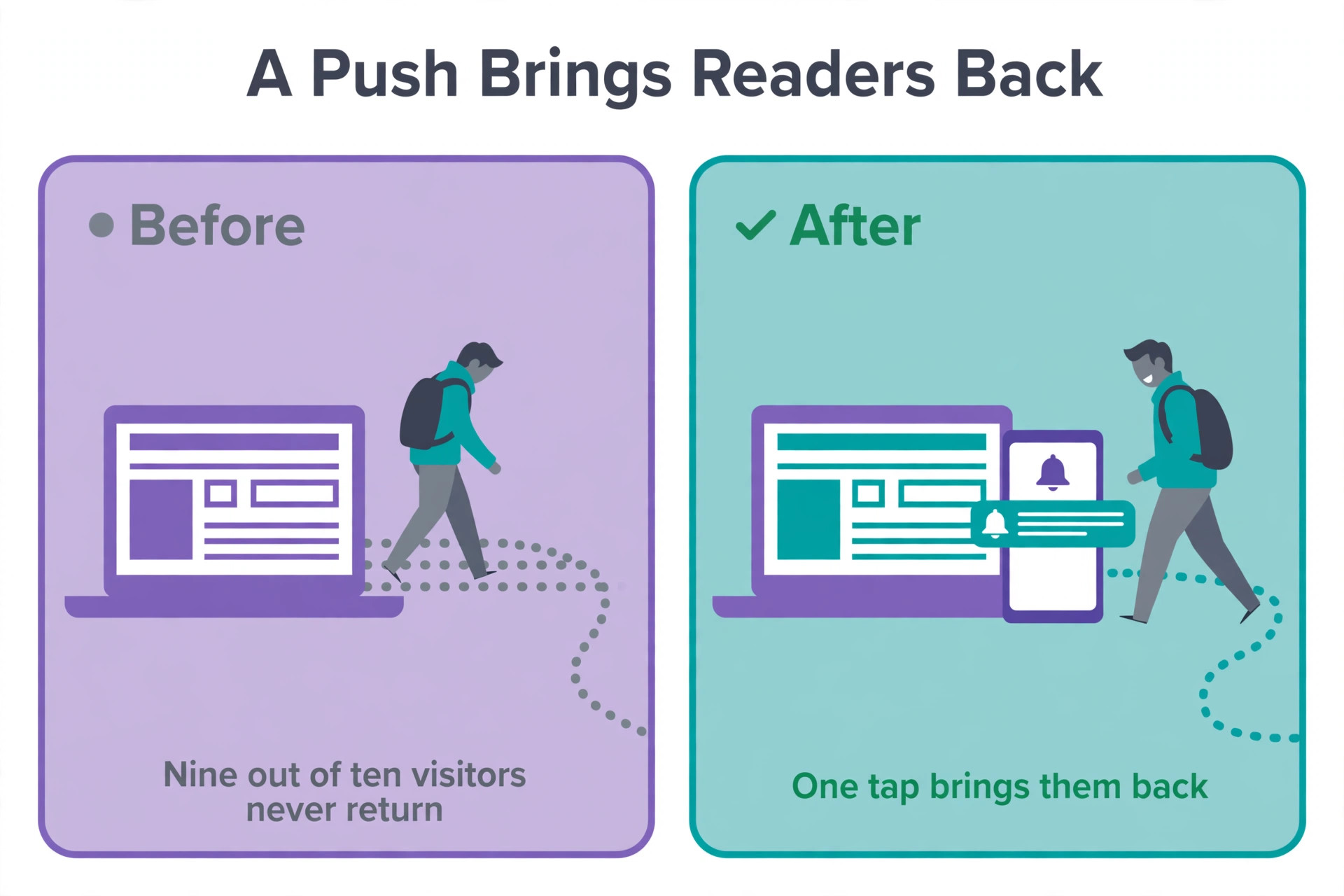
Most small websites lose nine out of ten visitors forever, because a visitor who leaves without subscribing has no reason to return. A push notification is the cheapest way to bring them back, and the right tool can turn a one time reader into a repeat visitor. Among the best push notification tools we compared, Webpushr is the best budget pick, PushEngage is the best pick for WordPress sites, and OneSignal is the best pick when your site also has an app. This guide compares 10 tools on real prices, free limits and the cost at 10,000, 50,000 and 100,000 subscribers, so you can pick the one that fits your list today and your list next year.
The trap in this category is the free tier. Free limits are counted in five different units across vendors, including monthly active users, subscribers, sends, deliveries and pushes, so two free plans that both say 10,000 can mean very different things. OneSignal free web push is unlimited subscribers but capped at 10,000 per send, while PushEngage free is 200 subscribers and 30 campaigns a month. Read the unit, not only the number, before you choose.
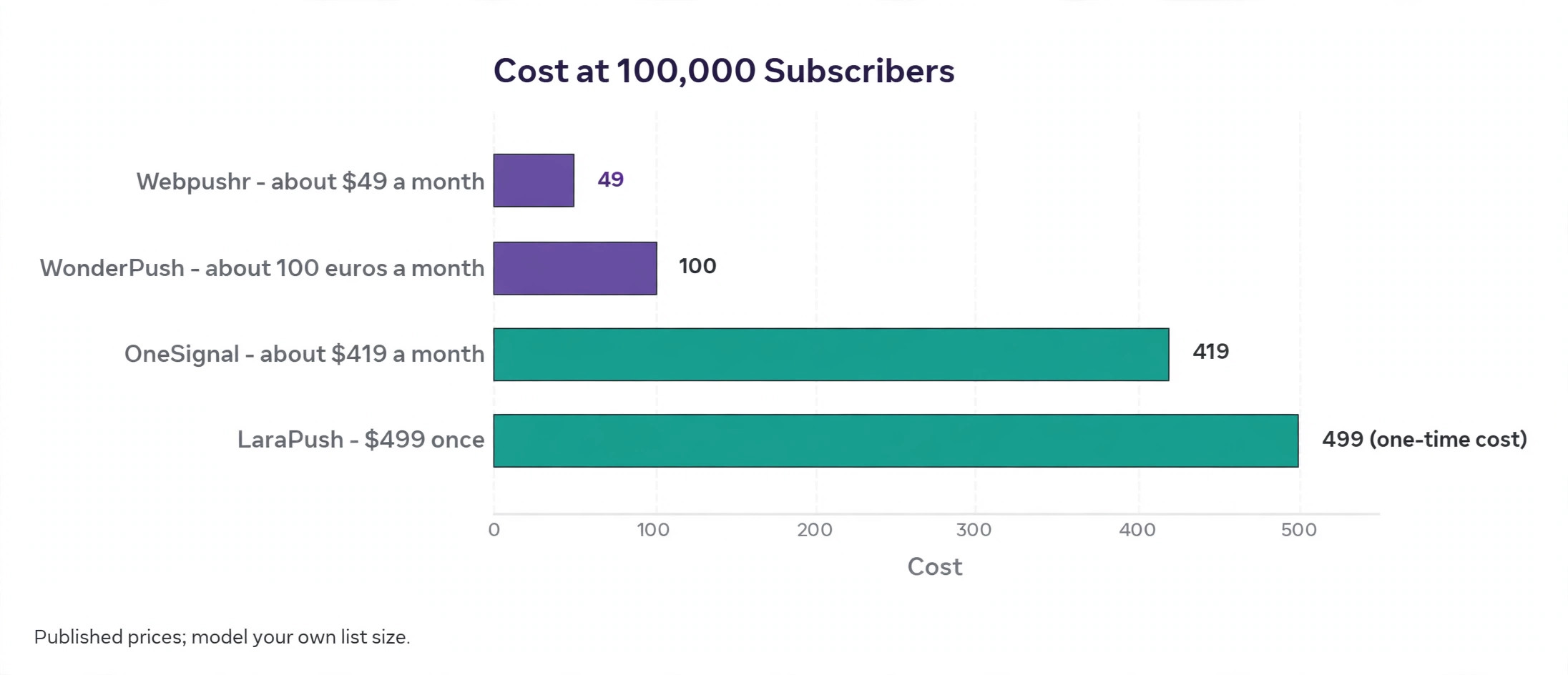
The second trap is the growth curve. A tool that is free at 5,000 subscribers can cost 419 dollars a month at 100,000, while a flat priced tool costs 49 dollars at the same size. That difference is why this guide models the cost at three list sizes in the table below. Pick the tool that is cheap at the size you will reach next year, not only at the size you have today.
How We Tested
We compared each tool on the same five points, because the best push notification tools win on the free limit, the growth cost, the setup and the automation, not on the longest feature list. Free value covered the subscriber limit, the per send cap and whether the free plan includes the features you need. Growth cost covered the price at 10,000, 50,000 and 100,000 subscribers, using each vendor published price. Setup covered how fast a small site can install the tool, with WordPress plugins scoring higher for WordPress sites. Automation covered abandoned cart, RSS to push, scheduling and segmentation. Platform covered web only against web plus mobile.
Prices in this guide were checked against vendor pricing pages and current 2026 roundups in October and November 2026. PushEngage is listed at 8 dollars a month billed yearly in some sources and 9 dollars a month for the first year in others, and OneSignal Growth is 19 dollars a month plus usage in every source we checked. Confirm the price on the checkout page before you pay, because vendors change pricing without notice and several run first year offers.
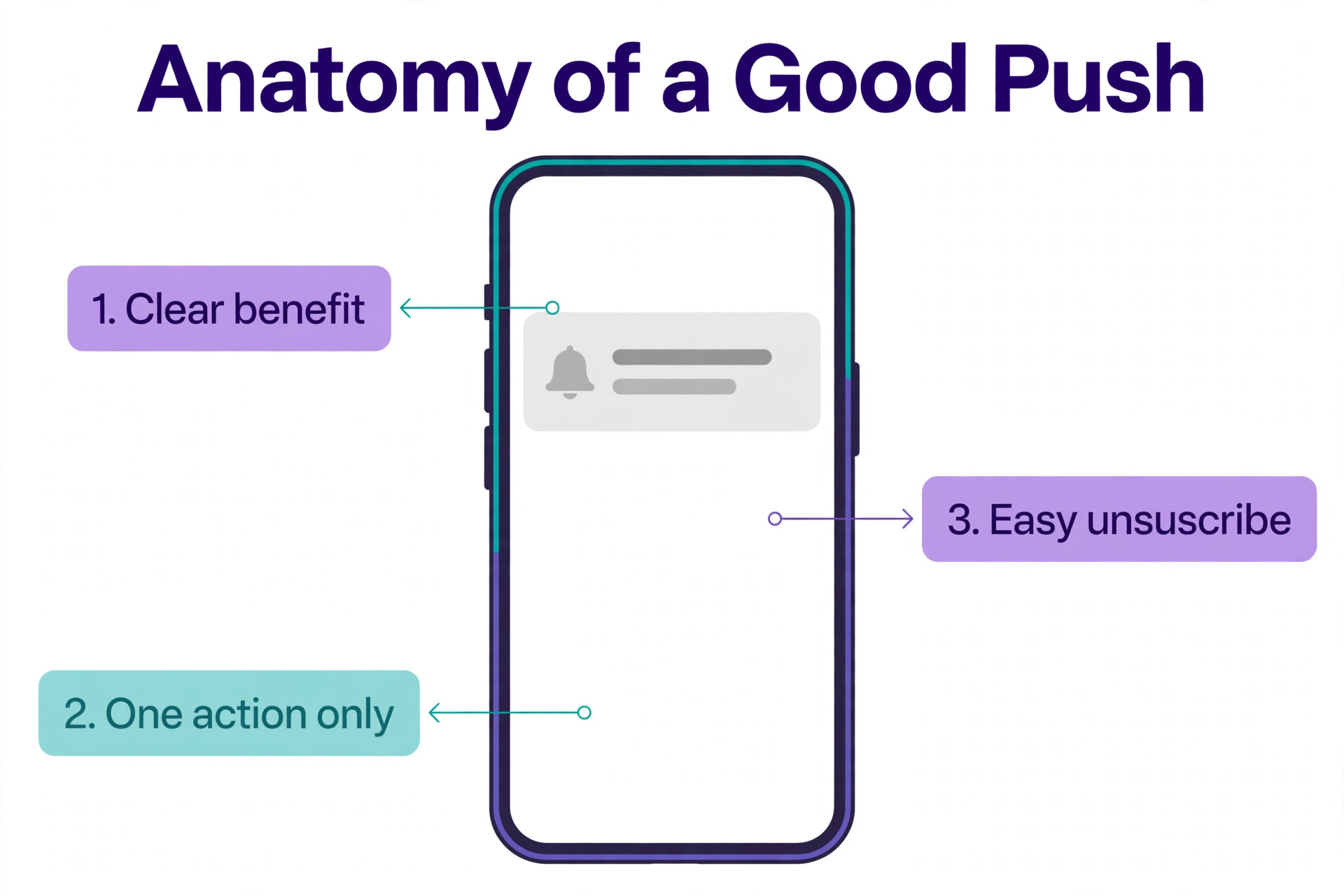
We also checked permission and privacy, because a push list is a consent list. The best push notification tools ask for clear opt in, show a simple unsubscribe in every message, and store consent in a way you can prove if a subscriber complains. A tool that hides the unsubscribe link or makes opt out hard will damage trust faster than any campaign can repair it, so test the unsubscribe flow as carefully as the opt in flow.
We also checked what each free plan leaves out. Webpushr includes every feature free up to 10,000 subscribers, while Gravitec free leaves out Safari and adds a Powered by Gravitec credit, and iZooto free Monetize places ads in your notifications. Those limits matter more than the subscriber number, because a free plan that hides the feature you need is not free in practice.
The best push notification tools for Each Job
| Job | Pick | Why it wins |
|---|---|---|
| Small blog or business site | Webpushr | Every feature free up to 10,000 subscribers |
| WordPress or WooCommerce | PushEngage | WordPress plugin and store automations |
| Small online store | PushAlert | Abandoned cart push from 12 dollars a month |
| News or media publisher | iZooto | Publisher playbooks and ad supported free plan |
| Website plus mobile app | OneSignal | One SDK for web, iOS and Android |
Use this table as a shortcut, then read the full section for the tool you are leaning toward. The cheapest option is not the best value when it misses the feature your centre uses every day, and the most expensive option is not the best choice when you only need the basics.
The Ranked List
The tools below fall into three groups. The first group is all in one platforms that cover billing, attendance and parent messaging in one place. The second group is specialists that win on one job, such as curriculum or billing. The third group is budget and small program tools that keep the monthly bill low.
1. OneSignal
OneSignal is the best known multi channel messaging platform, and it covers web push, mobile push, in app messages, email and SMS from one dashboard. The free plan covers web push with unlimited subscribers, but each send is capped at 10,000 subscribers, and mobile push on the free plan is limited to organisations under 1,000 monthly active users. That free plan is genuinely useful for a small site that is still growing.
Growth starts at 19 dollars a month plus usage, at 0.004 dollars per web push subscriber and 0.012 dollars per mobile monthly active user. At 100,000 web subscribers that works out to about 419 dollars a month, which is far more than the flat priced tools here. Pick OneSignal when your site also has an app and you want one SDK for every channel.
2. Webpushr
Webpushr is the budget pick for small websites, because it includes every feature on the free plan up to 10,000 subscribers, with unlimited websites, notifications and team members. There are no feature limits to trip over, only a subscriber limit. That makes the free plan a real workflow, not a trial, for a blog or a small business site.
Paid tiers are flat and simple. The plan costs 29 dollars a month up to 50,000 subscribers, 49 dollars up to 100,000 and 99 dollars up to 150,000. At 100,000 subscribers that is about 49 dollars a month, against about 419 dollars on OneSignal Growth. Pick Webpushr when you want the cheapest path as your list grows and you only need web push.
3. PushEngage
PushEngage is the best pick for WordPress and WooCommerce sites, because the plugin is built for that platform and the store automations are deep. Abandoned cart alerts, price drop alerts and back in stock alerts run without custom code, and the dashboard is friendly for a site owner who is not a developer. It also covers app push and WhatsApp in the same dashboard on higher plans.
The free plan is small, with 200 subscribers on one site or app and 30 campaigns a month. Paid plans start at 8 dollars a month billed yearly, or 14 dollars billed monthly, at the lowest subscriber tier, while some sources list 9 dollars a month for the first year. That price conflict is small, but confirm the figure at checkout. Pick PushEngage when you run WordPress or WooCommerce.
4. PushAlert
PushAlert is built for small online stores, and abandoned cart push starts on its 12 dollar Basic plan. The tool covers web push with segmentation, scheduling and automation, and it is simple enough for a store owner to set up in an afternoon. The focus on stores shows in the features, with cart recovery and order updates given priority over publisher tools.
The free plan covers up to 3,000 subscribers, which is generous for a new store. The Basic plan at 12 dollars a month adds the store automations that make the tool worth paying for. Pick PushAlert when you run a small store and cart recovery is the job that pays for the tool.
5. SendPulse
SendPulse is a multi channel platform that covers email, SMS, chatbots and web push in one account. That matters for a small team that already uses SendPulse for email, because the subscriber list, the segments and the billing sit in one place. Web push is one channel among several, rather than the whole product.
The free plan allows web push to up to 10,000 subscribers, though personalisation and optimisation features are limited on the free tier. Paid plans start from 12 dollars a month for 1,000 subscribers and scale by subscriber tier. Pick SendPulse when you already use it for email and you want push in the same account.
6. WonderPush
WonderPush is the simplest pricing model on this list, and it suits teams that want a bill that grows in a straight line. You pay 1 euro per month for up to 1,000 subscribers, then 1 euro more for every extra 1,000 subscribers. At 10,000 subscribers that is 10 euros a month, and at 100,000 it is 100 euros a month. There is no jump between tiers and no surprise at the next threshold.
There is no free push plan, only a 14 day trial with no card required. The tool covers web and mobile push, with unlimited team members on the dashboard. Pick WonderPush when you want predictable per subscriber pricing, European data handling and a bill you can work out in your head.
7. iZooto
iZooto is built for news and media publishers, with playbooks for content engagement, RSS to push and on site tools that fit a newsroom workflow. It also offers a free Monetize plan that places ads in your notification stream in exchange for free unlimited subscribers, up to 10 notifications a day. That trade off suits a publisher that wants reach without a monthly bill.
Paid plans start at 85 dollars a month for the Rise plan, which covers up to 30,000 subscribers and unlimited notifications. Higher tiers need a quote. That price puts iZooto far above the small site tools here, so it only makes sense for a publisher with real traffic. Pick iZooto when you run a news or media site and you want publisher playbooks or ad supported free push.
8. Firebase Cloud Messaging
Firebase Cloud Messaging is the no cost delivery layer from Google, and it is the cheapest way to send push at any volume, because the service itself costs nothing. You build the targeting, automation, segmentation and reporting layers yourself, in code, around the Firebase API. That is a large amount of work, and it is the reason most small sites choose a dashboard tool instead.
There is no dashboard, no free tier limit to outgrow and no monthly bill. The cost is developer time, both to build the system and to keep it running. Pick Firebase Cloud Messaging when you have a developer, you need full control, and you do not want to pay per subscriber at scale.
9. Gravitec
Gravitec is a web push tool for small sites, with a free plan that notifies up to 10,000 subscribers. The free plan adds a Powered by Gravitec credit to notifications and leaves out Safari support, which are the two limits to weigh before you rely on it. The dashboard covers segmentation, scheduling and automation for a blog or a small business site.
Paid plans add Safari support, remove the credit and unlock more features, with pricing by subscriber tier. Gravitec is a solid free start for a site that is mostly Chrome and Firefox traffic. Pick Gravitec when you want a free plan near 10,000 subscribers and you can live with the free plan limits for now.
10. LaraPush
LaraPush is the self hosted option, and it is the only tool here with a one time licence instead of a monthly bill. You pay 499 dollars once for the Startup licence, install the software on your own server, and send to unlimited subscribers. The trade off is that you run the server, the updates and the delivery yourself, so the cost moves from a subscription to your own time and hosting.
There is no free plan, and the 499 dollar licence is the entry point. At 100,000 subscribers the licence pays for itself in about a year against most monthly tools, and after that the only cost is your server. Pick LaraPush when you have a large list, you want to own the system, and you have someone who can run a server.
What a Good Opt In Flow Looks Like
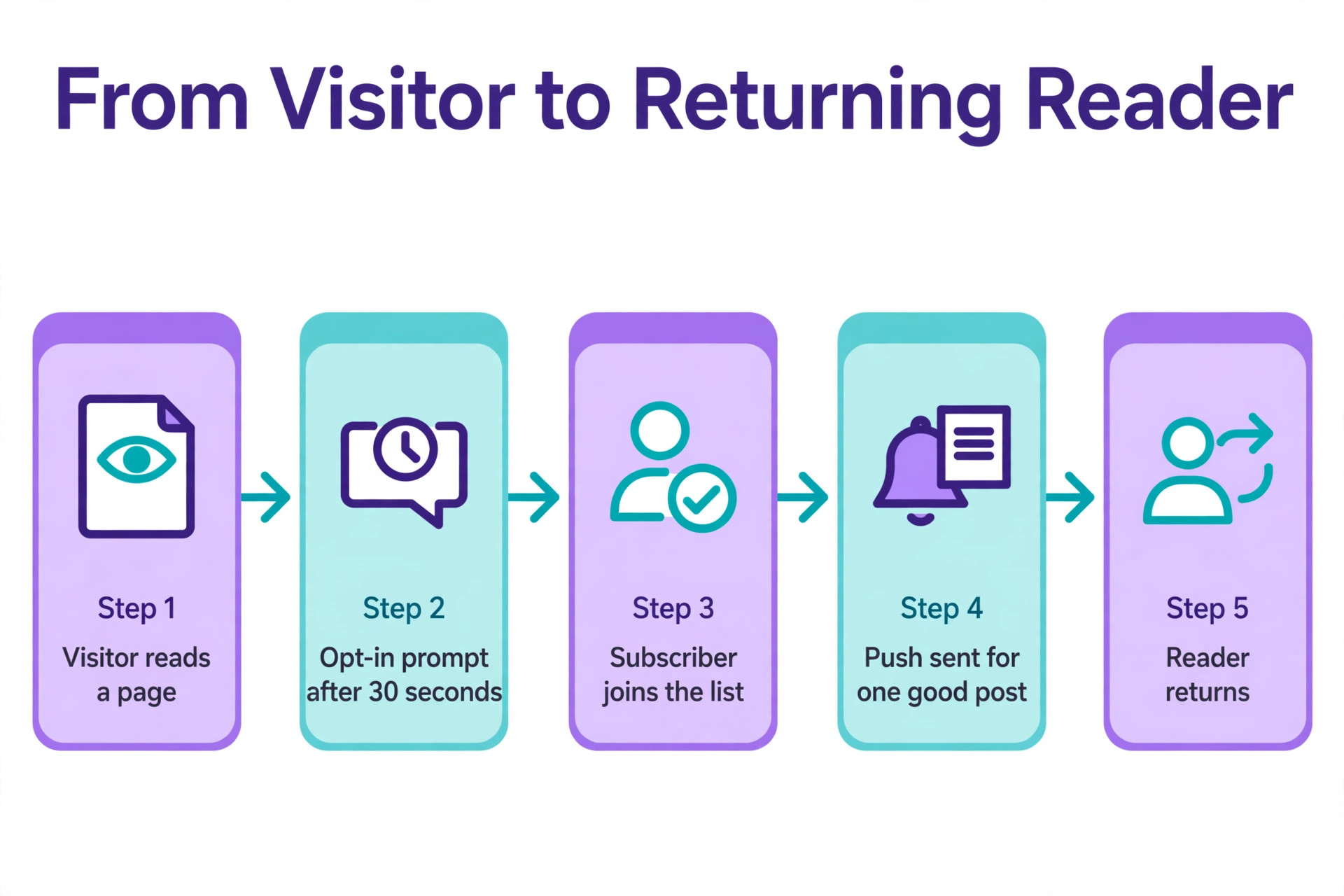
A good opt in flow has three parts, and you can test all three before you commit. The first part is timing. A prompt that appears after a visitor has read a page or spent 30 seconds on the site converts better than a prompt that appears on arrival, because the visitor has a reason to return. Most tools let you delay the prompt, and you should use that setting from day one.
The second part is the benefit. A prompt that says allow notifications tells the visitor nothing, while a prompt that says get new posts and exclusive offers tells them what they gain. Write the benefit in the visitor language, not in the tool language, and test two versions. A small change in wording can double the opt in rate, and the test costs nothing.
The third part is the fallback. A visitor who says no to the browser prompt cannot be asked again easily, so some tools offer a soft prompt first, a custom box that explains the benefit before the browser prompt appears. If the visitor says no to the soft prompt, you can ask again later. That two step flow protects your list growth, and it is worth checking before you pick a tool.
The best push notification tools make all three parts easy, with a customisable prompt, a delay setting and a soft prompt option. If a tool only offers the raw browser prompt, your opt in rate will be lower, and no amount of automation can recover the subscribers you never gained. Check the opt in flow in a demo, and test it on your own site before you launch.
How to Choose
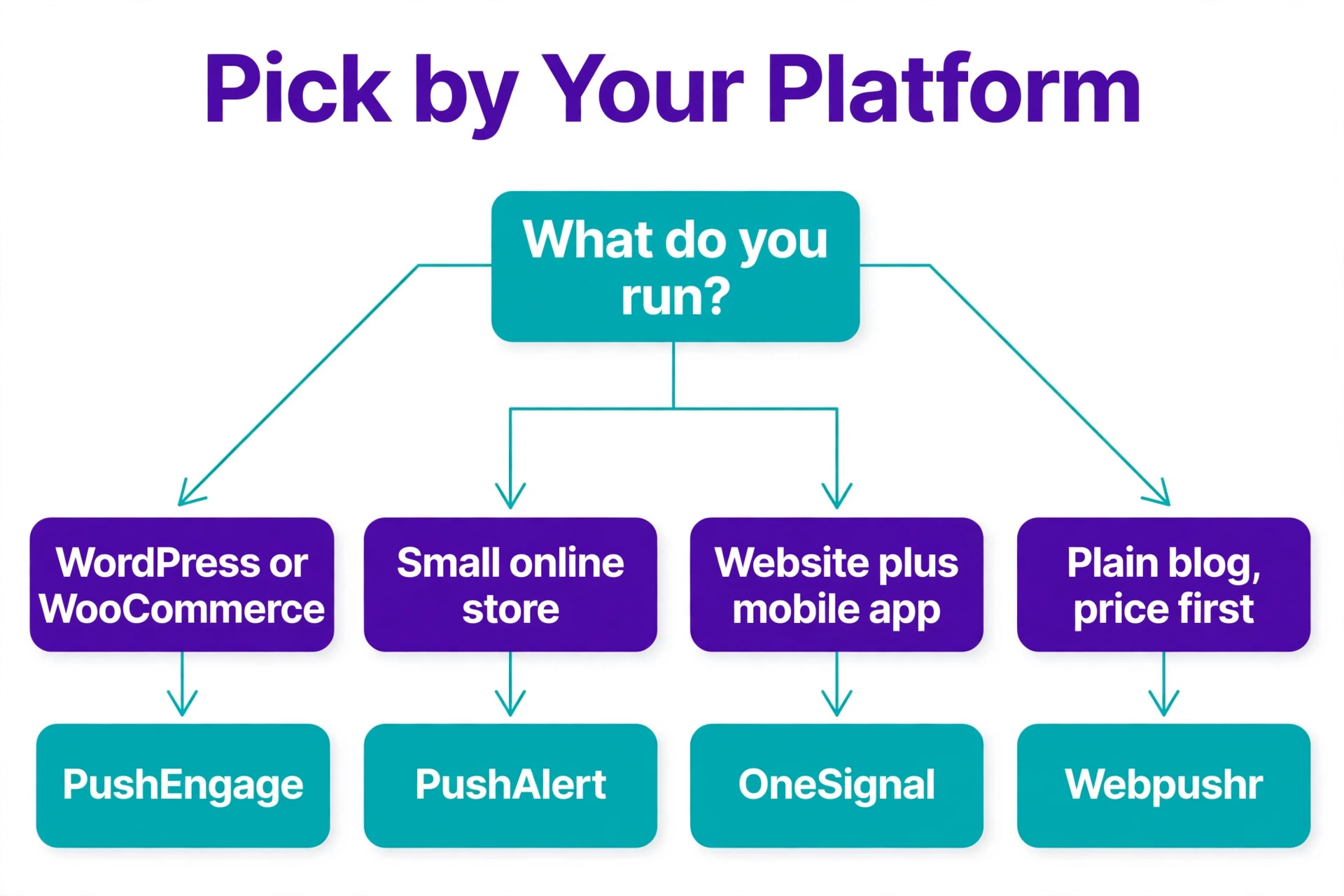
Start with your platform, because it narrows the list fast. A WordPress site should start with PushEngage, a WooCommerce store should weigh PushAlert, and a site with a mobile app should weigh OneSignal. A plain blog or business site with no app can pick on price alone, and Webpushr wins that comparison for most small sites.
Next, model your list size next year, not today. The best push notification tools differ most on growth cost, and the cheapest tool at 5,000 subscribers is often the most expensive at 100,000. Work out your subscriber count in 12 months, apply each vendor price to that number, and pick the tool that is still affordable then. A one time licence like LaraPush only makes sense when the list is large enough to repay the 499 dollars.
Then check the opt in prompt, because it decides how fast your list grows. A tool that lets you customise the prompt, delay it until a visitor has read a page, and test two versions will grow a list faster than a tool with a fixed browser prompt. Ask for a demo of the opt in flow before you buy, and test it on your own site.
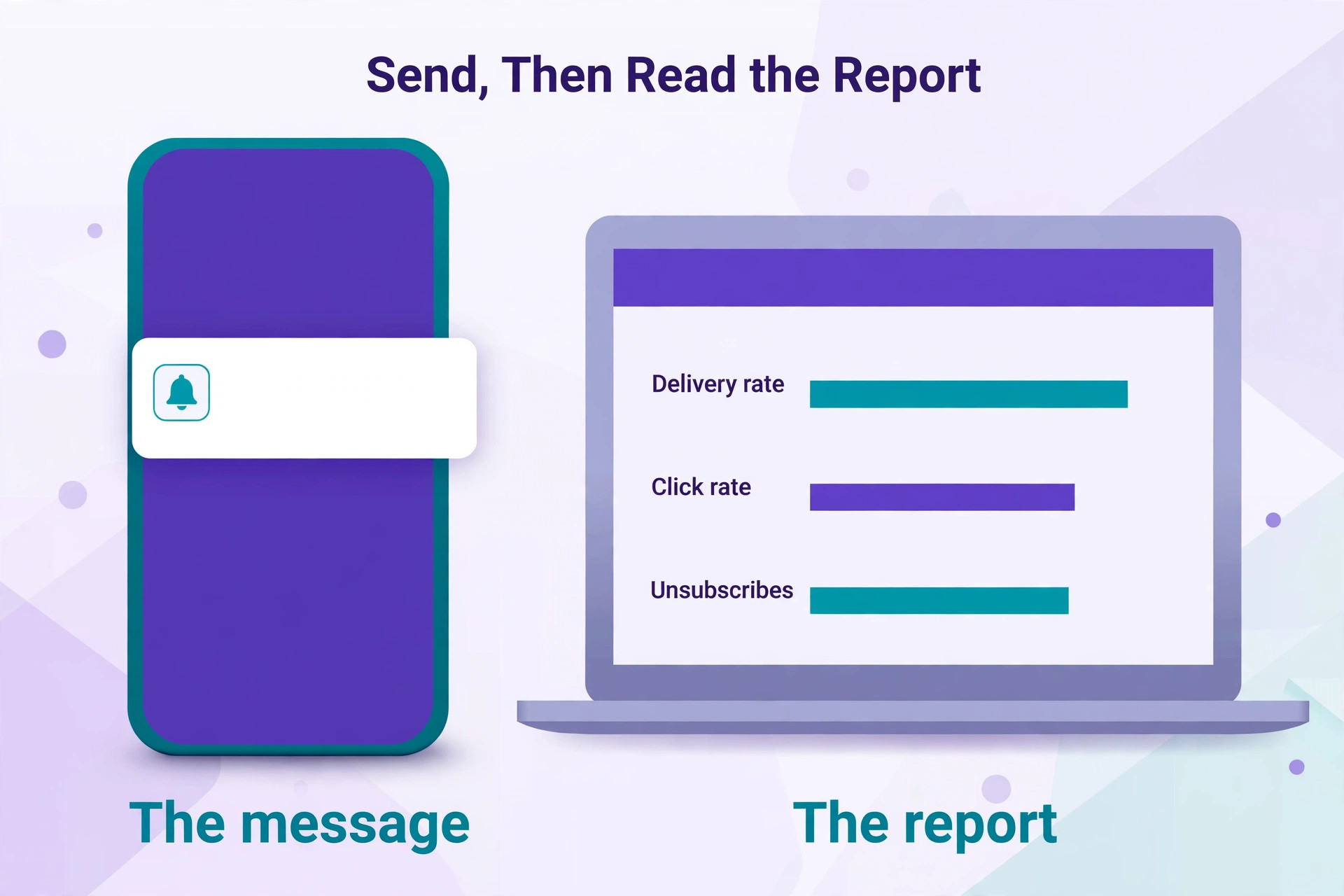
Finally, check deliverability and reporting. A tool should show delivery rate, click rate and unsubscribes per campaign, and it should let you segment by page, location or behaviour. Without those numbers you cannot tell whether a campaign worked or whether subscribers are quietly leaving. Pick the tool whose reports you can read in one minute, because a report that takes an hour to understand will never be read. Delivery rate, click rate and unsubscribes per campaign are the three numbers that matter, and they should sit on one screen.
What to Check Before You Pay
A purchase in this category is a long term decision, because moving billing, attendance and parent records to a new tool takes weeks. Read the contract, the export terms and the processing fees before you enter card details, and ask for a written quote that includes every fee.
- Confirm the free limit unit, whether it counts subscribers, monthly active users, sends or deliveries.
- Confirm the price at your list size next year, not only at your size today.
- Confirm whether Safari is supported on the plan you will use.
- Confirm whether automation such as abandoned cart or RSS to push is included or a higher tier.
- Confirm how you export your subscriber list if you leave.
Mistakes That Waste Money
The most common mistake is asking for permission too early. A visitor who sees a push prompt the second the page loads has no reason to say yes, and a no is hard to reverse. Wait until the visitor has read a page or spent 30 seconds on the site, then ask with a clear benefit, such as new posts or a discount. A delayed prompt grows a smaller but more engaged list.
The second mistake is sending too often. A site that pushes every new post, every offer and every update will train subscribers to ignore the notifications or to unsubscribe. Send only the posts and offers that deserve an interruption, and watch the unsubscribe rate after each campaign. A list that shrinks after every send is telling you to send less, and the subscribers who stay are the ones who still open your messages. Protect those readers first, because a small list that opens every message earns more return visits than a large list that ignores you.
The third mistake is picking a tool on the free tier and ignoring the growth cost. A tool that is free at 5,000 subscribers and costs 419 dollars a month at 100,000 will force a painful move later, when the subscriber list is large and the export is risky. Model the cost at 100,000 subscribers before you install anything, and pick the tool you can still afford then. A flat priced tool that costs 49 dollars at that size leaves room in the budget for content and ads, while a usage priced tool that costs more than 400 dollars at the same size can eat the whole marketing budget before you send a single campaign.
How to Move to a New Push Tool Without Losing Subscribers
A move between push tools is riskier than a move between most software, because the subscriber list lives in the browser, not in a file you can download. When you change tools, subscribers must opt in again on the new system, and many will not. That is why the choice of tool matters more here than in most categories, and why you should pick the tool you can afford at scale before you build the list.
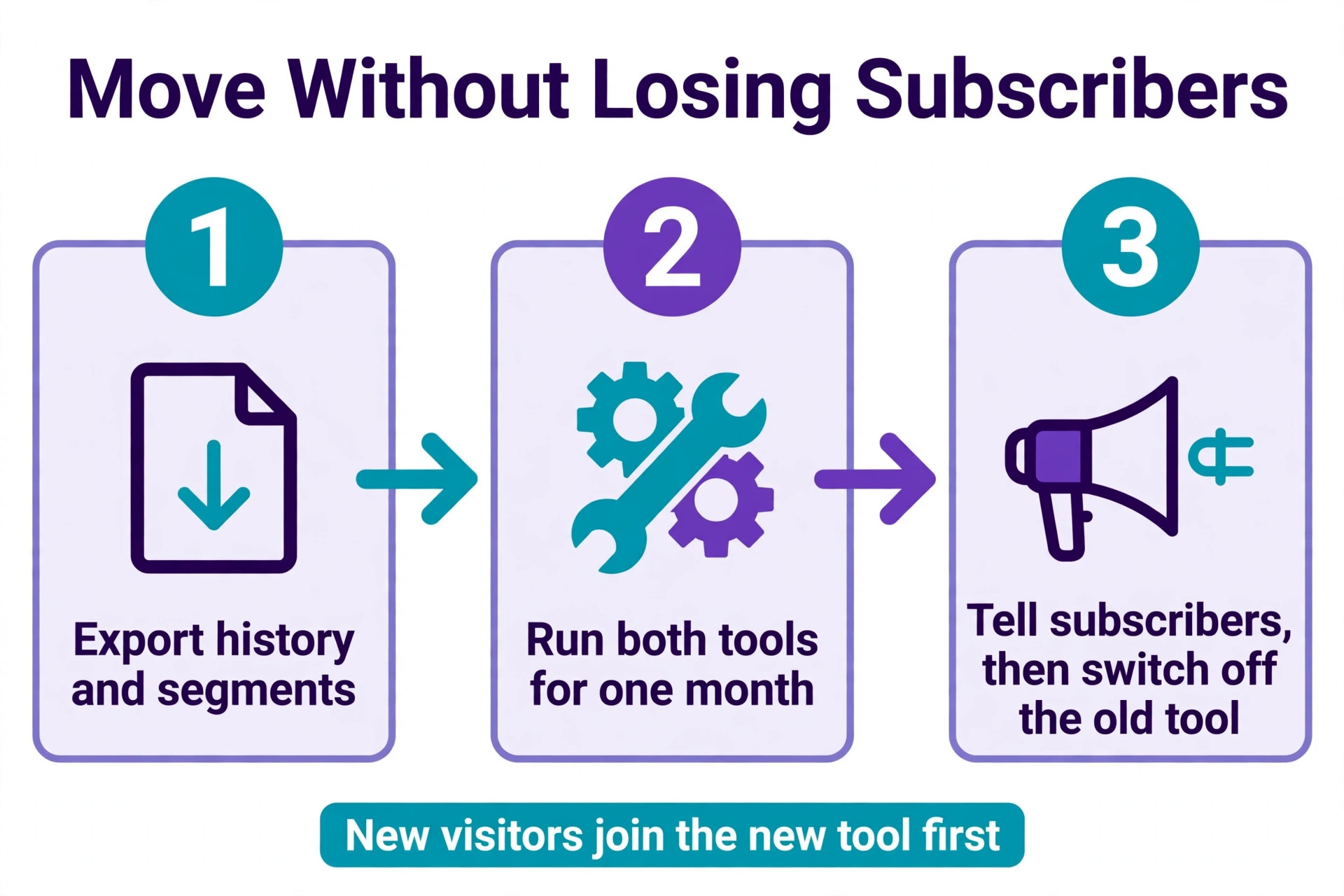
Start by exporting everything the old tool allows, including subscriber counts by segment, campaign history and click rates. That history tells you which segments are worth rebuilding and which campaigns earned clicks. A segment that never clicked is not worth the effort of re opt in, while a segment that clicks every week is the one to protect.
Next, run both tools side by side for a month if the old tool allows it. New visitors opt in on the new tool, while existing subscribers keep receiving notifications from the old tool. That overlap gives the new list time to grow before the old list is switched off. A hard cutover on a single day will lose a large share of your audience, and there is no way to recover them.
Finally, tell subscribers what is changing. A short post or email that explains the new notification system and asks readers to opt in again will recover more subscribers than a silent switch. Keep the old system running for at least a month after the new one launches, and watch the new list size weekly until it passes the old one.
Decide in One Paragraph
Webpushr is the pick for most readers among the best push notification tools, because every feature is free up to 10,000 subscribers and the flat price at 100,000 subscribers is only about 49 dollars a month. That combination is hard to beat for a small website.
PushEngage is the pick when you run WordPress or WooCommerce, because the plugin and the store automations save more time than the price difference costs. OneSignal is the pick when your site also has an app, because one SDK for web and mobile is simpler than two tools. LaraPush is the pick when your list is large and you want to own the system outright.
Whatever you choose, delay the opt in prompt, send only the messages that deserve an interruption, and model the cost at next year list size before you install. The best tool is the one you can still afford when the list grows.
Frequently Asked Questions
What is the cheapest push notification tool for a small website?
Webpushr is the cheapest for most small websites, because every feature is free up to 10,000 subscribers and the paid plan is 29 dollars a month up to 50,000. WonderPush is also cheap at 1 euro per 1,000 subscribers, and Firebase Cloud Messaging costs nothing, though you must build the system yourself.
Is OneSignal really free?
OneSignal free plan covers web push with unlimited subscribers, but each send is capped at 10,000 subscribers, and mobile push on the free plan is limited to organisations under 1,000 monthly active users. Growth starts at 19 dollars a month plus 0.004 dollars per web subscriber and 0.012 dollars per mobile monthly active user, so the bill grows fast at scale.
Which push tool is best for WordPress?
PushEngage is the best pick for WordPress and WooCommerce, because the plugin is built for that platform and the store automations include abandoned cart, price drop and back in stock alerts. OneSignal also works with WordPress, but PushEngage has deeper WordPress specific automation. The free plan is small at 200 subscribers, so most sites will pay from 8 dollars a month billed yearly.
How much does push cost at 100,000 subscribers?
At 100,000 web subscribers, published prices from October 2026 work out to about 49 dollars a month on Webpushr, about 100 euros on WonderPush and about 419 dollars on OneSignal Growth. LaraPush costs 499 dollars once plus your server cost. Always model your own list size, because the ranking changes with subscriber count.
Do I need a developer to set up push notifications?
No, most tools here need no developer. PushEngage, Webpushr, PushAlert and SendPulse install with a plugin or a small code snippet, and a site owner can set them up in an afternoon. Firebase Cloud Messaging is the exception, because you build the targeting, automation and reporting yourself in code. Pick a dashboard tool unless you have a developer on staff.
Can push notifications work without a mobile app?
Yes, web push works in a browser with no app at all. A visitor who opts in on Chrome, Edge or Firefox will receive notifications on desktop and on Android, even when your site is closed. Safari support varies by tool and by plan, so confirm Safari is included before you rely on it for Apple users.
A push notification is a small interruption, and the best tools earn that interruption by sending only what matters, at the right time, to the right people. Pick the tool that is cheap at next year list size, delay the opt in prompt until visitors have a reason to return, and watch the unsubscribe rate after every campaign. The list you build slowly and keep is worth more than a large list that unsubscribes.
The best push notification tools help you protect that list with clear opt in, honest frequency and reports you can read in a minute, but the habit of sending only what matters is yours to keep. Start with one campaign a week, watch the unsubscribe rate, and add frequency only when the numbers say subscribers want more.