A solo piano teacher with 30 students and a school with 12 teachers and 400 students do not need the same software, and that gap is where most buying guides go wrong. The best music lesson studio software for a solo teacher is a light tool that handles scheduling, invoicing and reminders without a setup project. The best choice for a growing school is a platform that manages rooms, teachers, group classes and family accounts in one place. We tested 9 tools against the same studio jobs, booking a lesson, moving it, billing for it, chasing a late payment and finding a substitute teacher, and compared them on price, billing depth and how much admin time they actually save.
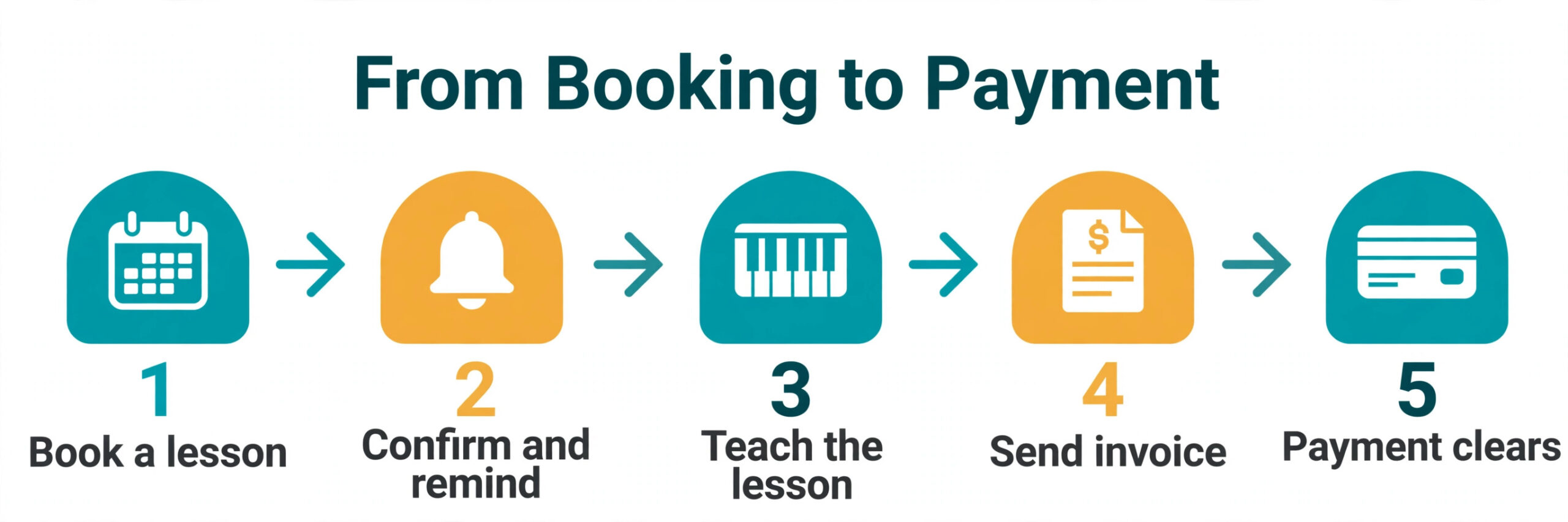
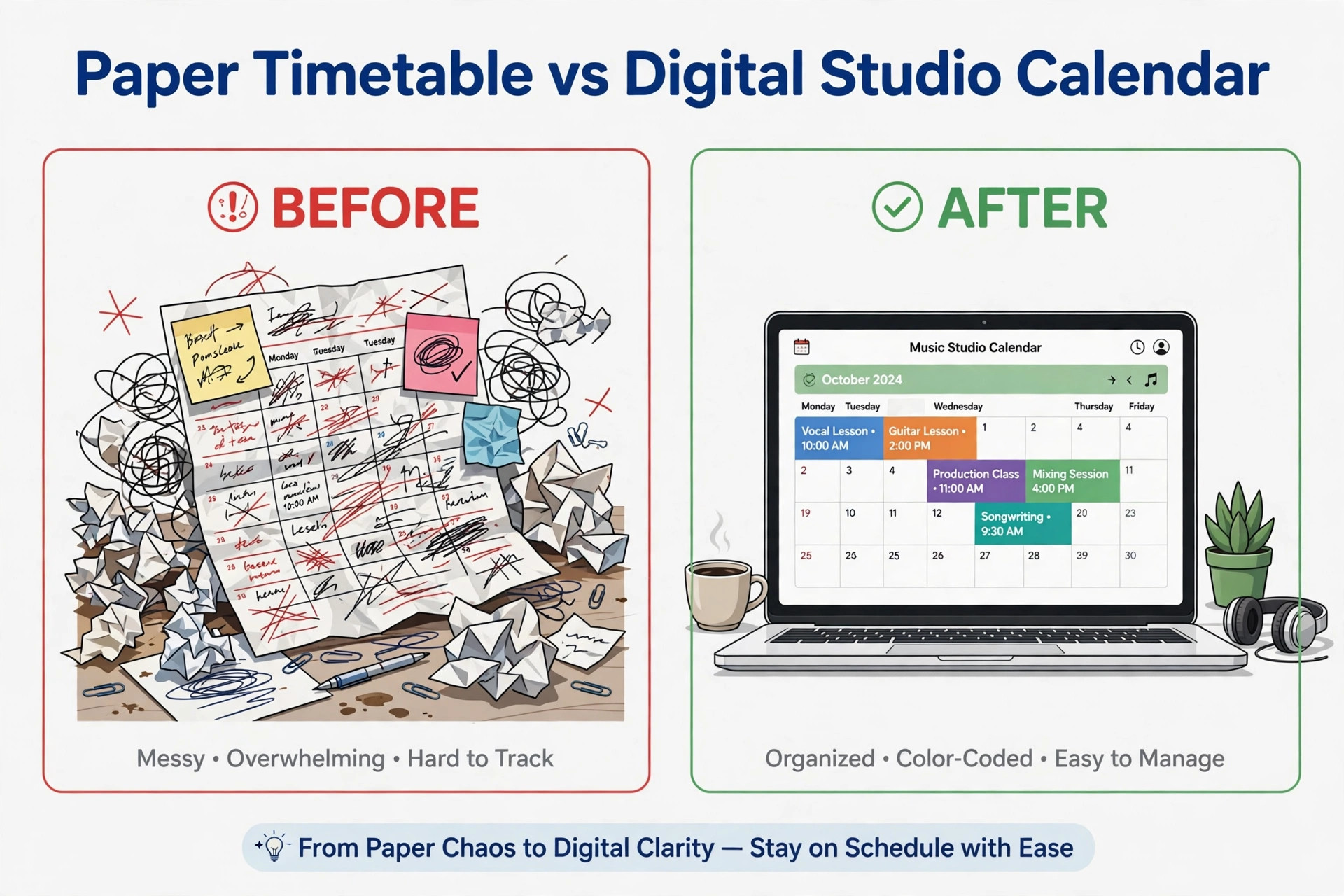
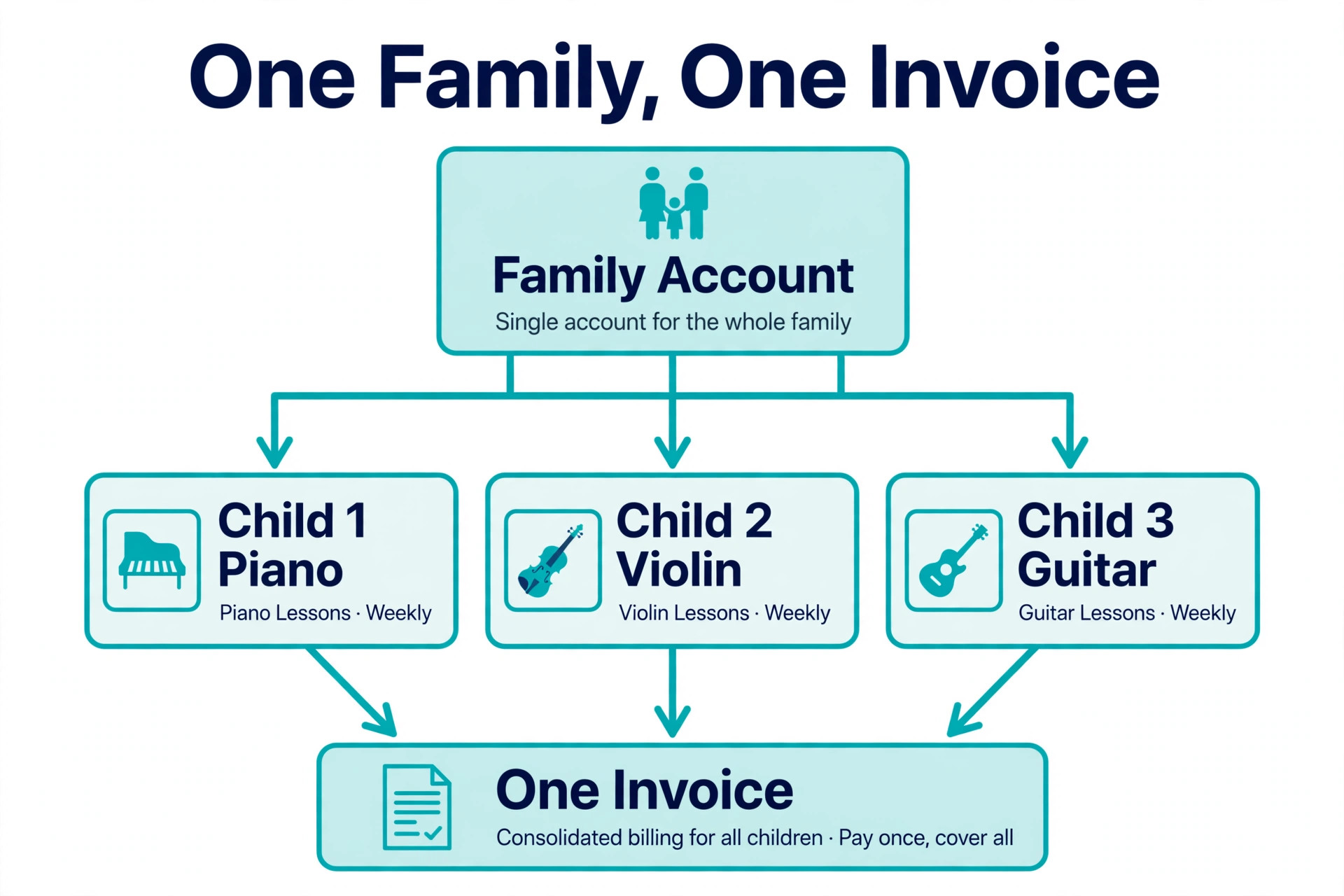
A music studio runs on recurring lessons, and recurring lessons create admin work that piles up fast. A cancelled lesson needs a make up credit. A family with three children needs one invoice, not three. A teacher who is sick needs a substitute, and the parents need to know before they drive to the studio. Spreadsheets and text messages can carry a studio to about 40 students. Past that point, missed invoices and double booked rooms start to cost real money, and the right software pays for itself by catching the work that used to slip through.
Prices in this guide were checked against vendor pricing pages and current 2026 roundups in November 2026. Studio software pricing changes often, and several vendors show different prices by region or by student count, so confirm the price on the checkout page before you pay. Where two trusted sources disagreed on a price, we say so in the text and give the figure we found most often.
How We Tested the Best Music Lesson Studio Software
We wrote three studio profiles before opening any tool. The first was a solo piano teacher with 28 students, one room and a need for simple invoicing. The second was a school with 6 teachers, 180 students and group classes on Saturday mornings. The third was a large school with 15 teachers, 400 students, multiple rooms and a front desk that handles enrolment. Each tool was judged against the jobs each profile actually does every week, not against a feature list on a homepage.
We scored each tool on five points. Scheduling covered online booking, recurring lessons, room and teacher conflicts, cancellations and make up credits. Billing covered invoicing, automatic card charges, family accounts, late payment handling and payroll for teachers. Communication covered email and text reminders, parent portals and substitute notifications. Ease of use covered how fast a new teacher could learn the daily flow. Price covered the true monthly cost at each studio size, including per teacher charges, per student charges and payment processing fees.
We also checked what each tool does badly, because a studio platform lives or dies on its weak spots. A tool with strong billing but no room scheduling fails a school that shares rooms. A tool with beautiful scheduling but weak invoicing fails a teacher who spends Sunday nights chasing payments. The sections below name those weak spots plainly, so you can match the tool to the studio you actually run.
The Best Pick for Your Studio
| Job | Pick | Why it wins |
|---|---|---|
| A solo teacher who wants everything in one place | My Music Staff | Scheduling, billing and reminders from 16.95 dollars a month |
| A small studio with several teachers | Teachworks | Payroll and group billing built in from 16.49 dollars a month |
| A teacher who wants the lowest cost start | Duet | Tiered pricing by student count with a free trial |
| A school that loses money to late payments | Fons | Automatic charging and cancellation rules |
| A large school with rooms and many teachers | Opus1 | Flat pricing with room and teacher coordination |
Use this table as a shortcut, then read the full section for the tool you are leaning toward. The cheapest option is not the best value when it cannot handle make up lessons, and the most expensive option is not the best choice when you teach 25 students from one room.
The 9 Tools That Run Real Music Studios
The 9 tools below fall into three groups. The first group is built for solo teachers and small studios, and these are the strongest all round picks for most readers among the best music lesson studio software we tested. The second group is built for larger schools, with room scheduling, group classes and front desk tools. The third group is built for class based programs, and these suit schools that run group classes alongside private lessons.
1. My Music Staff
My Music Staff is the all in one platform most solo teachers reach for first, and it earns that place by covering the whole daily flow in one dashboard. Scheduling, attendance, invoicing, online payments, lesson notes, email and text reminders, teacher management, payroll and expense tracking all sit in the same account, with a student and parent portal and a website builder on top. A solo teacher can run the business from the calendar view, and a small studio can add teachers at a small extra charge per teacher.
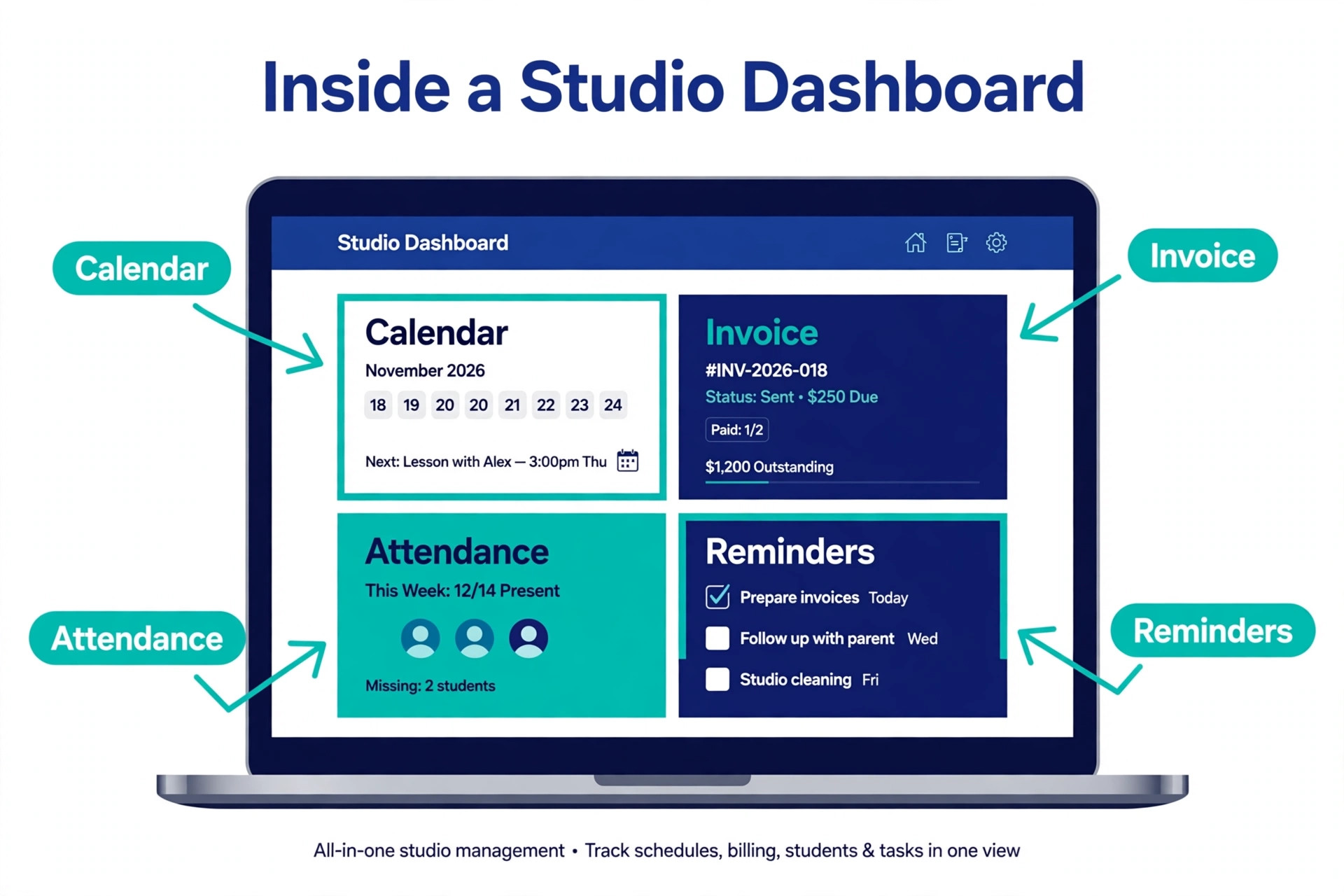
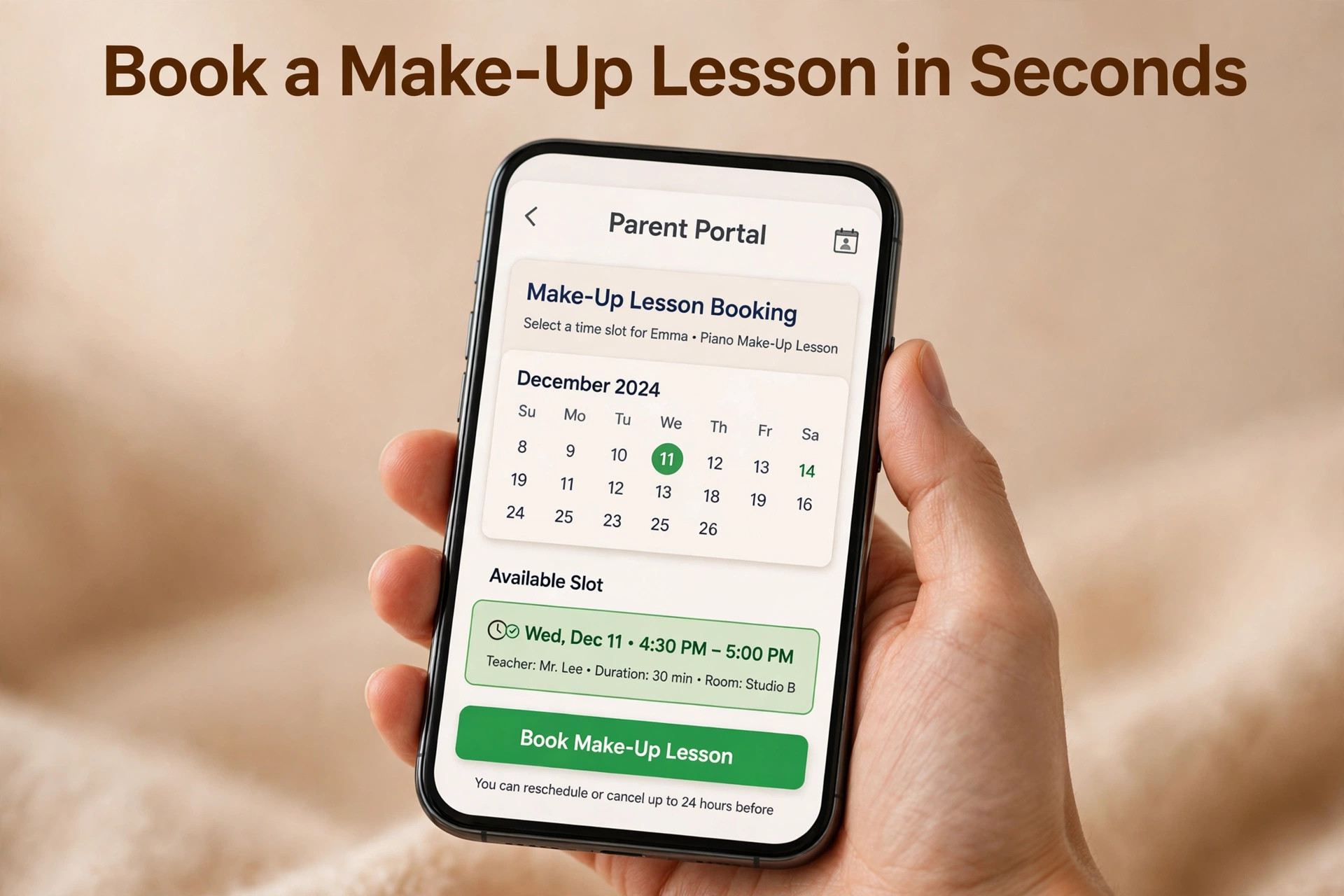
The make up lesson handling is the feature teachers mention most in reviews. When a student cancels, the system tracks the credit, and the family can book a make up slot from the portal instead of trading messages with the teacher. Automatic invoicing and automatic card charging remove the Sunday night billing session, and Google Calendar sync keeps the studio calendar and the personal calendar in step. The interface looks plain next to newer tools, and the mobile experience draws some complaints in reviews, but the depth of the admin features is hard to beat at this price.
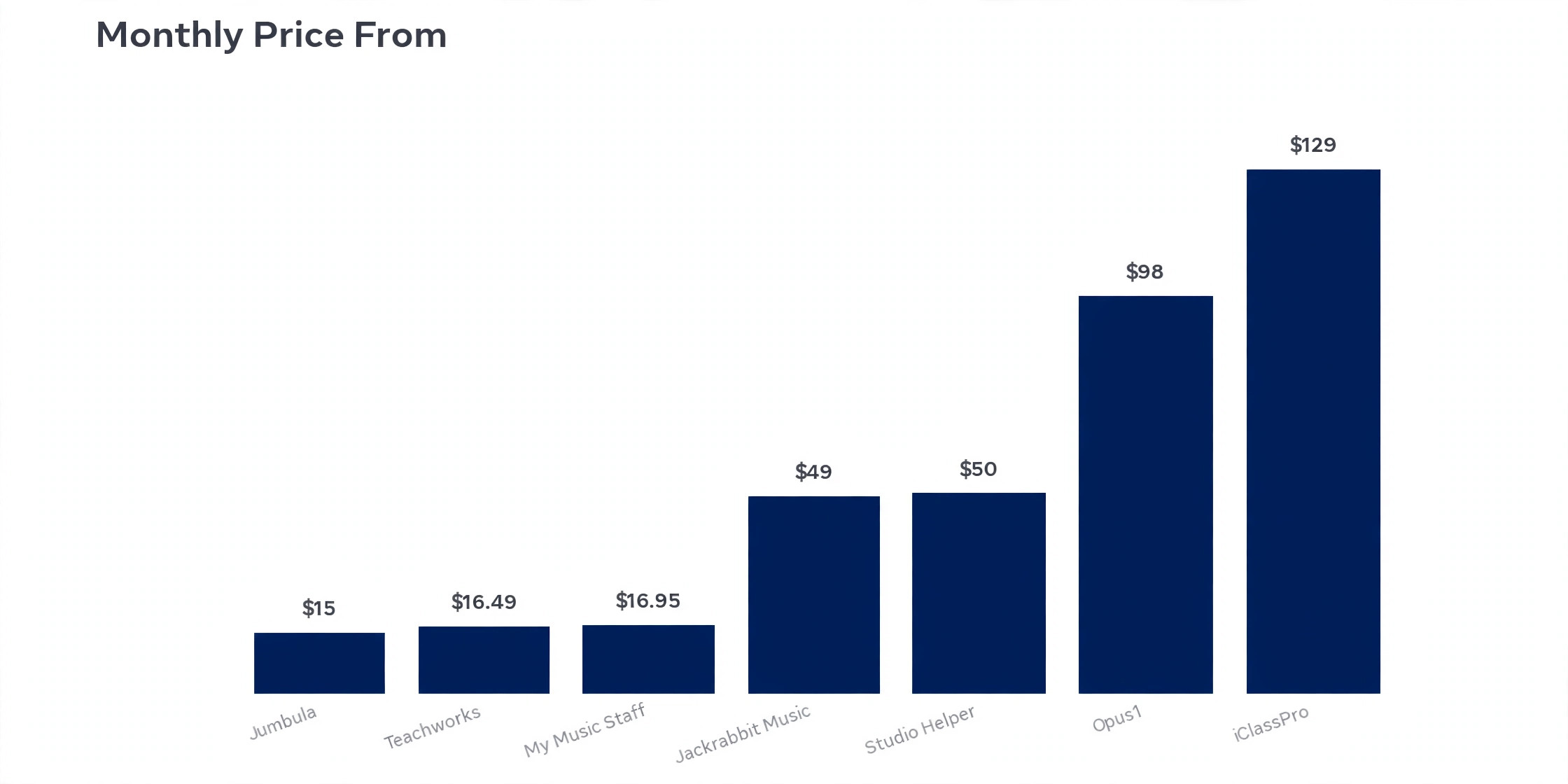
Pricing starts at 16.95 dollars a month for one teacher, with extra teachers at 4.95 dollars a month each. Some older roundups still list 14.95 dollars a month, so the price has moved up since those pages were written, and the 16.95 dollar figure is the one shown on current listings. A 30 day free trial lets you test the full flow with real students before you pay.
2. Teachworks
Teachworks is built for education businesses that bill by the lesson, and it shows in the way it handles money. The base fee starts at 16.49 dollars a month, with usage based charges per active student or lesson on top, so the monthly cost grows with the studio. That model suits a studio that wants a low entry price and accepts a bill that rises as enrolment rises. Payroll is built in, which matters the moment you pay teachers by the hour or by the lesson.
Scheduling covers one to one lessons, group lessons and courses, and the system handles the timetable conflicts that appear when several teachers share rooms. Billing supports one to one, group and course billing in the same account, and the reporting gives an owner a clear view of revenue per teacher and per program. The trade off is the per lesson charge, because a 10 student group class costs 10 times the per lesson rate of a single student, and that adds up fast for schools that run large groups. Check the usage charges against your real lesson volume before you commit.
Teachworks carries a 4.7 out of 5 rating on G2 and a long track record with tutoring and music schools. A 21 day free trial is available. For a small studio that needs payroll and group billing without paying for a large school platform, this is the most balanced choice on the list.
3. Duet
Duet is the current name for Music Teacher’s Helper, the long running tool for private music teachers, and it keeps the focus narrow on purpose. It covers scheduling, invoicing, lessons, attendance and student communication, with a student and parent portal, and it does not try to be a full school management system. That narrow focus is its strength for a solo teacher, because there is less to learn and less to pay for.
The pricing is tiered by student count, with Basic covering 1 to 20 students, Plus covering 21 to 40, Premium covering 41 to 100 and Unlimited covering 101 or more, and a 14 day free trial is included. The vendor pricing page does not show public prices for these tiers, so you need to contact the vendor or start the trial to see current rates. One comparison lists a starting figure near 14 dollars a month, but we could not verify that number on the vendor page, so treat it as unconfirmed and confirm the rate before you budget.
The scheduling flow feels dated next to newer tools, and the tool lacks the room management and front desk features a large school needs. For a solo teacher who wants reminders, invoicing and simple scheduling at a low cost, Duet is still a solid pick, and its 4.4 out of 5 G2 rating reflects years of steady use by private teachers.
4. Fons
Fons positions itself on one promise, that billing should happen without chasing. You set your pricing, connect a payment method, and Fons charges students automatically on schedule, enforces cancellation rules and follows up on failed payments. For a studio that loses money to late payments and no shows, that automation is worth more than a prettier calendar, because it turns admin time into teaching time.
The platform covers recurring lessons and packages, with a marketplace listing included, and it suits established schools that already have a booking flow and want the money side fixed first. It is weaker as a general studio platform, because room scheduling, group class management and front desk tools are limited, and larger schools will feel those gaps. Think of Fons as a billing engine with scheduling attached, not as a full school system.
Pricing is the weak spot in our research. One 2026 comparison lists plans from 29.95 dollars to 149.95 dollars a month plus 2.9 percent plus 30 cents per transaction, while another guide says to contact Fons directly for current pricing. The range is wide enough that you should get a written quote for your student count before you compare Fons with a flat rate tool. A school with 100 students paying by card will feel the transaction fees, so work out the full monthly cost, not just the plan price.
5. Opus1
Opus1 is built for music schools that need teacher and room coordination at volume, and it is the most complete platform on this list for that job. Scheduling covers single and recurring lessons, online lessons through Zoom or any other video tool, and substitute handling that lets you batch update an instructor when a teacher is sick. Invoicing, family accounts, teacher notes and communication sit in the same system, and the platform is designed for arts education organisations rather than adapted from a general tutoring tool.
The depth shows in daily use. A front desk can see which rooms are free, which teachers are available and which students need a make up lesson, all from one screen. Parents manage bookings and payments from their own accounts, and teachers track attendance and notes without leaving the platform. The trade off is price and setup, because Opus1 costs more than the solo teacher tools and takes longer to configure. One review notes that there is no native mobile app, though the vendor helps you save the website to a phone home screen as a workaround.
Pricing starts at 98 dollars a month on a flat rate, with a free trial available. That flat rate covers up to 200 active students on the entry tier in some comparisons, which makes Opus1 cheaper per student than per teacher tools once a school passes about 6 teachers. For a large school, this is the pick. For a solo teacher, it is far more than you need.
6. Jackrabbit Music
Jackrabbit Music is the music specific product from Jackrabbit Technologies, a company with a 20 year track record in class based software, and it shows in the way it handles group classes. Registration, attendance, tuition billing and family accounts are built for programs that run classes on a term basis, with a parent portal and a mobile app for families. Schools that run group classes alongside private lessons will find the class tools more complete here than in tools built only for one to one teaching.
Pricing scales with student count, starting at 49 dollars a month for up to 100 students, with a Plus plan from 93 dollars a month that adds the parent app, plus a 169 dollar one time setup fee and app store fees. An Enterprise tier from 245 dollars a month adds a business intelligence dashboard. The mobile app for parents is a real advantage, because families check schedules and pay from their phones, and that cuts front desk calls.
Jackrabbit Music suits large music schools that prioritise a proven track record and a mobile app for group classes. For a school with hundreds of students in group programs, the class management depth justifies the price.
7. Studio Helper
Studio Helper is one of the oldest tools in this category, founded in 2008, and it covers the core studio jobs without trying to add everything else. Scheduling, student records, invoicing and communication sit in a single system, and the tool suits a small studio that wants a stable platform with a predictable price. It does not carry the newer automation features of Opus1 or the class depth of Jackrabbit Music, but it also does not carry their price or their setup time.
The strength here is simplicity and longevity. A studio that has run on Studio Helper for years does not need to relearn a new system, and a new studio gets a tool that has been tested by thousands of teachers over more than a decade. The interface looks older than the newer tools, and the feature set is narrower, with less depth on group classes, room management and parent apps. For a private teacher or a two teacher studio, that narrow scope is a fair trade for a lower bill and a shorter learning curve.
Pricing is listed at 50 dollars a month in current comparisons. There is no free version, and a free trial is not listed on the comparison pages we checked, so ask the vendor about a trial before you pay. Studio Helper fits a small studio that wants a proven, no surprise platform and does not need the advanced features of the larger school tools.
8. iClassPro
iClassPro is built for class based businesses, from gymnastics and swim schools to dance, music and art studios, and it brings that class first design to music schools that run group programs. Registration, scheduling, attendance, billing and family accounts are built around classes and terms, with online booking that lets families self book single or recurring lessons. A school that runs Saturday group classes, holiday camps and term enrolments will find the class tools more natural here than in a tool built only for private lessons.
The platform covers teacher availability, room scheduling and front desk work, and it scales to schools with several locations. The trade off is price and complexity. iClassPro costs more than the solo teacher tools, and the setup takes longer, because the class structure, terms and tuition rules need to be configured before the first family enrols. Solo teachers and small private studios will find it heavier than they need, and the per location pricing means a second site doubles the bill.
Pricing is listed at 129 dollars a month in one comparison, while another guide lists 139 dollars a month per location, so the current rate sits in that range and you should confirm it with the vendor. A free trial is available. iClassPro is the pick for a class based music school with group programs at its core, and it is the wrong pick for a teacher who only teaches one to one lessons from a single room.
9. Jumbula
Jumbula is built for program administrators who manage seasonal registration, and it suits music schools that run classes, camps and after school programs on a term basis. Registration, attendance, billing and communication are built around programs rather than around single lessons, so a school that enrols 200 students for a 10 week term will find the flow more natural than in a tool built for weekly private lessons. The platform handles the registration rush at the start of a term, when dozens of families sign up in the same week.
The trade off is navigation and setup friction, which reviewers mention in feedback. The system is flexible, but that flexibility means more screens to configure before the first class runs. Private lesson scheduling is covered, but it is not the centre of the product, so a studio that teaches mostly one to one lessons will get more from My Music Staff or Teachworks. Jumbula earns its place here for schools where registration and attendance across many programs is the daily work.
Pricing starts at 15 dollars a month billed monthly, which makes it one of the cheapest entry points on this list. That low price covers the core registration and attendance tools, and the cost rises with the features and volume you add. For a small program based school on a tight budget, Jumbula is worth a trial, and the low entry price makes the test cheap.
Choosing the Right Studio Platform
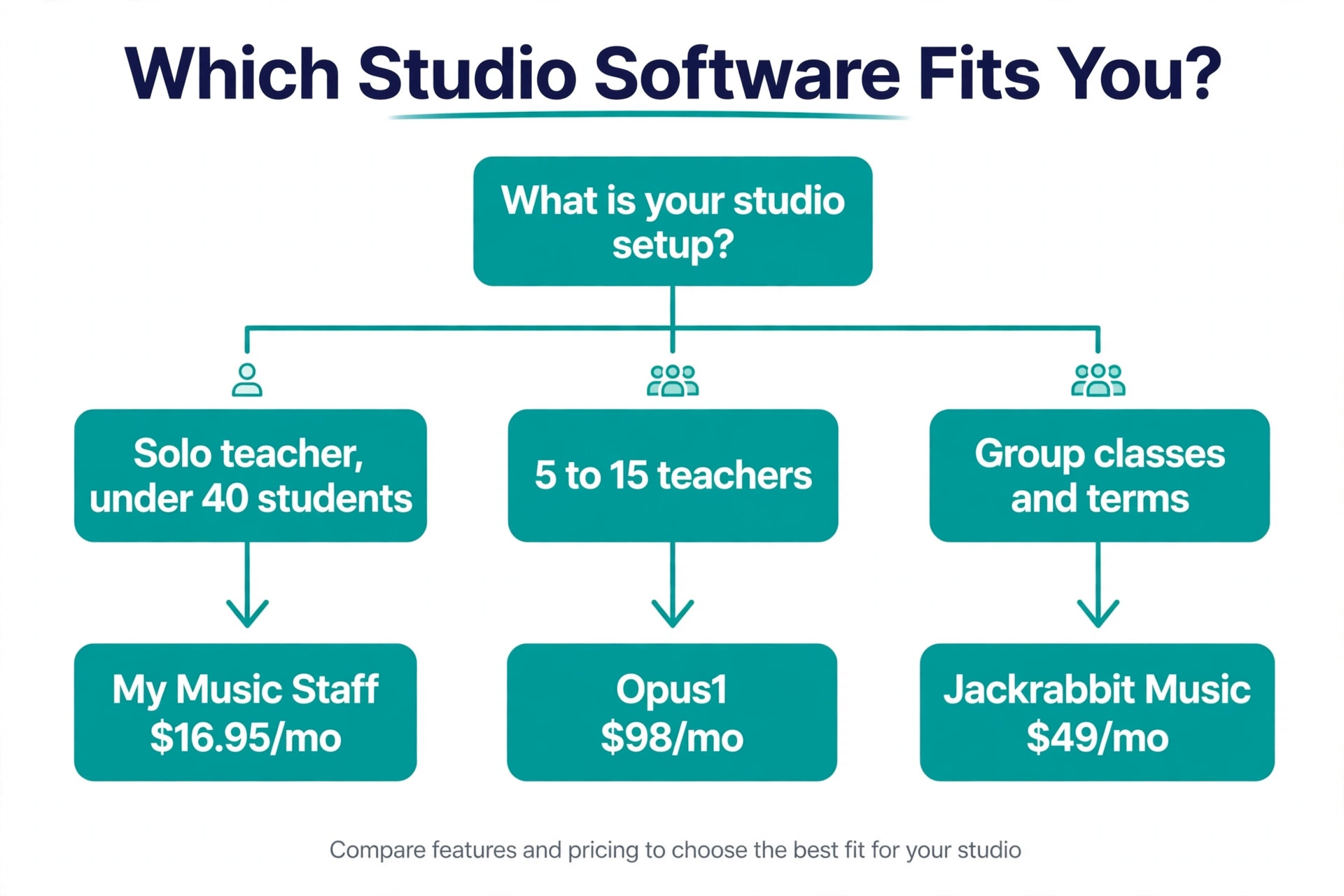
Start with your studio size, because it decides which tools are even in the running. A solo teacher with under 40 students should shortlist My Music Staff, Duet and Teachworks, and should not pay for Opus1 or iClassPro. A school with 5 to 15 teachers should shortlist Opus1, Jackrabbit Music and Teachworks, and should test room scheduling with real timetables before deciding. A class based school should shortlist iClassPro, Jackrabbit Music and Jumbula, and should test term registration with a real enrolment rush.
Next, work out the true monthly cost at your size, because the headline price is rarely the full bill. My Music Staff charges per extra teacher. Teachworks adds per lesson charges on top of the base fee. Jackrabbit Music scales with student count. Fons adds transaction fees on every payment. Take your real student count, your real teacher count and your real lesson volume, and price each tool on those numbers. The best music lesson studio software for your budget is the one whose full monthly cost you can predict, not the one with the lowest starting price.
Then test the three jobs that cause the most admin pain. Book a recurring lesson for a family with two children, then cancel one lesson and book a make up. Send an invoice to that family and watch how the system chases a late payment. Mark a teacher sick and find a substitute, then check what the parents see. The tool that handles those three jobs cleanly is the tool that will save you hours every week. The tool that fumbles them will cost you hours, whatever its feature list promises.
Finally, check the parent experience, because parents decide whether the system feels professional. Can a parent book, pay and check the schedule from a phone without calling the front desk. Can a parent see lesson notes and attendance. A portal that parents actually use cuts calls and messages, and that is where the time saving shows up first.
Fees and Limits to Check First
A studio platform is a long term commitment, because moving student records, payment details and lesson history to a new tool is painful. Check the contract and the exit path before you enter card details, and confirm that you can export your student and billing data. Ask about the free trial length and whether the trial covers the full feature set, because a trial that hides billing or payroll tells you nothing about the daily flow.
Check the payment processing fees at the same time. Some tools charge a flat monthly price and pass card fees through at the standard rate. Others add a percentage on every transaction, which adds up fast when a school bills thousands of dollars a month. Ask for the full monthly cost for your student count in writing, including per teacher charges, per lesson charges and transaction fees, so the comparison is honest.
- Confirm the full monthly cost at your real student and teacher count, including all per lesson and transaction fees.
- Confirm you can export student records, lesson history and billing data if you leave.
- Confirm the trial covers billing, payroll and parent portal features, not just scheduling.
- Confirm how make up credits, cancellations and substitute teachers work in practice.
- Confirm the parent portal works on a phone without a separate app download.
Mistakes That Cost Studios Money
The most common mistake is buying a large school platform for a solo studio. A teacher with 25 students pays 98 dollars a month for Opus1 and uses a tenth of its features, when My Music Staff at 16.95 dollars a month would have covered the whole job. Match the tool to the studio you run today, and upgrade when the studio grows, not before. The larger tools will still be there when you need them.
The second mistake is ignoring the per lesson and per transaction charges until the first bill arrives. A studio that runs large group classes can find Teachworks per lesson fees doubling the expected cost, and a school that bills by card can find Fons transaction fees adding hundreds of dollars a month. Price every tool on your real volume before you sign up, and ask for the first month bill in writing if the pricing page is unclear.
The third mistake is skipping the parent test. An owner tests the admin screens, loves the reporting, and signs up, only to find that parents cannot book a make up lesson from their phones and keep calling the front desk. Test the parent portal with a real parent before you pay, because the admin screens are only half the product. The best music lesson studio software earns its price in the parent experience as much as in the admin dashboard, and a tool parents ignore will not save you time.
Our Take for Studio Owners
My Music Staff is the pick for most readers, because it covers scheduling, billing, attendance and reminders for a solo teacher or a small studio at 16.95 dollars a month, with a make up lesson flow that actually works. Teachworks is the pick when payroll and group billing matter, and its per lesson pricing is fair for a studio that bills mostly one to one lessons. Opus1 is the pick for a large school, because its flat rate and room coordination beat per teacher pricing once the teacher count passes six.
Fons is the pick when late payments are the biggest leak in the business, and its automatic charging fixes that leak directly. Jackrabbit Music is the pick for a school built around group classes, and iClassPro is the pick when term registration and class programs are the core of the business. Duet, Studio Helper and Jumbula cover the low cost and program based corners of the market, and each one is the right answer for the studio it was built for.
Start with a trial of two tools, run the same week of lessons through both, and watch which one the parents use without being asked. The winner of that test is the tool your studio will actually live with.
Frequently Asked Questions
What is the best music lesson studio software for a solo teacher?
My Music Staff is the strongest pick for a solo teacher, because it covers scheduling, invoicing, attendance and reminders from 16.95 dollars a month, with automatic card charging and a parent portal. Duet is the cheaper alternative when you want tiered pricing by student count and a simpler tool. Teachworks is the better pick when you plan to hire teachers soon and want payroll built in from the start.
How much does music lesson studio software cost?
Most solo teacher tools cost between 15 and 20 dollars a month, with My Music Staff at 16.95 dollars and Teachworks from 16.49 dollars a month plus usage charges. School platforms cost more, with Jackrabbit Music from 49 dollars a month, Opus1 from 98 dollars a month and iClassPro near 129 dollars a month. Add per teacher charges, per lesson charges and card transaction fees to the headline price to get the true monthly cost.
Can music studio software handle make up lessons?
Yes, and this is one of the features that separates good tools from weak ones. My Music Staff tracks make up credits when a student cancels and lets families book a make up slot from the portal. Opus1 and Jackrabbit Music handle make up lessons across many teachers and rooms. Test this flow in a trial before you pay, because a tool that handles cancellations badly will cost you hours every week.
What is the best music lesson studio software for a large school?
Opus1 is the strongest pick for a large school, because its flat rate from 98 dollars a month covers room and teacher coordination for up to 200 active students on the entry tier, and its substitute handling is built for schools with many teachers. Jackrabbit Music is the better pick when group classes and a parent mobile app matter most. iClassPro is the better pick when term registration and class programs are the core of the business.
Does studio software replace a website?
Partly. My Music Staff includes a website builder, and several tools include online booking pages that families can use without a separate site. A booking page is not a full marketing website, so a school that needs search visibility and brand pages should keep a real website and link it to the booking system. Use the built in pages for booking and payments, and use your website for marketing.
Can I switch studio software later?
Yes, but the move takes planning, because student records, payment details, lesson history and family accounts all need to move. Check that your current tool exports student and billing data before you switch, and run the new tool alongside the old one for two weeks so no lesson is lost in the move. The best time to switch is between terms, when the timetable is quiet and families expect a change.
A studio platform should give you your evenings back, not add a new admin job. Pick the best music lesson studio software that matches your studio size, test it with real lessons and real parents, and let the make up lesson flow decide.