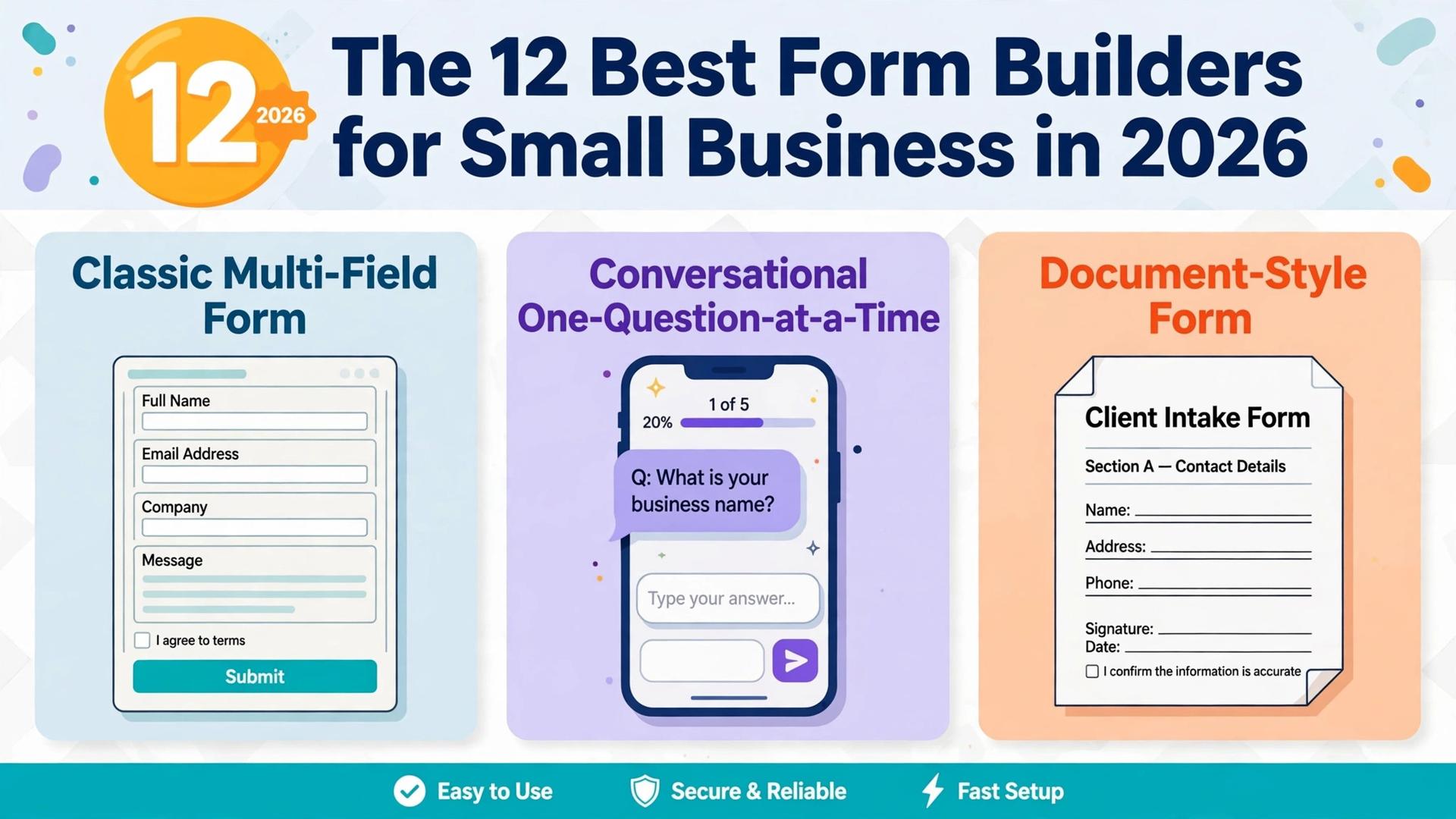
Jotform is the best overall pick among the best form builders for small business, because every plan includes every feature and only the limits change between tiers.
| Job | Pick | Why it wins |
|---|---|---|
| The best overall builder | Jotform | Every feature on every plan, payments included |
| The most beautiful form | Typeform | One question at a time, premium feel |
| The free builder | Google Forms | Free and unlimited responses |
| The best value per dollar | Cognito Forms | Calculations and payments from 19 dollars a month |
| The WordPress pick | WPForms | Unlimited submissions from 49.50 dollars a year |
That table is the short answer, and the rest of this guide is the proof behind it. We compared 12 builders on the numbers that decide the real cost, the monthly price, the response limit, the payment options, the logic tools and the branding rules, because a form builder charges in very different ways, by monthly responses, by stored submissions, or by editor seats, and the cheapest headline price can be the dearest at your volume. This guide shows what each builder actually costs at real response counts, what it does well, and where it falls short, so you can pick by the forms you send, not by the template gallery.
A form is often the first interaction a customer has with your business, after the website. A contact form, an order form, a booking form and a feedback survey all run through the same tool, and the difference between a good builder and a weak one shows up in completion rates and in the hours you spend fixing submissions.
Prices in this guide were checked against vendor pricing pages and current 2026 roundups in November 2026. Several vendors test prices and show different figures by region, and Typeform in particular says it is experimenting with pricing, so confirm the price on the checkout page before you pay.
How We Tested the Best Form Builders for Small Business
We scored each builder on five points, because a good form builder wins on completion rate and total cost, not on the size of its template library. Price covered the monthly or yearly fee at 100, 1,000 and 10,000 responses a month, because the same builder can be cheap at low volume and expensive at high volume. Response limits covered how many submissions each plan allows and what happens when the limit is hit. Logic and payments covered conditional logic, calculations, payment gateways and signatures. Ease of use covered how fast a non technical colleague can build, publish and read the results. Branding covered whether the builder logo appears on the form, and whether the form can match your website.
We also looked at what each builder leaves out of the headline price, because the best form builders for small business must be judged on the cap, not the headline fee. Response caps, per user fees, HIPAA compliance and payment fees are the usual traps, and a builder that looks cheap at 12 dollars a month can turn expensive once the response cap forces an upgrade. Each tool section below names the cap that matters, so the price you see here is closer to the price you will pay.
The Best Form Builders for Small Business in 2026, Ranked
The 12 tools below fall into three groups. The first group suits most small businesses, with a strong free plan and a clear paid path. The second group suits a specific job, beautiful forms, calculations, or high volume inside an ecosystem. The third group suits a platform you already use, WordPress, Microsoft or a workflow system, where the form should live inside the tool you already pay for.
1. Jotform
Jotform is the safe default in this category, and the reason is the pricing structure. Every feature ships on every plan, including the free one, conditional logic, payments, approvals, e signatures, tables and workflows, and only the limits change between tiers. The free Starter plan gives 5 forms and 100 submissions a month, Bronze at 39 dollars a month, or 34 dollars a month billed annually, gives 25 forms and 1,000 monthly submissions, Silver at 49 dollars a month, or 39 dollars billed annually, gives 50 forms and 2,500 submissions, and Gold at 129 dollars a month, or 99 dollars billed annually, gives 100 forms, 10,000 submissions and HIPAA features.
The breadth around the builder is the other strength. Jotform Sign covers e signatures, Tables turns submissions into a spreadsheet, and Workflows handles approvals. More than 40 payment gateways are supported with no Jotform fee, and more than 150 native integrations connect the forms to email, CRM and accounting tools.
The limits are the submission caps and the single editor seat on lower plans. A business that needs HIPAA compliance must reach Gold. Even so, for a small business that wants one form builder for everything, Jotform is the clearest pick.
2. Typeform
Typeform is the design first pick, and it wins when the form has to feel premium. The one question at a time layout, the clean typography and the smooth transitions lift completion rates on short customer facing forms, such as lead qualification, feedback surveys and event registration, because the form feels like a conversation rather than a spreadsheet. The free plan is limited to 10 responses a month, which is a trial in practice, and paid plans start at Basic, 39 dollars a month, or 28 dollars a month billed annually, with 100 responses a month and the Typeform logo on the form.
Higher tiers raise the cap sharply. Plus at 79 dollars a month, or 56 dollars billed annually, gives 1,000 responses and removes branding, Business at 129 dollars a month, or 91 dollars billed annually, gives 10,000 responses. Advanced logic and calculations are gated to Plus, so the cheap plan is weaker than it looks for a form that needs branching or maths.
The limits are the response caps, which are tight on the cheaper plans. Pick Typeform when the form is short, low volume and customer facing, and pick Jotform when volume or payments matter more than the look.
3. Google Forms
Google Forms is the right answer more often than form vendors admit. It is free, with unlimited forms and unlimited responses, collaborative by default, and it exports every response to Google Sheets without an integration. A form can be built in 5 minutes, shared by link or email, and the results arrive in a spreadsheet the whole team can read. For internal surveys, event signups, simple feedback forms and any job where nobody outside the business looks at the form, Google Forms is the fastest and cheapest tool on this list.
The limits are branding, payments and logic. Google Forms cannot take payments, cannot carry your branding beyond a header image, and offers section level branching only, with no calculations. Google Workspace at 7 dollars per user a month adds storage and admin controls, not form features.
Pick Google Forms when the job is internal, the volume is high, and the budget is zero, and pick a paid builder when the form takes money or needs logic that changes the next question based on the last answer.
4. Tally
Tally is the builder for a team that wants a professional form with a document style editor and a generous free plan. You type a form like a document, rather than dragging fields onto a canvas, and the free plan gives unlimited forms and unlimited submissions on a fair use basis, with payments, signatures and logic included, and a 10 megabyte upload limit. That free plan is the most generous on this list after Google Forms, and it is the reason more than a million teams use Tally.
Paid plans add polish and control. Pro costs about 24 to 29 dollars a month, with your own domain, no Tally branding, team members and analytics, and Business costs about 74 dollars a month on yearly billing, with data retention rules and a 90 day version history.
The limits are the fair use cap on the free plan, which is not a published number, and the smaller integration range than Jotform. Pick Tally when you want a clean form with a free plan that does not meter every response.
5. Paperform
Paperform is the builder for a form that must look like a designed page. The editor lets you build a form that also works as a landing page, a quiz, a booking page or a small store, with rich media, custom fonts, colours and layouts that match your brand, and payments through Stripe and Square. A marketing team that needs a beautiful lead form, a product order page or a booking flow will get a better result here than in a plain form builder, because the form is the page, not a widget on the page.
Pricing starts at Essentials, 29 dollars a month, or 24 dollars a month billed annually, Pro at 59 dollars a month, and Business at 129 dollars a month. Some roundups list a lower starting price from 20 dollars a month billed annually, so confirm the current Essentials price, because Paperform has changed its plan names and prices during 2026.
The limits are the response caps on the cheaper plans, which are tight for a busy form. Pick Paperform when the form is a marketing asset and the look drives conversions.
6. Cognito Forms
Cognito Forms is the value pick for a business whose forms need maths. The calculation engine is the strongest on this list at this price, with custom formulas, conditional logic, secure payments and signatures, so quotes, order forms, pricing calculators and finance forms work well without a separate tool. The free Individual plan includes unlimited forms and 100 entries a month, Pro at 24 dollars a month, or 19 dollars a month billed annually, raises the cap to 2,000 entries a month with 2 users, Team at 49 dollars a month, or 39 dollars billed annually, reaches 10,000 entries with workflows, e signatures and documents, and Enterprise at 174 dollars a month, or 129 dollars billed annually, is unlimited.
That capacity per dollar is the reason Cognito Forms wins for a tight budget. A small business that needs calculations, payments and logic will find the same jobs covered here for 19 dollars a month billed annually. HIPAA support comes on the Enterprise plan, which costs far less than most rivals with the same feature.
The limits are the template range and the design polish, which are plainer than Typeform or Paperform, and the smaller integration library. Pick Cognito Forms when the form needs calculations or a tight budget, and pick Jotform when you need the widest template and integration range.
7. Zoho Forms
Zoho Forms is the best pick for a team already running Zoho apps, because it plugs straight into Zoho CRM, Zoho Desk and Zoho Projects, and the data flows between the apps without an integration. A lead captured on a form can land in the CRM, trigger a task in Projects and open a ticket in Desk, which is the workflow a Zoho shop needs.
The free plan gives 3 forms and 500 submissions a month, Basic costs 12 dollars a month, or 10 dollars a month billed annually, Standard costs 30 dollars a month, Professional costs 60 dollars a month, and Premium costs 110 dollars a month, with submission limits from 10,000 a month on Basic up to 150,000 a month on Premium.
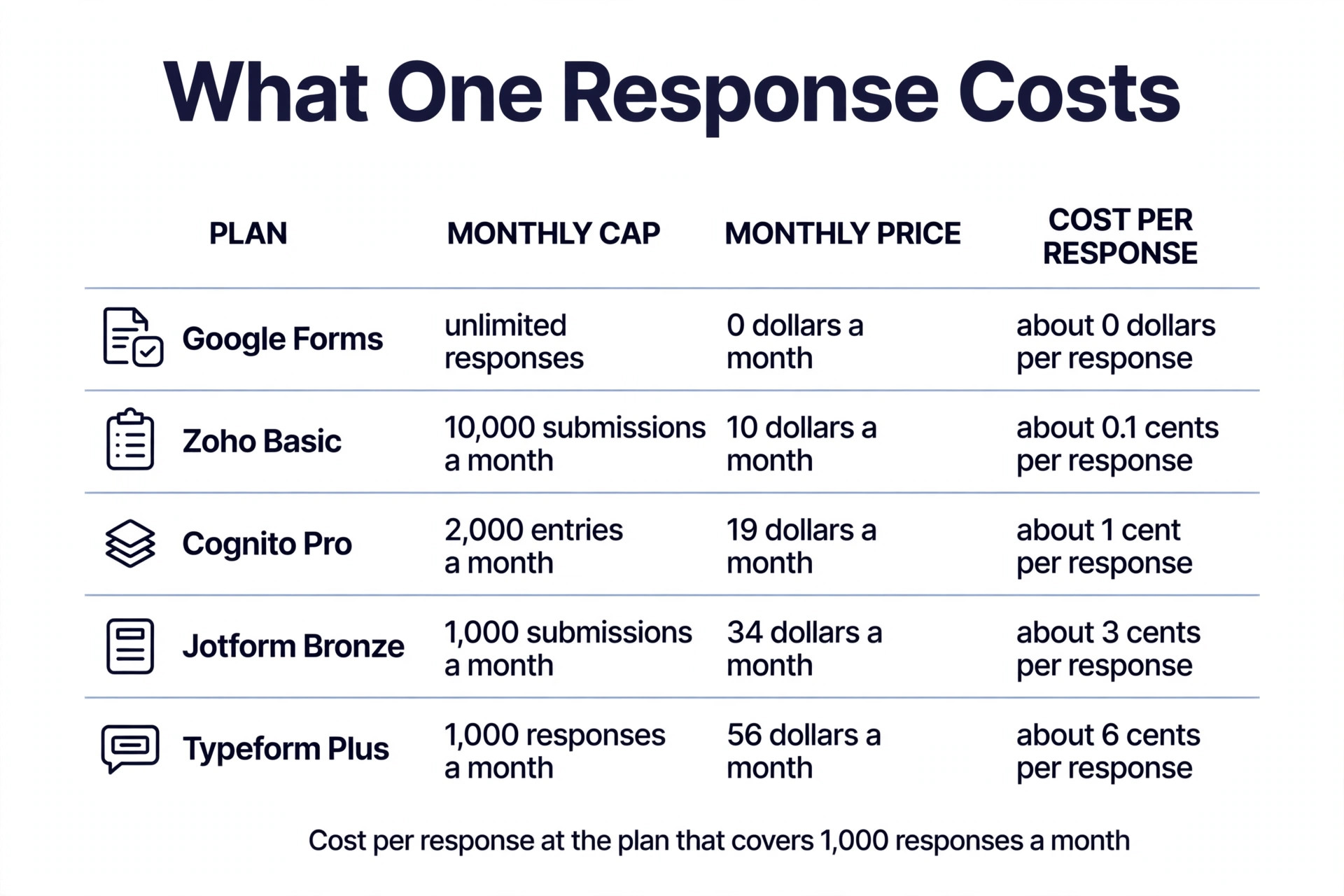
That volume per dollar is strong. Basic at 10 dollars a month billed annually gives 10,000 submissions a month, which is more than Jotform Bronze gives for 34 dollars a month, and the offline mobile app lets field teams collect submissions without a connection.
The limits follow from the ecosystem. Zoho Forms is less useful outside Zoho, the design is plainer than Typeform, and the free plan is small at 3 forms. Pick Zoho Forms when the business already runs Zoho, and pick Jotform or Cognito Forms when the business runs no ecosystem at all and needs a standalone builder.
8. WPForms
WPForms is the best pick for a WordPress site that wants forms without code. The builder is drag and drop, the template library covers more than 2,000 forms, and the forms live inside WordPress, so submissions, notifications and payments stay on the site you already own. Basic costs 49.50 dollars a year as an introductory price and renews at 99 dollars a year, with unlimited submissions, which is the key difference from SaaS builders, because the price is yearly, not monthly, and the submission count does not meter the bill.
Higher tiers add payments, surveys and user registration, with Plus at 199 dollars a year, Pro at 399 dollars a year and Elite at 599 dollars a year on published list prices. The free WPForms Lite covers simple contact forms, so a small site can start free and upgrade when it needs payments or logic.
The limits are the platform, because WPForms only works on WordPress, and the yearly renewal price, which is double the introductory price on Basic. Pick WPForms when the site runs on WordPress and the forms should live there, and pick Jotform when the forms need to live outside WordPress or on several sites at once.
9. Gravity Forms
Gravity Forms is the developer pick for WordPress, and it suits an agency or a business that builds complex forms with custom logic, calculations and integrations. The builder is deeper than WPForms, with advanced conditional logic, multi page forms, file uploads, calculations and a large add on library that connects to payment gateways, CRMs and email tools. A complex application form, a quote calculator or a multi step registration form is easier to build here than in a simpler builder.
Pricing is yearly, with a Basic licence at 59 dollars a year for one site, and higher licences for more sites and more add ons. There is no free plan, though an interactive demo is available. That yearly price with unlimited submissions is cheap for a business that runs many forms.
The limits are the learning curve and the lack of a free plan, because Gravity Forms expects a user who is comfortable with WordPress and with form logic. Pick Gravity Forms when the forms are complex and the site is WordPress, and pick WPForms when the team wants a simpler builder with a free starting tier.
10. Formstack
Formstack suits a team that needs forms, documents and workflows in one system, rather than a form builder alone. The platform covers online forms, e signatures, document generation and workflow automation, so a business that collects data, generates a PDF, routes it for approval and stores the signed copy can run the whole chain in Formstack. Pricing starts from 50 dollars a month, with higher tiers adding more users, more submissions and more workflow features.
The strength is the workflow depth. Conditional logic, calculations, approvals and integrations with CRM, payment and storage tools are built in. A team that handles applications, onboarding or compliance paperwork will get more from Formstack than from a form only builder, because the document and the approval are part of the same job.
The limits are the price and the complexity, because 50 dollars a month is a high starting price for a small business that only needs a contact form, and the platform takes longer to learn than Jotform or Tally. Pick Formstack when the workflow after the form matters as much as the form itself, and pick a simpler builder when the form is the whole job.
11. Microsoft Forms
Microsoft Forms is the best pick for a team already on Microsoft 365, because it is included in the subscription and it works with Excel, Teams and SharePoint without an integration. The builder is simple, with quick polls, quizzes, surveys and feedback forms, and the results land in Excel where the team can analyse them. There is no separate form bill, which makes it the cheapest option for a Microsoft shop, and the free version covers basic forms for a personal Microsoft account.
The limits are depth and branding. Microsoft Forms has no payment collection, no advanced calculations, and limited design control. It suits internal surveys, training quizzes and feedback forms, where speed and Excel export matter more than the look.
12. Wufoo
Wufoo is the veteran builder, and it still suits a small business that wants a simple, reliable form with a gentle learning curve. The drag and drop builder is easy to learn, the templates cover contact, registration, order and survey forms, and the reporting shows submissions in a clear table with charts. Pricing starts at about 15 dollars a month billed annually on the Starter plan, with higher tiers adding more forms, more entries and more users, though the exact price varies by region and by the current plan names, so confirm it on the pricing page.
The strength is simplicity. A business that needs a form today can build and publish in under an hour, and the form embeds cleanly on any website. Payment collection and logic are included on paid plans, though the range is narrower than Jotform.
The limits are the age of the platform, because Wufoo has added fewer new features than its rivals, and the integration range is smaller. Pick Wufoo when you want a simple builder that has been stable for years, and pick Tally or Jotform when you want a modern free plan with more integrations.
How to Choose the Right Form Builder
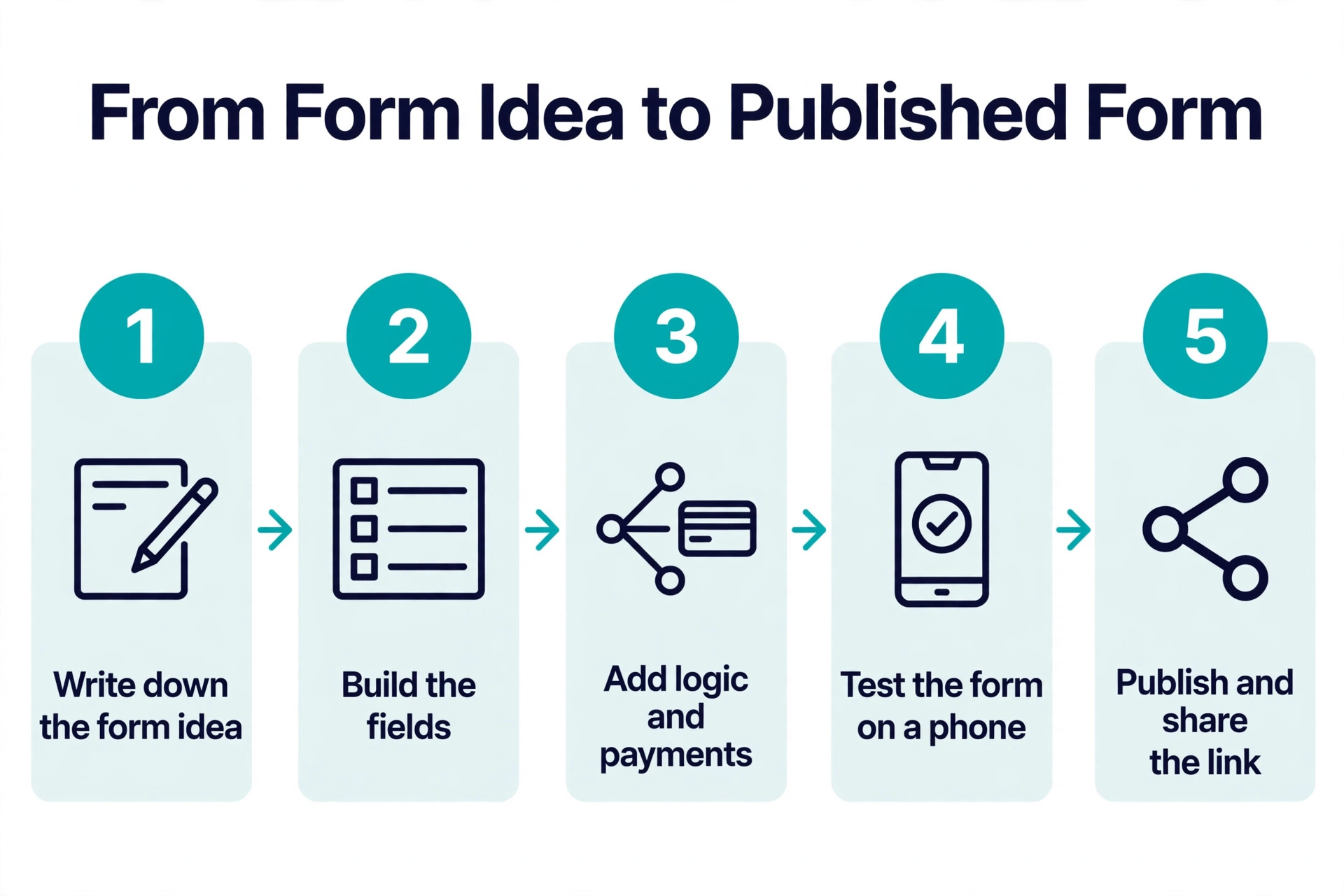
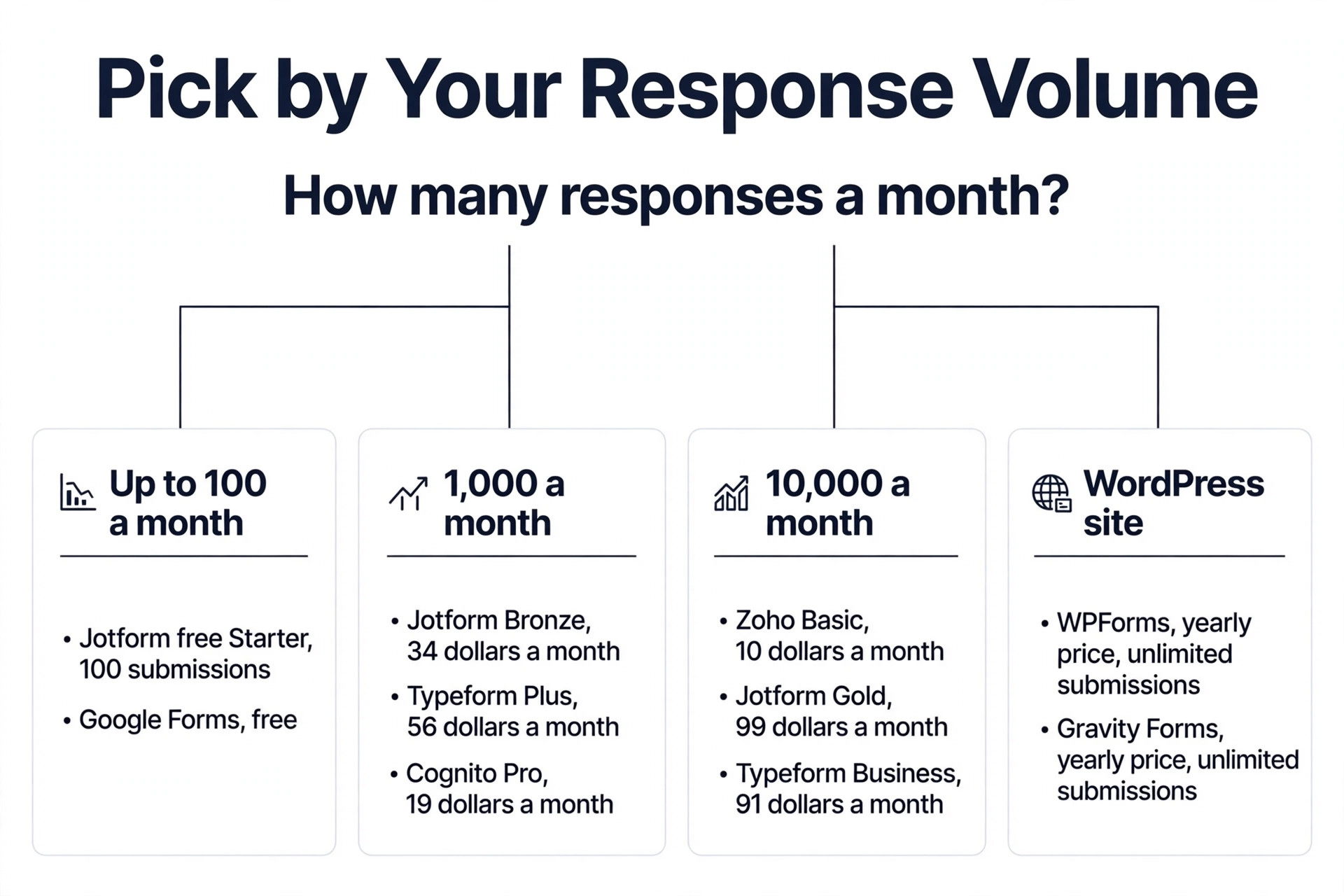
Start with the volume, because the best form builders for small business follow the response count, not the other way round. A business that receives 100 responses a month needs a different builder from a business that receives 10,000, and the price that looks cheap at low volume can be the dearest at high volume. Write down the monthly response count, the number of forms, and whether the forms take payments, then check each builder against those three facts before you look at the template gallery.
Next, check the free plan with a real form. Build the form you actually need, publish it, submit it from a phone, and read the result. A free plan that caps responses at 10 a month, as Typeform does, is a trial, not a free plan, while a free plan that gives unlimited responses, as Google Forms does, or unlimited forms and submissions on fair use, as Tally does, is a real free plan you can build a habit on.
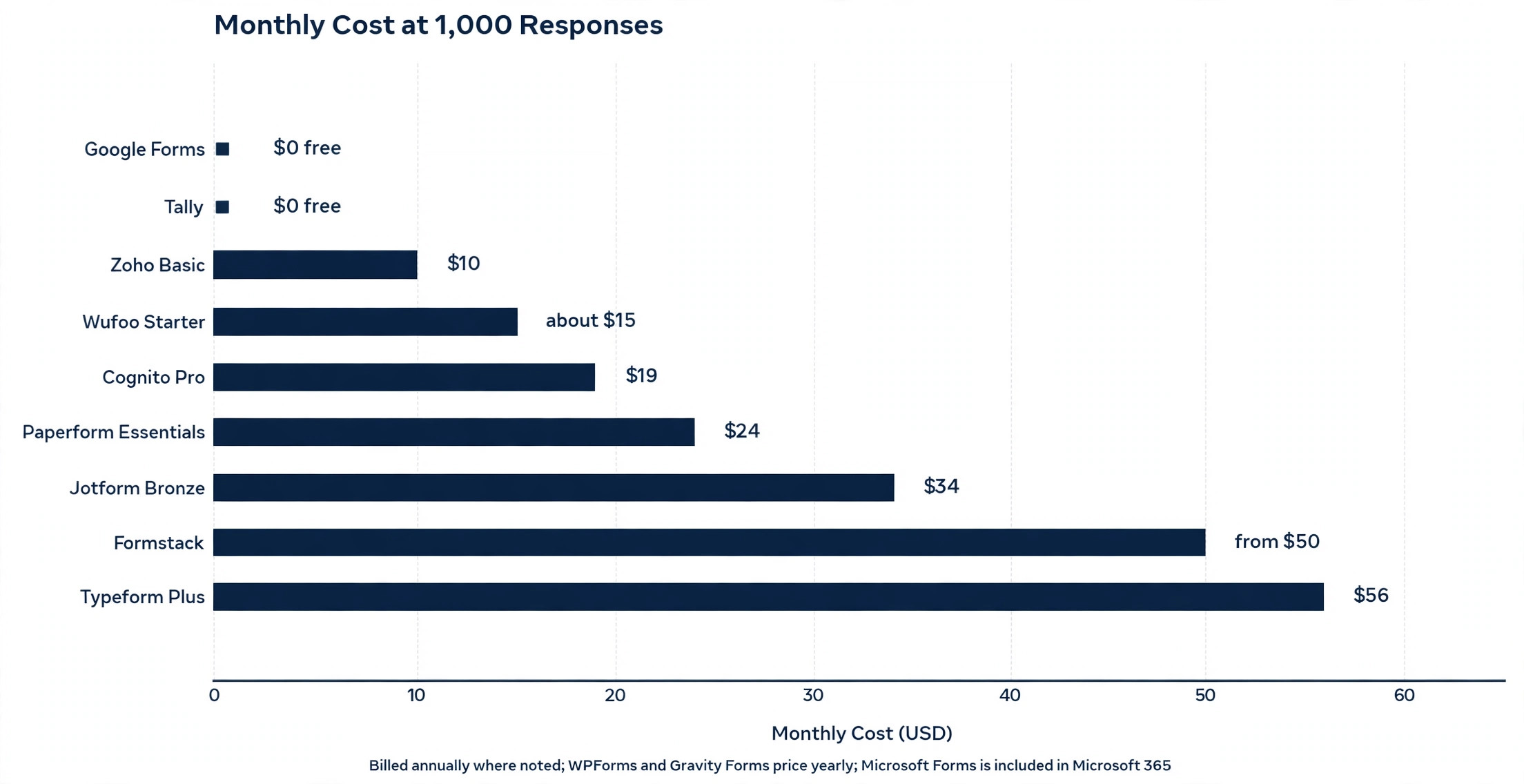
Then work out the cost at 1,000 responses a month, because that is the volume where the builders split. Jotform Bronze covers 1,000 submissions for 34 dollars a month billed annually, Typeform Plus covers 1,000 responses for 56 dollars a month, and Cognito Forms Pro covers 2,000 entries for 19 dollars a month. Run your volume through that table before you subscribe.
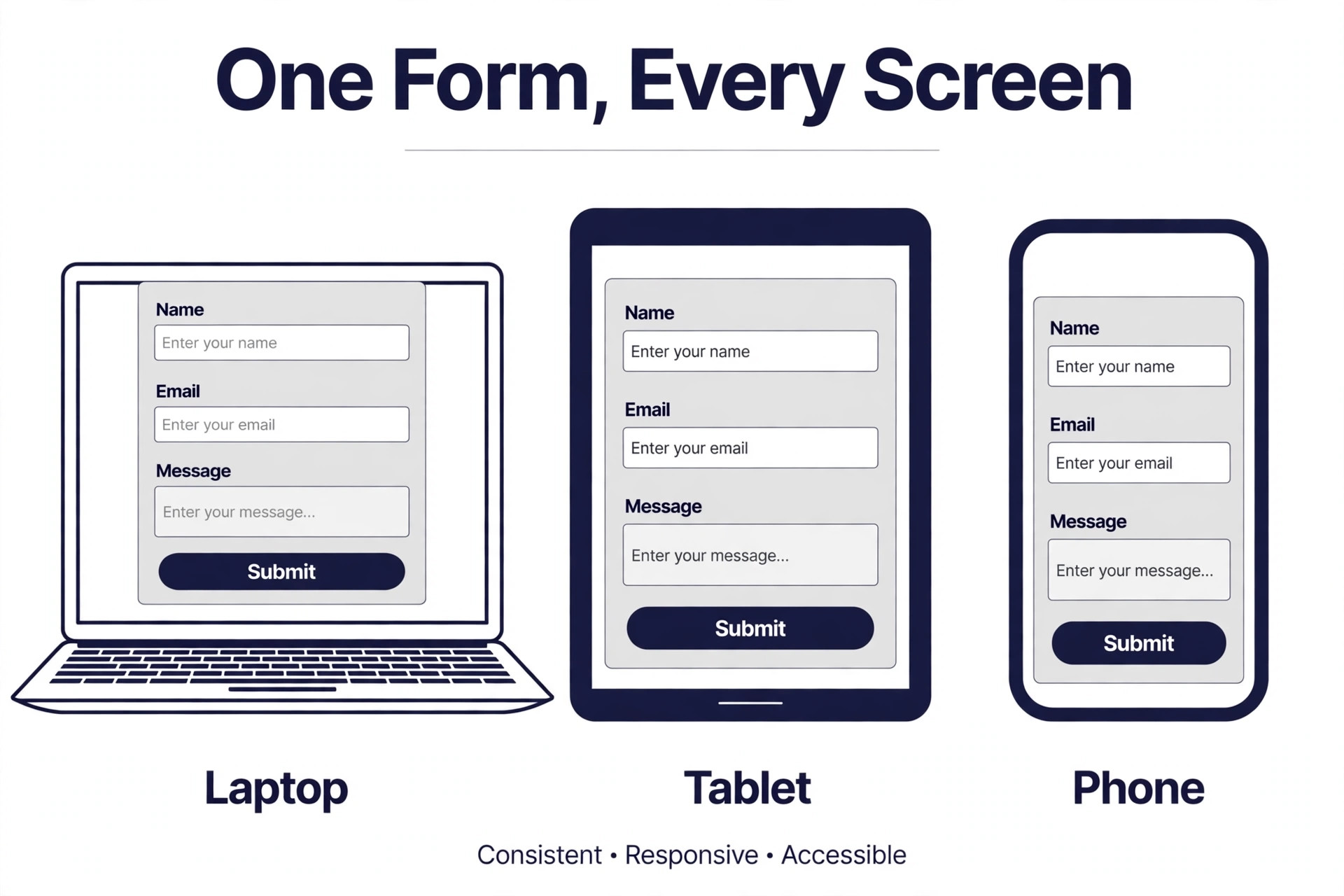
Finally, test the form on a phone. Most responses arrive on a phone, so a form that looks good on a desktop and fails on a small screen will lose the customer it was built to catch. Submit the test form from your own phone, check the layout, the keyboard and the submit button, and pick the builder whose mobile form feels easiest to complete.
What to Check Before You Pay
A form builder subscription is a response limit contract as much as a software contract, and the best form builders for small business still need their limits read in full, because the limits differ more than the prices. Read the monthly price, the response cap and the branding rules together, and ask what happens when the cap is hit, because some builders stop collecting responses, some charge extra, and some simply warn you. When a vendor hides the cap behind a help page, treat that as a warning, because the cap is the line that forces an upgrade.
Check the branding rules at the same time. Some builders put their logo on every free form, some remove it on the first paid plan, and some keep it until a higher tier. A builder logo on a customer facing form looks unprofessional, so the branding rule decides whether the free plan is usable for customer forms at all. Test a published form before you build a workflow around a tool.
Check the payment and compliance needs too. A form that takes money needs a payment gateway you already use, with no extra fee from the builder, and a form that collects health data needs HIPAA compliance with a signed agreement. Jotform Gold and Cognito Forms Enterprise both cover HIPAA, while Google Forms covers it only through a Workspace agreement, so check the compliance terms for your industry before you collect sensitive data.
- Confirm the response cap covers your monthly volume with room to grow.
- Confirm the builder logo is removed on the plan you will buy.
- Confirm the payment gateways you use are supported with no builder fee.
- Confirm the price on the web, not only in an app store or a promotion.
- Confirm you can export all submissions and cancel without losing your forms.
Mistakes That Waste Money
The most common mistake when picking the best form builders for small business is choosing on the template gallery alone. A business picks the builder with the prettiest templates, then discovers the response cap is 100 a month, the payments need a higher tier, and the form costs 3 times the budget by the second month. The fix is simple, build your real form first, count the responses, and price the plan that covers that volume, because the template is free and the responses are what you pay for.
The second mistake is ignoring the yearly renewal price. A WordPress builder looks cheap at 49.50 dollars a year, then renews at 99 dollars a year. The fix is to read the renewal price on the pricing page before you buy, and to budget the renewal, not the introductory price.
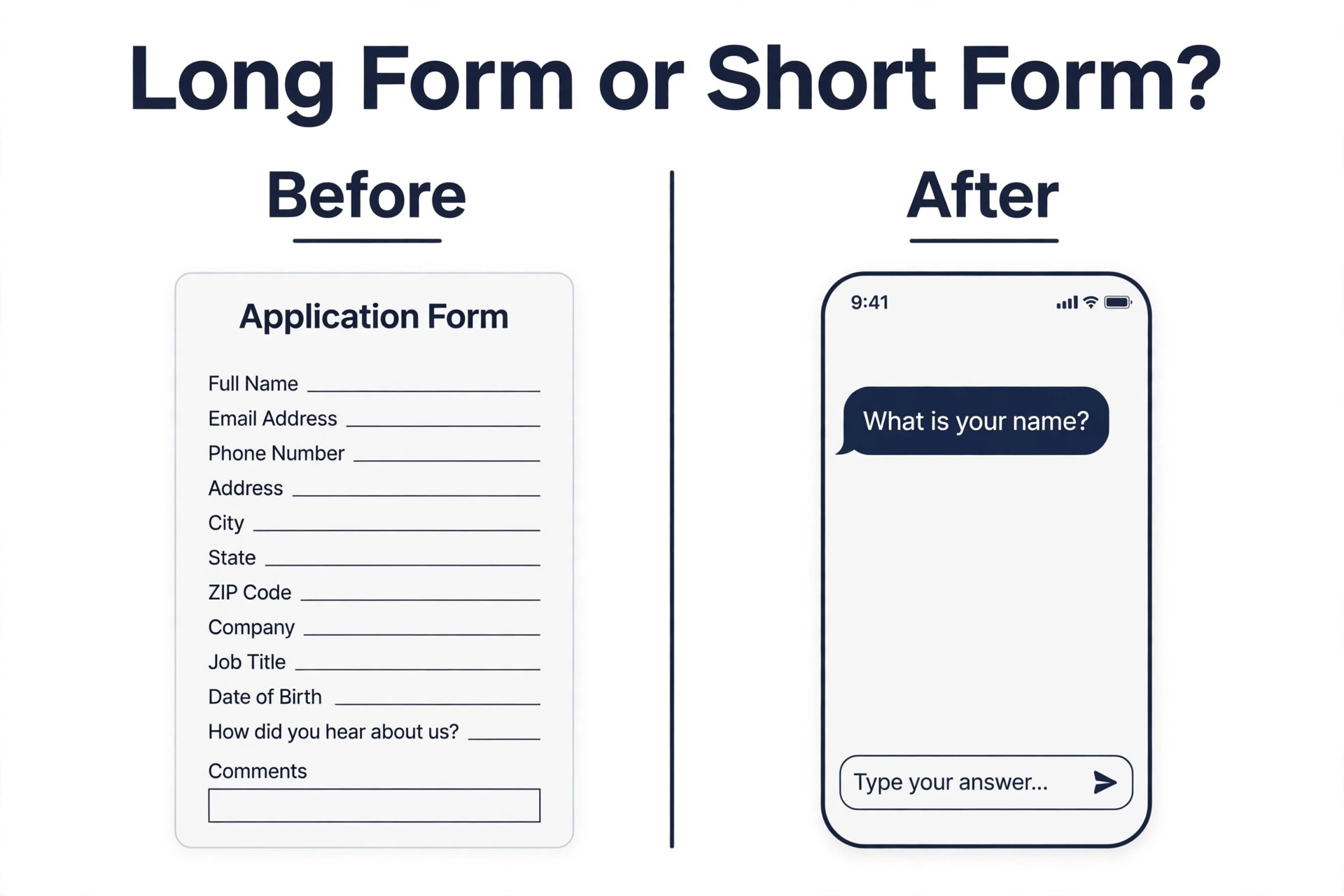
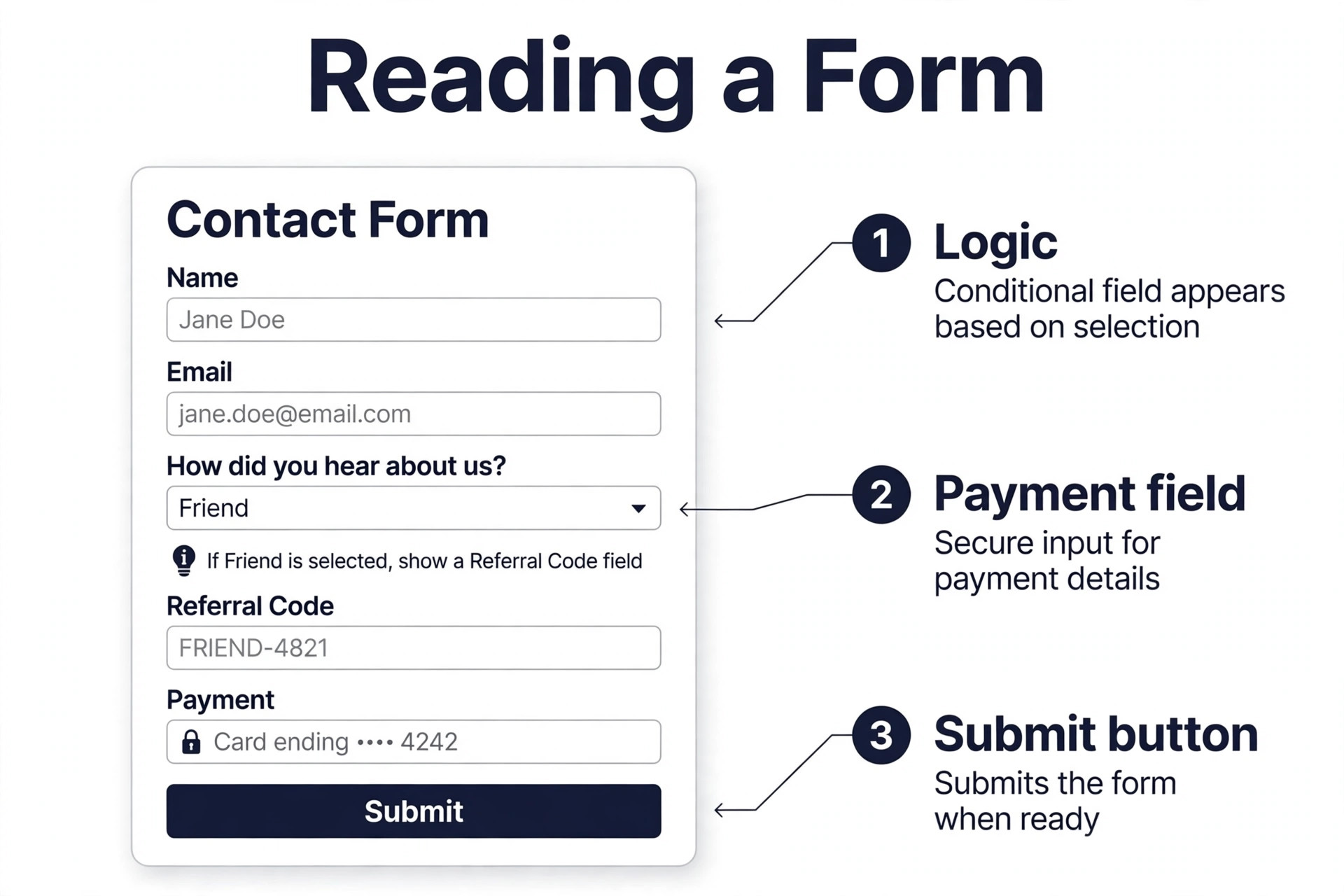
The third mistake is building a form that asks too much. A business adds 20 questions to a lead form, the completion rate falls, and the team blames the builder. The fix is to ask only what you need to reply, move the rest to a follow up, and use logic to hide questions that do not apply. A short form that gets completed beats a long form that gets abandoned, whatever builder you use.
Our Verdict
Jotform is the pick for most readers among the best form builders for small business, because every feature ships on every plan, the free Starter plan covers 5 forms and 100 submissions a month, and Bronze at 34 dollars a month billed annually covers 1,000 submissions with payments, logic and signatures included. The breadth around the builder, from Sign to Tables to Workflows, means one account covers contact, order, registration and intake forms.
Typeform is the pick when the form must feel premium, because the one question flow lifts completion rates on short customer facing forms, with Basic at 28 dollars a month billed annually. Google Forms is the pick when the budget is zero and the volume is high, because unlimited responses for free is unmatched. Cognito Forms is the pick when the form needs calculations on a tight budget, at 19 dollars a month billed annually, and Zoho Forms is the pick inside Zoho, at 10 dollars a month billed annually for 10,000 submissions.
When the site runs on WordPress, choose WPForms for simplicity or Gravity Forms for complex logic, both with unlimited submissions for a yearly price. When the form is a marketing page, choose Paperform, and when the workflow after the form matters, choose Formstack. The best builder is the one whose response cap, payment options and mobile form all fit the forms you actually send.
Frequently Asked Questions
Which form builder is best for a small business?
Jotform is the best overall pick for most small businesses, because every feature ships on every plan, Bronze at 34 dollars a month billed annually covers 1,000 submissions with payments and logic, and the template and integration range is the widest on this list. Google Forms is the best free pick, Typeform is the best pick for beautiful customer facing forms, and Cognito Forms is the best value pick when calculations matter.
Is Google Forms really free for a small business?
Yes. Google Forms is free with unlimited forms and unlimited responses, and it exports every response to Google Sheets without an integration. The limits are branding, payments and logic, because Google Forms cannot take payments, cannot carry your branding beyond a header image, and offers section level branching only with no calculations. Google Workspace at 7 dollars per user a month adds storage and admin controls, not form features.
How much should a small business pay for a form builder?
Most small businesses pay between 10 and 39 dollars a month for a form builder, with free plans covering low volume work. Zoho Forms Basic at 10 dollars a month billed annually covers 10,000 submissions, Cognito Forms Pro at 19 dollars a month covers 2,000 entries, and Jotform Bronze at 34 dollars a month covers 1,000 submissions. WordPress builders price yearly instead, with WPForms Basic at 49.50 dollars a year introductory and Gravity Forms Basic at 59 dollars a year.
What is the best form builder for payments?
Jotform is the best pick for payment forms, because it supports more than 40 payment gateways with no Jotform fee, and payments are included on every plan, including the free Starter plan. Paperform takes payments through Stripe and Square, Cognito Forms includes secure payments with calculations, and Typeform collects payments on paid plans. Google Forms cannot take payments at all, so a business that sells through a form should not use it.
Do form builders charge per response?
Some do, and some do not, and the difference decides the real cost. Jotform, Typeform, Cognito Forms and Zoho Forms meter submissions or responses per month, with a higher plan needed when the cap is hit. Google Forms, WPForms and Gravity Forms do not meter submissions, because Google Forms is free and the WordPress builders price yearly with unlimited submissions. Check the cap on your volume before you subscribe, because a 100 response cap is a trial, not a plan.
Which form builder is best for WordPress?
WPForms is the best pick for most WordPress sites, because the drag and drop builder is easy to learn, the template library covers more than 2,000 forms, and Basic at 49.50 dollars a year introductory gives unlimited submissions. Gravity Forms is the best pick for complex WordPress forms, because the logic, calculations and add on library are deeper, with a Basic licence at 59 dollars a year. Both price yearly, not monthly, and both include unlimited submissions.