More than 90 percent of commercial cleaning businesses have fewer than 10 employees, yet most of them pay 149 to 299 dollars a month for software built for plumbers and HVAC technicians. The best cleaning business software does the opposite. It is built around recurring cleans, routes, cleaner checklists and online booking, and it charges a price that fits a small crew. This guide compares 10 tools on price, booking, scheduling, payroll and payments, so you can stop paying for features you will never use and pick the tool that fits the way a cleaning business actually runs.
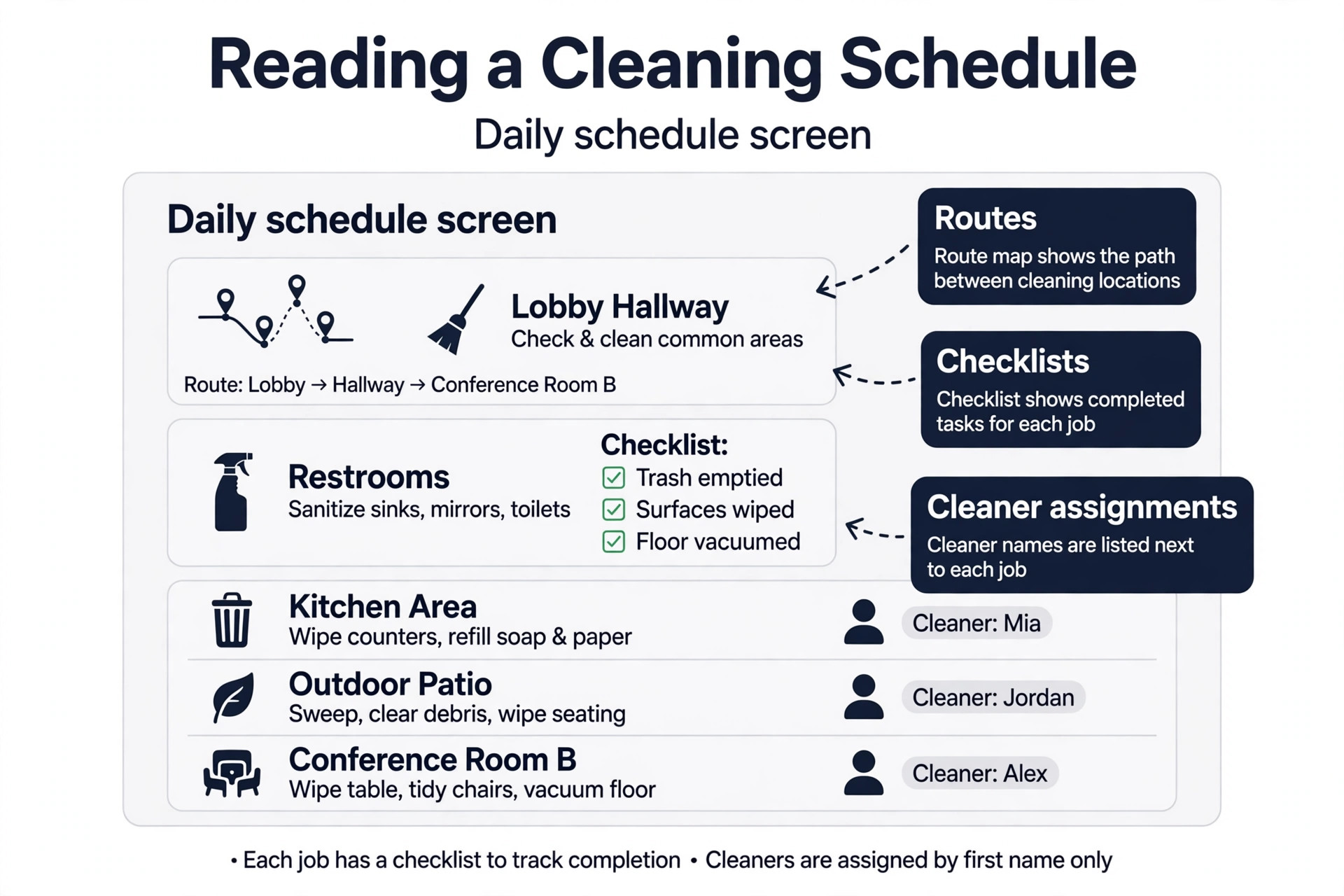
A cleaning business lives or dies on the schedule. A missed clean is a lost client, a late cleaner is a bad review, and a route that zigzags across town burns fuel and time that no invoice recovers. Software earns its price when it keeps the schedule full, the cleaners on time, and the invoices paid without the owner chasing either one by phone.
The second job of the software is money. Recurring clients should pay on time, new clients should book without a phone call, and the owner should see at a glance which jobs made money and which ones did not. A tool that handles booking and payments in one place saves more hours than a tool with a prettier calendar, because the hours saved are the hours the owner spends growing the business instead of running it.
How the Best Cleaning Business Software Was Compared
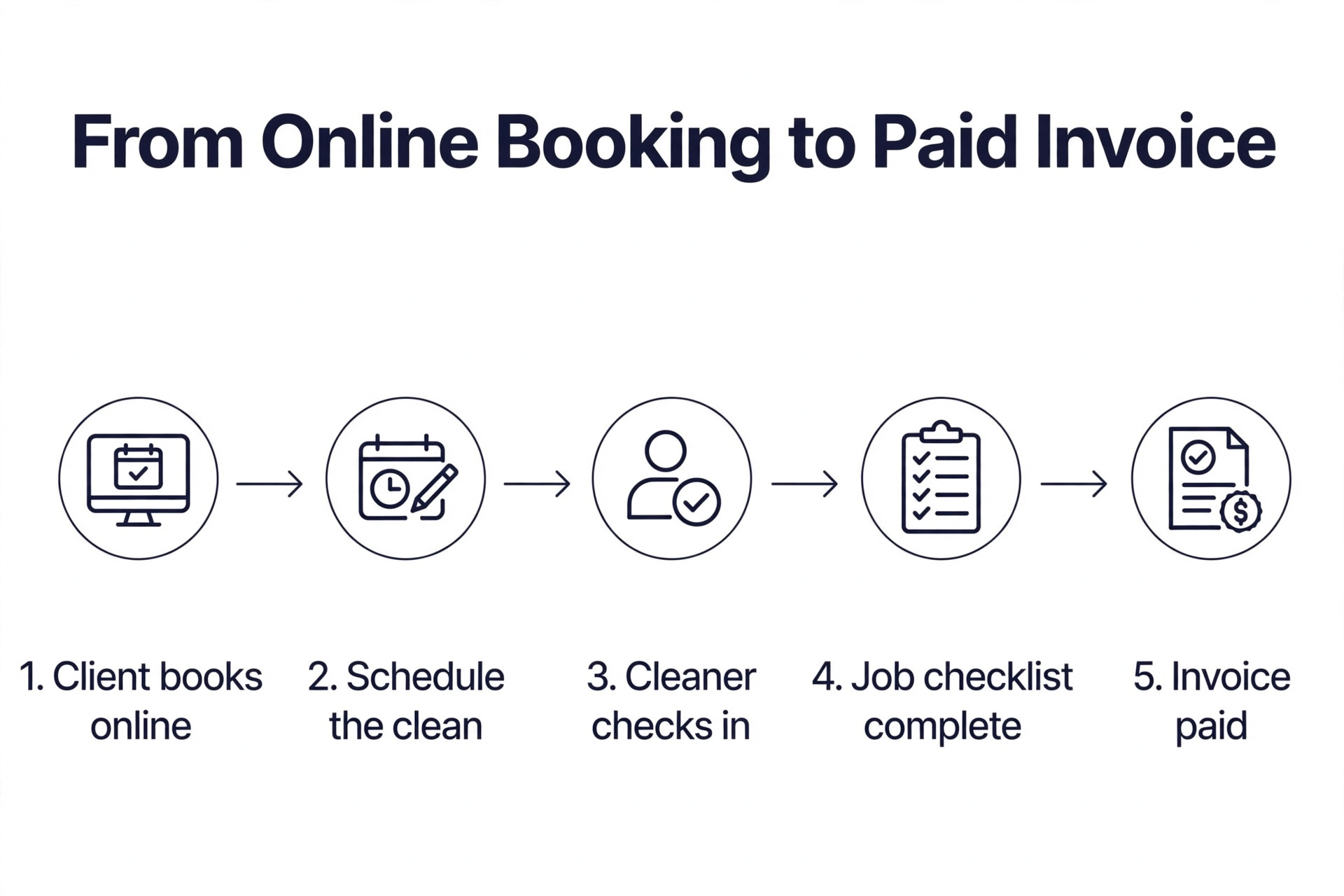
We checked vendor pricing pages and current 2026 roundups in November 2026, and we weighed each tool against the same five questions. First, does it handle recurring cleaning schedules well, with routes, repeat visits and cleaner assignments built in. Second, can clients book and pay online without calling the office. Third, does it track cleaner time, GPS check in and job checklists, because accountability is what keeps quality steady across a crew. Fourth, does it handle invoicing, payments and payroll reporting without a second tool. Fifth, what does the real monthly cost look like once you count every cleaner on the team.
Prices in this guide were checked against vendor pricing pages and current 2026 roundups. Cleaning software prices change often, and several vendors charge per user, per location or per completed job, so the headline price is rarely the price a real crew pays. Price each tool against your real crew size and your real job count before you commit, and use the free trial to run a real week of jobs through it.
The Best Pick for Each Job
| Job | Pick | Why it wins |
|---|---|---|
| Cheapest capable start | ZenMaid | 19 dollars a month for recurring maid services |
| Online booking on a budget | BookingKoala | Branded booking page from 27 dollars a month |
| Polished all in one field service | Jobber | Scheduling, quotes, invoices and payments in one place |
| Commercial janitorial crews | Swept | Location based scheduling with inspections |
| Growing multi team operations | MaidCentral | Deep automation priced by completed job |
Use this table as a shortcut, then read the full section for the tool you are leaning toward. The cheapest option is not the best value when it cannot handle your crew size, and the most expensive option is not the best choice when you only run three cleaners.
The Best Cleaning Business Software in 2026, Ranked
The 10 tools below fall into three groups. The first group is cleaning specific tools, which were built for maid and janitorial work from the start. The second group is general field service platforms, which cover cleaning alongside other home services and suit mixed service businesses. The third group is specialist and premium tools, which suit larger operations, commercial contracts and businesses that need payroll depth.
1. ZenMaid
ZenMaid is the cheapest capable start on this list, and it was built by a former maid service owner, so the details show it. The booking form prices jobs by bedrooms and bathrooms automatically, recurring schedules are first class, and automated texts keep both clients and cleaners informed. The cleaner app, digital checklists and GPS tracking keep quality steady without the owner visiting every job.
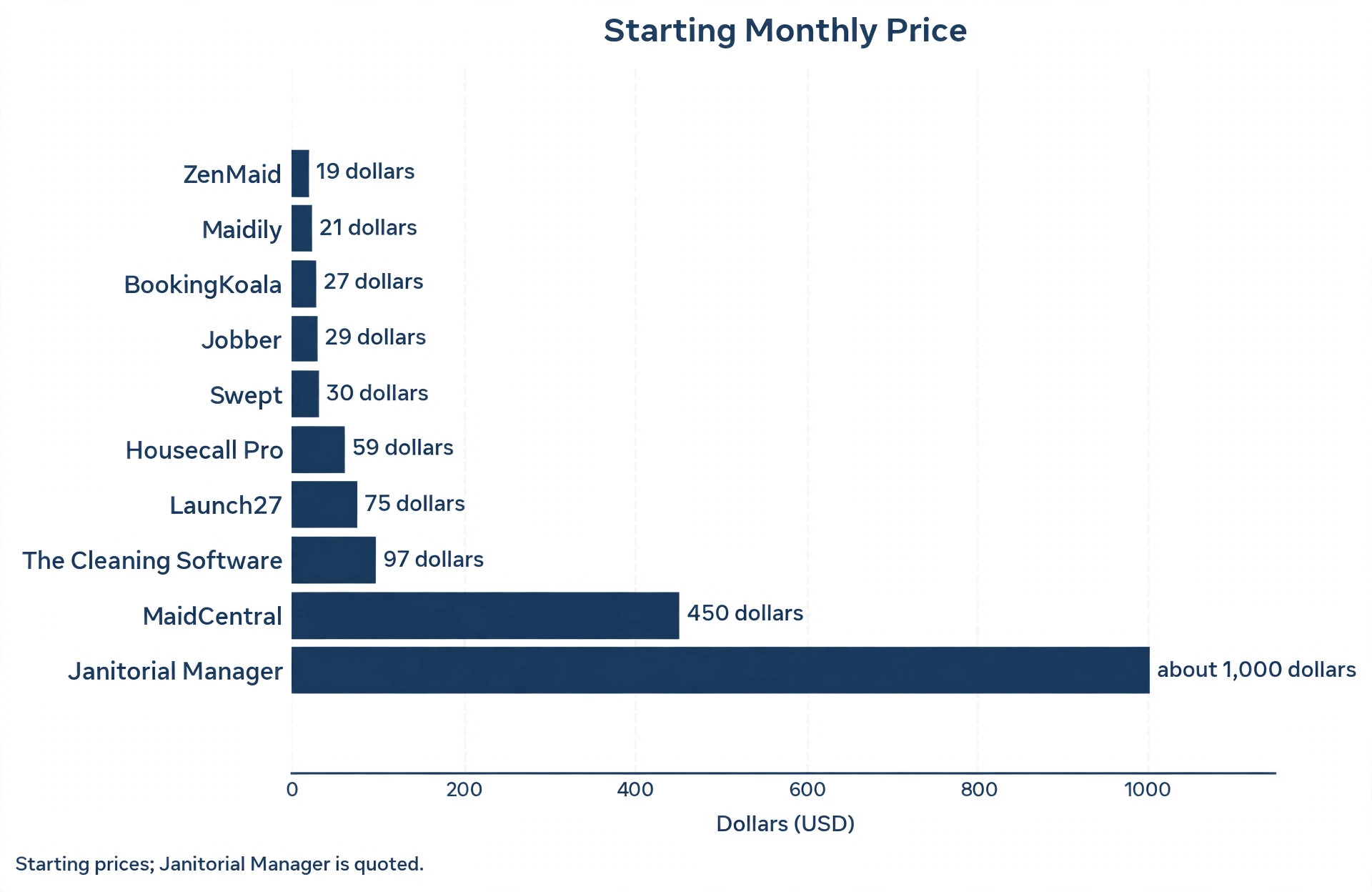
Pricing starts at 19 dollars a month for the Starter plan, which handles up to 40 appointments a month, with extra users from 4 dollars a month. The Pro plan costs 39 dollars a month and adds unlimited appointments, digital checklists, GPS tracking and advanced automated communication. The Pro Max plan costs 49 dollars a month and adds PTO tracking, service ratings, Mailchimp and Zapier integrations, and custom branded booking forms. ZenMaid is the best pick for a residential maid service with a small crew and a tight budget, because it does the core job well at a price a new business can afford.
2. Jobber
Jobber is the most polished generalist on this list, and it suits solo operators and small teams that want all in one field service software. Scheduling, quotes, invoices, payments and client reminders live in one interface that a non technical owner can learn in a weekend. Recurring job scheduling, custom quote templates, job checklists and QuickBooks sync cover the daily workflow, and the mobile app is one cleaners actually use.
Pricing starts at 29 dollars a month on annual billing for the Core plan with one user, or 49 dollars month to month. The Connect plan costs 99 to 139 dollars a month depending on billing term, Grow costs 149 to 199 dollars, and Plus costs 399 to 499 dollars and includes five users. Add ons include a Marketing Suite at 99 dollars, Pipeline at 49 dollars, and an AI Receptionist at 29 dollars. The watch out is per user pricing. A five person crew costs far more than the headline 29 dollars, and automation features such as automatic payments and follow ups need higher tiers, so price Jobber against your real crew size.
3. Housecall Pro
Housecall Pro is a home service platform that suits cleaning businesses adding services alongside residential cleaning. It covers online booking, scheduling, dispatch, invoicing and payments, plus consumer financing for larger jobs and a call answering service. The mobile app is strong for field teams, and the sales funnel tools help a business that also sells one off deep cleans and add on services.
Pricing starts at 59 dollars a month on annual billing for the Basic plan with one user, or 79 dollars month to month. The Essentials plan costs 149 dollars a month for up to five users, and the MAX plan costs 299 dollars a month for up to eight users, with 35 dollars per additional user. Card processing runs about 2.59 percent with no per transaction fee on some plans, and about 2.99 percent online to 3.49 percent for card on file on others, with ACH at 1 percent. QuickBooks sync, GPS tracking and the estimate builder need higher tiers, so most businesses are pushed to Essentials at 149 dollars fairly quickly.
4. BookingKoala
BookingKoala sells itself on one promise, and that promise is that customers book themselves. The entry tier gives you a branded website, a live booking form with instant pricing based on bedrooms and square footage, and basic appointment management, all from 27 dollars a month. It was founded by a cleaning business owner, and the booking flow shows that origin, because it asks the questions a cleaning client expects and prices the job before anyone picks up the phone.
Pricing is reported from 27 dollars a month for the Solo plan with one user, 57 dollars for Growth with up to five users, and 97 dollars for Pro with unlimited users in some summaries, while other summaries list a Premium tier at 197 dollars that unlocks automated client emails and CRM features. Confirm the current tiers on the vendor site before you budget, because the published summaries disagree. BookingKoala is the best pick when online booking is the bottleneck and you want clients to book and pay without calling, and it is a weaker pick when you need deep payroll or commercial inspection tools.
5. Launch27
Launch27 is an online booking engine first and a scheduler second, and its booking flow is its standout feature. Clients pick a service, see a price, choose a time and pay, all without a phone call, and the dispatch tools assign the job to a cleaner with a route that makes sense. It suits a cleaning business built around online booking volume, where the website is the main source of new jobs.
Pricing is reported from 75 dollars a month for the Base plan in some summaries, with Pro at 150 dollars and Plus at 299 dollars, while other summaries list Base at 65 dollars a month on annual billing. Confirm the current price on the vendor site, because the summaries conflict. The 75 dollar starting price needs real booking volume to justify, so a business with only a handful of online bookings a month will do better on BookingKoala or ZenMaid. A business that already gets steady online bookings will earn the price back in saved phone time.
6. Swept
Swept is to commercial cleaning what ZenMaid is to residential cleaning, and it is the only serious option on this list for multi site janitorial work. Scheduling is location based, so a crew is assigned to buildings rather than to individual appointments, and GPS verified timekeeping, inspection checklists, supply tracking and client portals keep a commercial contract accountable. A cleaner clocks in at the site, the supervisor sees the check in, and the client sees that the work happened.
Pricing starts at 30 dollars a month for the Launch plan covering 1 to 15 locations, with Optimize at 150 dollars adding inspections and breaks compliance, and Scale at 225 dollars unlocking supply tracking, client portals and checklists. Some summaries list Launch at 50 dollars and higher tiers above 150 dollars, so confirm the current tiers. Swept is a poor fit for a residential maid service, because it has no residential booking form, and it is the best fit for a commercial crew running several buildings on recurring contracts.
7. MaidCentral
MaidCentral is the premium operations platform for maid services that are past the startup phase, and it is priced for businesses that run several teams at once. It combines scheduling, dispatching, online booking, payroll reporting, customer management, automation, payments, quality tracking and detailed business reporting in one system. Cleaner scorecards, performance pay and branch management are built in, which is why larger operations choose it over the cheaper tools.
Pricing starts at 450 dollars a month, which includes up to 100 jobs, then 1.20 dollars per completed job up to 500 jobs and 1.00 dollar beyond that, with 250 dollars per additional branch. A one time onboarding fee also applies, and there is no free trial, only a live demo. MaidCentral is far too expensive for a solo cleaner or a three person crew, and it is the right tool when you run ten or more cleaners across several teams and you need payroll depth and scorecards that the cheaper tools cannot give you.
8. The Cleaning Software
The Cleaning Software, often shortened to TCS, is a cleaning industry specific platform with built in payroll automation, direct invoicing and payments, automatic client reminders, a cleaner focused mobile app, and industry specific reporting and dashboards. It covers routes, payroll and client communication in one place, which suits a cleaning company that wants one system instead of three.
Pricing starts at 97 dollars a month for the Starter plan with three users and 20 dollars per additional user, 297 dollars for Pro with three users and 15 dollars per additional user, and 597 dollars for Agency with custom seats. The limit is focus. It is built only for cleaning companies, so a business that also does lawn care, pest control or handyman work will need a second tool for those jobs. For a cleaning only business that wants payroll automation without a separate payroll tool, it is a strong mid price option.
9. Maidily
Maidily is a newer cleaning specific option that suits a small maid service that wants a simple start with room to grow. It covers online booking, scheduling, invoicing and client communication, with a free plan for up to 10 jobs a month that lets a new business test the workflow before paying anything. The interface is simple, and the setup is faster than the larger platforms.
Pricing is reported from 21 dollars a month for the first paid tier, with higher tiers for more jobs and more features. Confirm the current tiers on the vendor site, because Maidily is a smaller vendor and its pricing pages change. Maidily is the best pick when you want a free test drive with real jobs and a low paid entry point, and it is a weaker pick when you need commercial inspections, deep payroll or a large crew, because those features sit with Swept and MaidCentral.
10. Janitorial Manager
Janitorial Manager is the strongest all in one pick for commercial cleaning companies running multi building contracts, and it is priced for that job. It covers bidding, scheduling, inspections, timekeeping, supply management and client reporting across many buildings, with pricing quoted by building count, features and service level. A commercial operator can bid a contract, staff it, inspect it and report on it in one system.
Pricing is quoted rather than published as a flat rate, and published summaries place it from around 1,000 dollars a month for multi building operations. That price puts it far beyond a residential maid service, and that is the point. Janitorial Manager is not a tool for a small crew, and a small crew should not buy it. It is the tool for a commercial business that manages dozens of buildings and needs one system that ties bidding to operations to client reporting.
How to Choose the Right Cleaning Software
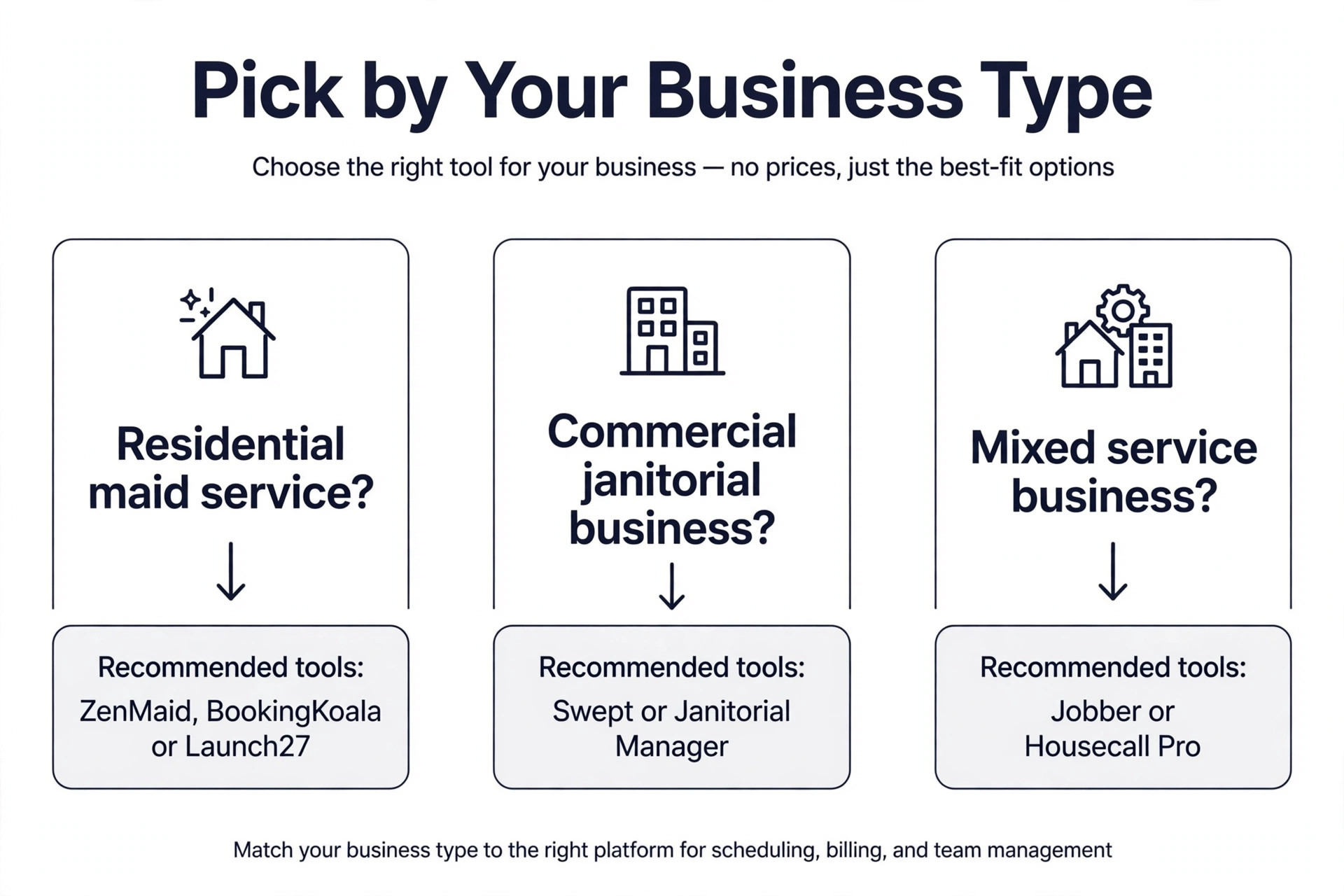
Start with your business type, because residential and commercial cleaning need different tools. A residential maid service needs online booking, recurring schedules and automated reminders, and ZenMaid, BookingKoala or Launch27 fits that job. A commercial janitorial business needs location based scheduling, GPS check in and inspections, and Swept or Janitorial Manager fits that job. A mixed service business that also does HVAC, plumbing or handyman work needs a general platform, and Jobber or Housecall Pro fits that job.
Next, count your crew and your jobs. A solo cleaner with 30 jobs a month pays a very different price from a five person crew with 300 jobs a month, because most tools charge per user, per seat or per completed job. ZenMaid Starter handles 40 appointments a month for 19 dollars, while MaidCentral charges 450 dollars a month plus per job fees, so the right tool for one crew is the wrong tool for another. Write down your crew size and your monthly job count, then price three tools against those two numbers before you choose.
Then think about booking. If most of your new clients find you online, a booking first tool such as BookingKoala or Launch27 will pay for itself in saved phone time. If most of your new clients come from referrals and repeat bookings, a scheduling first tool such as ZenMaid or Jobber will serve you better. Test the booking form as a customer before you buy, because a form that confuses a client costs you the job before you ever see it.
Finally, run a real week through the free trial. Put your real jobs, your real cleaners and your real clients into the tool, and see where it slows you down. A tool that looks good in a demo can still fail on a real route, a real checklist or a real invoice, and the trial is the only place to find that out before you pay. The best cleaning business software for your crew is the one that survives a real week without extra spreadsheets.
- Write down your business type, your crew size and your monthly job count.
- Price three tools against those real numbers, including per user and per job fees.
- Test the online booking form as a customer before you buy.
- Run a real week of jobs through the free trial with real cleaners.
- Check payroll, GPS and inspection features on the tier you would actually buy.
What to Check Before You Pay for Cleaning Software
Check the contract terms before you enter card details, because several tools on this list charge a setup fee, an onboarding fee or a minimum term that the pricing page does not show clearly. MaidCentral charges a one time onboarding fee and offers no free trial, so a demo is the only way to test it before you pay. Ask for every fee in writing, including per user fees, per job fees and payment processing rates, and compare the full monthly total rather than the headline price.
Check the cancellation terms at the same time. A tool that locks you into a year of payments is a poor fit for a seasonal cleaning business, because winter demand and summer demand are rarely the same. Month to month billing costs more per month but lets you drop a tier when the crew shrinks, and that flexibility is worth the extra cost for a business under two years old. The best cleaning business software for a growing crew is the one you can leave without a penalty if it stops fitting.
Check the support hours too. A cleaning business runs early mornings, evenings and weekends, so support that only answers on weekday afternoons will not help when a schedule breaks on a Saturday morning. Test support during the trial by asking a real question at a real working hour, and note how long the reply takes. A tool with fast support saves more money than a tool with a lower price and no one to call.
Mistakes That Waste Money
The most common mistake is buying a general field service tool for a cleaning specific job. A cleaner needs recurring schedules, room based pricing and cleaner checklists, and a general tool makes you build those features with custom fields and workarounds. That workaround costs hours every week, and the hours cost more than the price difference between a general tool and a cleaning specific one. Match the tool to the job first, and the price second.
The second mistake is ignoring per user pricing. A 29 dollar plan with one user becomes a 145 dollar plan with five users, and a 19 dollar plan with a 4 dollar seat fee becomes a 39 dollar plan with five cleaners. Add up the full crew cost before you compare headline prices, because the cheapest headline is often the most expensive crew price. Ask the vendor for a quote at your real crew size, in writing, before you sign up.
The third mistake is skipping the cleaner app test. The owner buys the software, the cleaners hate the app, and the schedule falls apart because nobody checks in on time. Give the app to two cleaners during the trial, watch them use it on a real job, and listen to what they say. A tool your cleaners will actually use is worth far more than a tool with a longer feature list that nobody opens. The best cleaning business software earns its price in the field, not on the pricing page.
Our Recommendation
ZenMaid is the pick for most readers among the best cleaning business software, because the Starter plan at 19 dollars a month handles recurring maid services with booking, reminders and checklists at a price a new business can afford. BookingKoala is the pick when online booking is the bottleneck, because the branded booking page turns website visitors into paid jobs without a phone call. Jobber is the pick when you run a mixed service business, because the polished all in one platform covers quotes, scheduling, invoices and payments in one place.
When your work is commercial, choose Swept for multi site crews or Janitorial Manager for multi building contracts, because residential tools cannot do location based accountability well. When your crew grows past ten cleaners across several teams, MaidCentral at 450 dollars a month is the premium pick, because the payroll reporting and scorecards replace a second system. Pick the tool that matches your business type, your crew size and your job count, and the software will save hours instead of adding them.
Frequently Asked Questions
What is the cheapest cleaning business software?
ZenMaid is the cheapest capable start, at 19 dollars a month for the Starter plan with up to 40 appointments a month. Maidily offers a free plan for up to 10 jobs a month, which is cheaper for a brand new business with very few jobs. Connecteam offers a free tier for up to 10 users, but it is a workforce tool rather than a cleaning specific scheduler, so it needs more setup. The cheapest tool is not always the best value, because a free tool that cannot handle recurring schedules will cost you clients.
Do I need cleaning specific software or will Jobber work?
Jobber will work when you run a mixed service business or a residential cleaning business with simple recurring jobs, because its scheduling, quotes and invoicing are polished and its mobile app is strong. Cleaning specific software such as ZenMaid or BookingKoala works better when online booking, room based pricing and cleaner checklists are central to your day, because those features are built in rather than added with custom fields. Test both with a real week of jobs and choose the one that needs fewer workarounds.
How much should a small cleaning business pay for software?
A solo cleaner or a two person crew should expect to pay 19 to 59 dollars a month, with ZenMaid at 19 dollars and Jobber Core at 29 dollars as the common starting points. A five person crew should expect to pay 100 to 200 dollars a month once per user fees are counted, with Housecall Pro Essentials at 149 dollars as a typical mid point. A commercial crew or a multi team operation should expect to pay 225 to 450 dollars a month or more, with Swept Scale at 225 dollars and MaidCentral at 450 dollars as the premium range.
Can clients book and pay online with cleaning software?
Yes, clients can book and pay online with BookingKoala, Launch27, ZenMaid Pro, Jobber and Housecall Pro, among others on this list. BookingKoala and Launch27 are built around that flow, with instant pricing and a branded booking page, while ZenMaid adds online booking on its Pro tier and Jobber adds it through quotes and invoices. Test the booking form as a customer before you buy, because a confusing form will lose jobs even when the software itself is good.
Does cleaning software track cleaner time and location?
Yes, most tools on this list track cleaner time, and several track location as well. ZenMaid Pro adds GPS tracking, Swept adds GPS verified timekeeping at client sites, and MaidCentral adds time tracking with payroll reporting. Jobber and Housecall Pro add GPS tracking on higher tiers, so check which tier includes it before you buy. GPS tracking helps with accountability and payroll accuracy, and it also protects your cleaners when a client disputes a visit time.
What is the best cleaning business software for commercial janitorial work?
Swept is the best pick for commercial janitorial work at a small to mid size, because its location based scheduling, GPS verified timekeeping and inspection checklists fit multi site crews. Janitorial Manager is the best pick for larger commercial operations running multi building contracts, because it ties bidding, scheduling, inspections and client reporting together. Both tools are poor fits for residential maid services, so choose by business type first and by price second.
A good cleaning tool keeps the schedule full, the cleaners on time and the invoices paid. Pick the tool that matches your business type and your crew size, run a real week through the trial, and let the field test decide. The software that survives a real week is the one worth paying for.