
The best ai tools for job seekers do not win you a job on their own. They win back the hours a search eats. A typical hunt now runs 50 applications or more, and each one asks for a tailored resume, a custom cover letter, a form filled by hand and a follow up that never gets sent. The tools in this guide attack that workload in order, from finding roles worth your time to naming a salary with a straight face. Every price below was checked in October and November 2026, and where sources disagree, this guide gives both figures.
A free stack carries most of the search. Simplify Copilot finds and autofills roles for free, Teal tracks every application for free, Perplexity researches companies for free, and Google Interview Warmup gives structured practice for free. Paid tiers buy speed and volume, not magic. The two tools worth paying for first are Rezi for documents and Final Round AI for interview practice, and only for the weeks you actually need them.
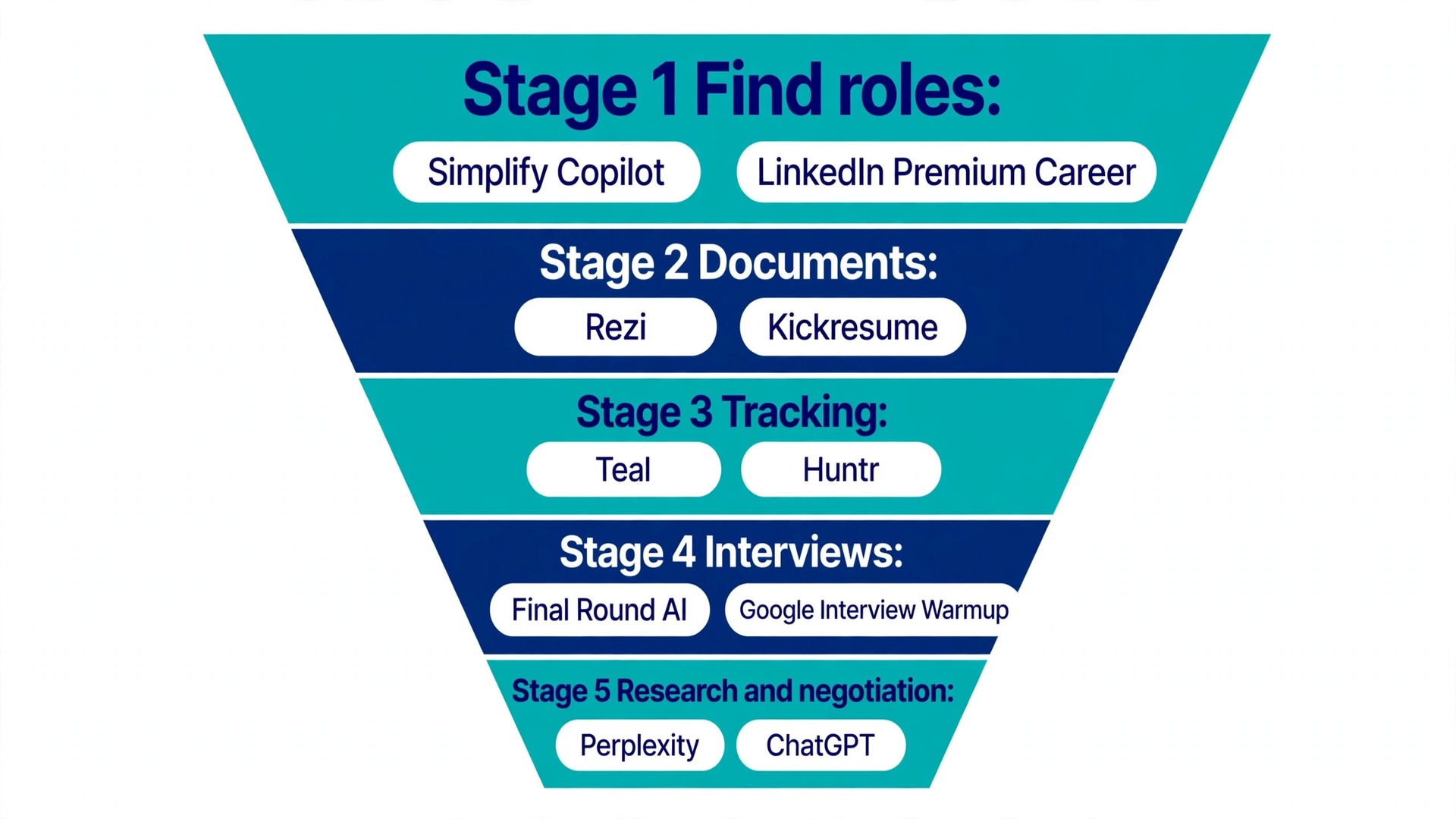
A job search has five jobs, and this guide follows them in order. Find roles that fit. Write documents that survive the screen. Track every application. Practise interviews until the answers sound like you. Research the company and negotiate the offer. Two tools per stage, ten in total, each with its real price, honest limits and a verdict on who should pay.
The 10 Best AI Tools for Job Seekers at a Glance
| Tool | Stage | Free tier | Paid from | Best for |
|---|---|---|---|---|
| Simplify Copilot | Find roles | Full core free | Simplify+ varies | High-volume applicants |
| LinkedIn Premium Career | Find roles | Limited | 39.99 dollars a month | LinkedIn-centric fields |
| Rezi | Documents | 1 resume, 3 PDF downloads | 29 dollars a month | ATS-proof resumes |
| Kickresume | Documents | 4 basic templates | 24 dollars a month | Resume plus cover letter |
| Teal | Tracking | Unlimited tracking | 29 dollars a month | Most job seekers |
| Huntr | Tracking | 100 jobs, unlimited contacts | 40 dollars a month | Referral-driven searches |
| Final Round AI | Interview prep | Lists free mocks | 150 dollars a month | Nervous interviewees |
| Google Interview Warmup | Interview prep | Fully free | Free | Structured practice |
| Perplexity | Research | Generous | 20 dollars a month | Fast company briefs |
| ChatGPT | Negotiation | Free tier | 20 dollars a month | Scripts and role-play |
Best Pick by Job
| Your situation | Pick this first | Why |
|---|---|---|
| Applying to 50 roles or more | Simplify Copilot | Free autofill across 100 plus ATS platforms |
| Changing careers | Rezi | Keyword targeting reframes past experience for a new field |
| Just graduated | Kickresume | Yearly Premium is 8 dollars a month, free for students |
| Targeting big companies | Teal plus Jobscan free scans | Teal tracks the pipeline and Jobscan diagnoses keyword gaps |
| Referrals are your main channel | Huntr | Contacts and interviews get their own views |
| Interviews make you freeze | Final Round AI for one month | Mock practice with feedback, then stop paying |
| No budget at all | Simplify, Teal, Perplexity, Interview Warmup | The free stack covers every stage for zero dollars |
| Holding an offer | ChatGPT Plus for one month | Role-play the counter for 20 dollars |
Stage 1: Find Roles Worth Your Time
Most searches fail at the top of the funnel, where people apply to roles they barely fit and get silence. The fix is fewer, better-matched applications, and the two tools in this stage make that choice cheap.
1. Simplify Copilot
Simplify Copilot is best for anyone applying at volume who hates retyping their history into Workday. The core extension is free for job seekers, and Simplify earns its money from employer partnerships rather than from you. A paid Simplify+ tier exists with extra features, and its price varies, so check the site before you commit to anything.
Simplify does two jobs in one browser extension. First, it autofills application forms across more than 100 enterprise ATS platforms, including Workday, Greenhouse and Taleo, with one click. You review everything before it goes out, so there is no bot-detection risk and no application sent that you have not seen. Second, it matches roles to your profile and shows fit signals before you spend 30 minutes on an application that was never a fit.
The honest limit is that Simplify does not apply while you sleep. You still open each posting and press submit yourself, because mass auto-apply services have weak callback data and some platforms flag automated submissions. Simplify saves the hours lost on forms, not the decision about which roles deserve them.
The verdict. Free autofill across more than 100 ATS platforms is the best value in this guide, and review-before-submit keeps you safe. The only real limit is that matching quality follows profile completeness, so fill the profile properly and install it first.
2. LinkedIn Premium Career
LinkedIn Premium Career is best for candidates whose industry hires through LinkedIn. The price is 39.99 dollars a month on monthly billing, or 239.88 dollars a year, which works out to 19.99 dollars a month. Older roundups still list 29.99 dollars a month, and that figure is out of date. LinkedIn raised the monthly rate, though some accounts still see the old price in pricing tests, so the number on your own checkout screen is the one that counts.
Premium Career adds natural-language job search, AI fit assessments against postings, and AI-assisted outreach drafts to hiring managers. You also get the full list of who viewed your profile, 5 InMail credits a month, Applicant Insights on where you rank, LinkedIn Learning, and salary insights. Eligible accounts get a one-month free trial.
The AI job-match scoring is the feature that earns its keep, telling you where to spend application effort instead of treating every posting as equal. The outreach drafts save time but still need heavy personalising, because an untouched AI message to a hiring manager reads as spam.
The verdict. Fit signals, InMail credits and Applicant Insights are worth having for a focused search in a LinkedIn-centric field, but the price is steep for a long search. Buy one month at the right moment and cancel the day the search ends.
Stage 2: Documents That Survive the Screen
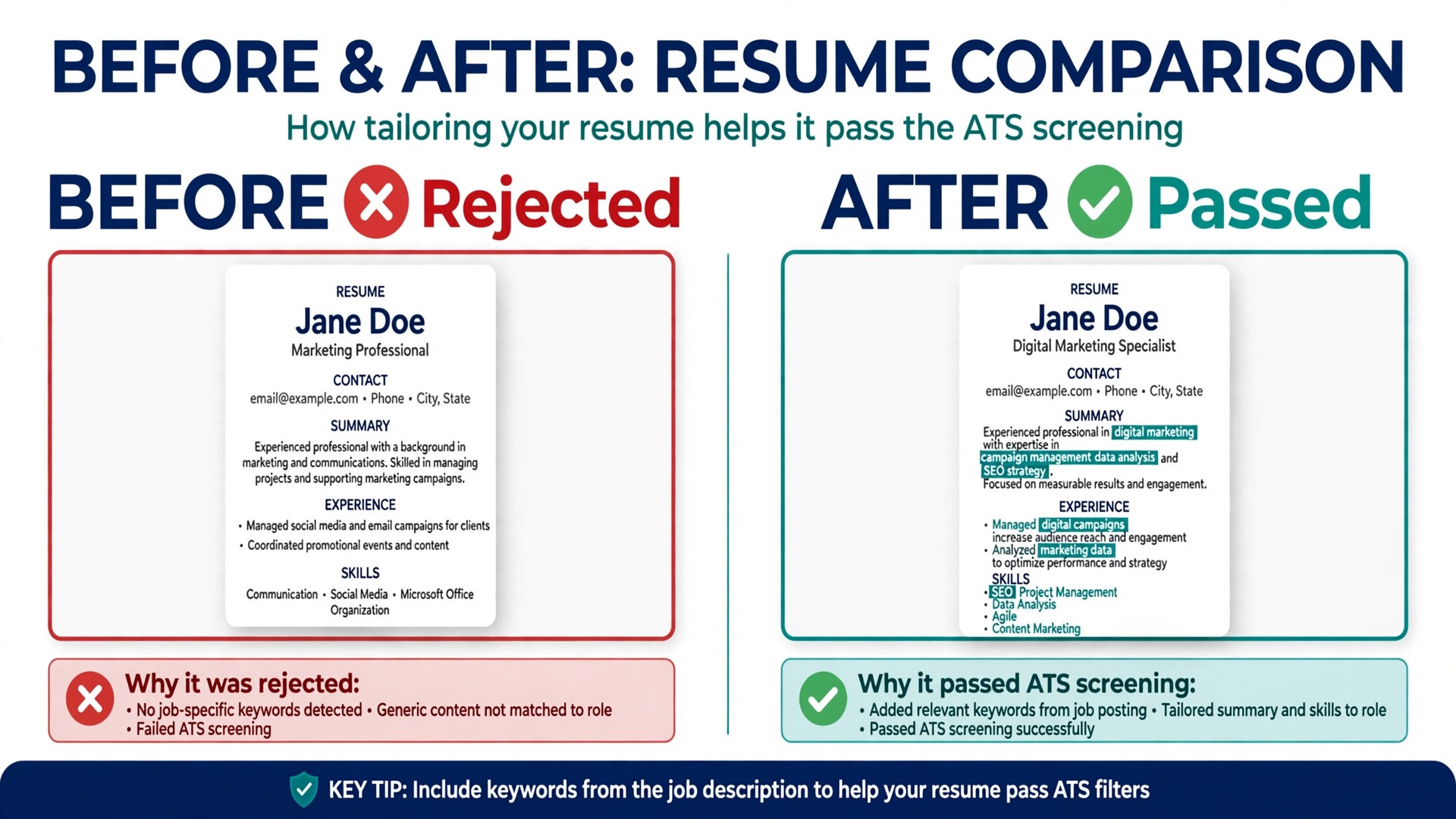
A resume gets about six seconds before a recruiter decides whether to keep reading, and before that it must survive parsing software. Most rejections happen here, quietly. The two tools in this stage build documents that parse cleanly, with the AI writing the structure and you supplying the achievements.
3. Rezi
Rezi is best for candidates who want a resume built around ATS keyword targeting rather than around visual design. The free plan costs nothing and covers 1 resume, 3 PDF downloads, 1 AI interview and limited access to the Rezi Score and keyword targeting. Pro costs 29 dollars a month, or 19 dollars a month on a quarterly plan. A Lifetime plan costs 149 dollars once and carries the Pro features without the monthly expert review. Paid plans carry a 30-day money-back guarantee.
The Rezi Score is the centrepiece. It rates a resume from 1 to 100 against 23 criteria, including bullet length, active verbs, quantified results, filler words and consistent formatting. Keyword Targeting compares your resume against a specific job description and shows which phrases are missing. Pro also includes one human expert review a month, a real person reading your resume, not another AI pass.
The honest limit is the free plan. One resume and three PDF downloads in total is tight if you tailor for every job, and the full Rezi Score and the AI cover letter writer need a paid plan. Treat the score as a diagnostic checklist, not a hiring guarantee, because no employer ever sees it. Use it to catch missing skills language, then stop optimising at good enough.
The verdict. The 23-criteria score gives a concrete fix list instead of vague advice, and the Lifetime plan suits repeat searches. The free plan runs out fast and month-to-month Pro costs 10 dollars more than the quarterly rate, so buy Pro for one quarter.
4. Kickresume
Kickresume is best for job seekers who want a resume and a matching cover letter from one tool, with a personal website thrown in. The free plan costs nothing and includes 4 basic resume templates, 4 matching cover letter templates, 1 basic website template, more than 20,000 pre-written phrases and more than 1,500 resume examples, with unlimited downloads inside the free options.
Premium costs 24 dollars a month on monthly billing, 54 dollars every 3 months, or 96 dollars every 12 months. Two figures need flagging here. An older price check from August 2026 lists Premium at 19 dollars a month, 27 dollars every 3 months and 54 dollars a year, and the current page shows 24, 54 and 96 dollars, so the price moved between checks. Visitors in Europe see the same numbers in euros rather than dollars, so check the currency on your own checkout screen. Paid plans carry a 14-day money-back guarantee.
Premium adds more than 40 resume and cover letter templates, the AI Writer, an ATS checker, a Career Map, LinkedIn and PDF import, 7 website templates and priority support. The AI Writer drafts bullets from your job history, and the ATS checker flags formatting that parsing software chokes on. Students and teachers can get Premium free after verification through ISIC, ITIC or UNiDAYS, which is one of the best student deals in this category.
The honest limit is the free tier. Independent tests describe restrictions such as two work-experience entries, capped AI access and watermarked exports, so the free plan is a demo rather than a working product. The monthly plan at 24 dollars is steep, and the yearly plan at 8 dollars a month is the only price that makes sense for most people.
The verdict. The yearly plan at 8 dollars a month is genuinely cheap and the student offer is excellent, but the monthly plan is steep and the free tier frustrates mid-search. Take the yearly plan or the free student offer, and skip monthly.
Stage 3: Keep Every Application From Slipping
A search falls apart in week three, when 40 applications are live and nobody remembers which need a follow up and which are already dead. A tracker turns that chaos into a pipeline you can see, and the choice here comes down to whether your search runs on applications or on people.
5. Teal
Teal is best for almost everyone who applies manually and wants a real system. The free plan is the most generous in the category, with unlimited job tracking, unlimited resumes, 10 templates and a starter allowance of AI credits. Teal+ costs 13 dollars a week, 29 dollars every 30 days, or 79 dollars every 90 days. One figure needs flagging. A yearly option of 179 dollars appeared in the in-app upgrade dialog in September 2026, but it does not appear on the public pricing page, so treat it as unconfirmed until you see it yourself.
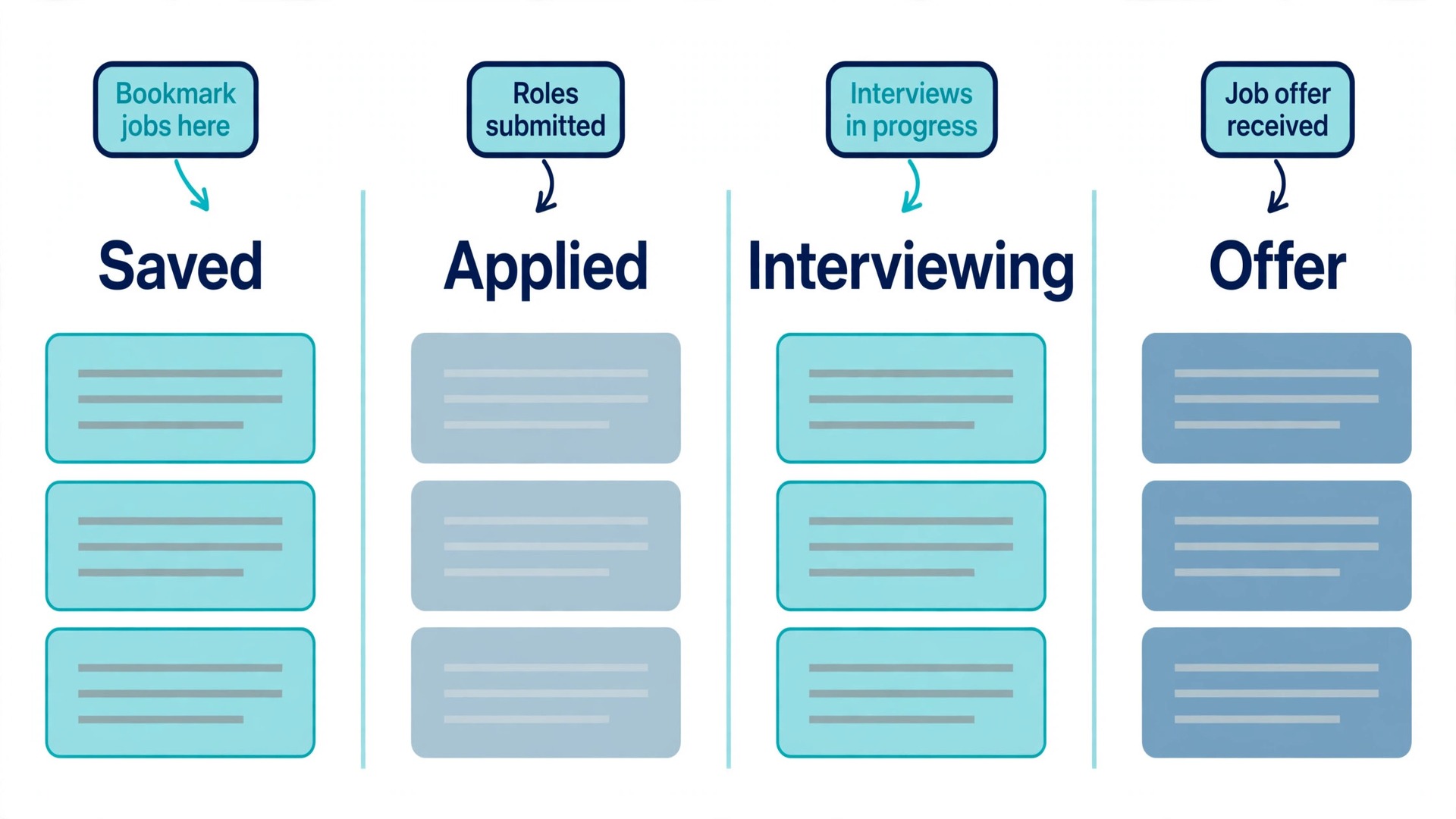
Teal works like a CRM for your search. Save jobs from more than 40 boards with the Chrome extension in one click, drag them through Kanban stages from Saved to Applied to Interviewing to Offer, and get keyword insights per posting, contact tracking and follow-up reminders with more than 40 email templates. The resume builder stores many versions of your resume and compares each one against a saved posting, so tailoring stays inside the same tool as tracking.
The weekly plan is the trap to avoid. It renews every 7 days, and left running for a month it costs about 55.71 dollars, almost double the 30-day plan. Buy the 90-day plan if you upgrade, at about 26.33 dollars a month.
The verdict. Unlimited free tracking is genuinely usable without paying, and one-click saving from more than 40 boards removes the data entry that kills searches. Avoid the weekly plan, which costs about 55.71 dollars a month if left running, and upgrade to the 90-day plan only at high volume.
6. Huntr
Huntr is best for relationship-driven searches with many conversations and referrals. The free plan tracks up to 100 jobs and gives unlimited contacts, unlimited autofills, unlimited base resumes with PDF export, 2 tailored resumes and 2 application packets. Pro costs 40 dollars a month on monthly billing, 90 dollars a quarter, or 160 dollars every 6 months, which works out to about 26.66 dollars a month.
Huntr’s edge over Teal is the contact layer, with separate views for jobs, contacts and interviews, metrics that reveal where your pipeline stalls, and a map view. If your strategy is referrals and warm introductions, and it should be, because that is how most roles actually fill, Huntr tracks the humans, not just the postings. Pro adds unlimited AI tailored resumes and cover letters, unlimited AI resume reviews with role-targeted critique, and full keyword visibility in job matching.
The honest limit is the price. Pro at 40 dollars a month is the most expensive mainstream tracker, and the free tier caps at 100 tracked jobs, which an active searcher hits in three to four weeks. The 6-month plan is the real price, so do not judge Huntr on the monthly rate alone.
The verdict. The contact and interview tracking is the best in the category, and the metrics show where your pipeline stalls. Pro at 40 dollars a month is the most expensive mainstream tracker, so pick Huntr when networking is your main channel and use Teal otherwise.
Stage 4: Walk Into Interviews Ready
Interviews are where preparation shows. Candidates who rehearse sound calm, specific and structured, while the rest ramble and forget their best examples. The two tools in this stage cover both ends of that gap, one free and one expensive, and the free one comes first.
7. Final Round AI
Final Round AI is best for candidates who freeze on live questions and want practice with feedback before the real thing. The pricing needs careful reading, because the numbers on the site do not all agree. The plan grid lists a Monthly Plan at 150 dollars a month, a Quarterly Plan at 83.33 dollars a month billed as about 250 dollars per quarter, a Yearly Plan at 25 dollars a month billed as about 300 dollars upfront, and a Premium MAX Plan at 41.67 dollars a month billed as about 500 dollars a year. The monthly plan is explicitly non-refundable, and the annual and quarterly plans carry a 72-hour refund window.
Older roundups list different tier names, Plus at 148 dollars, Pro at 96 dollars and God Mode at 81 dollars, and those names no longer match the current plan grid, so ignore any review that quotes them.
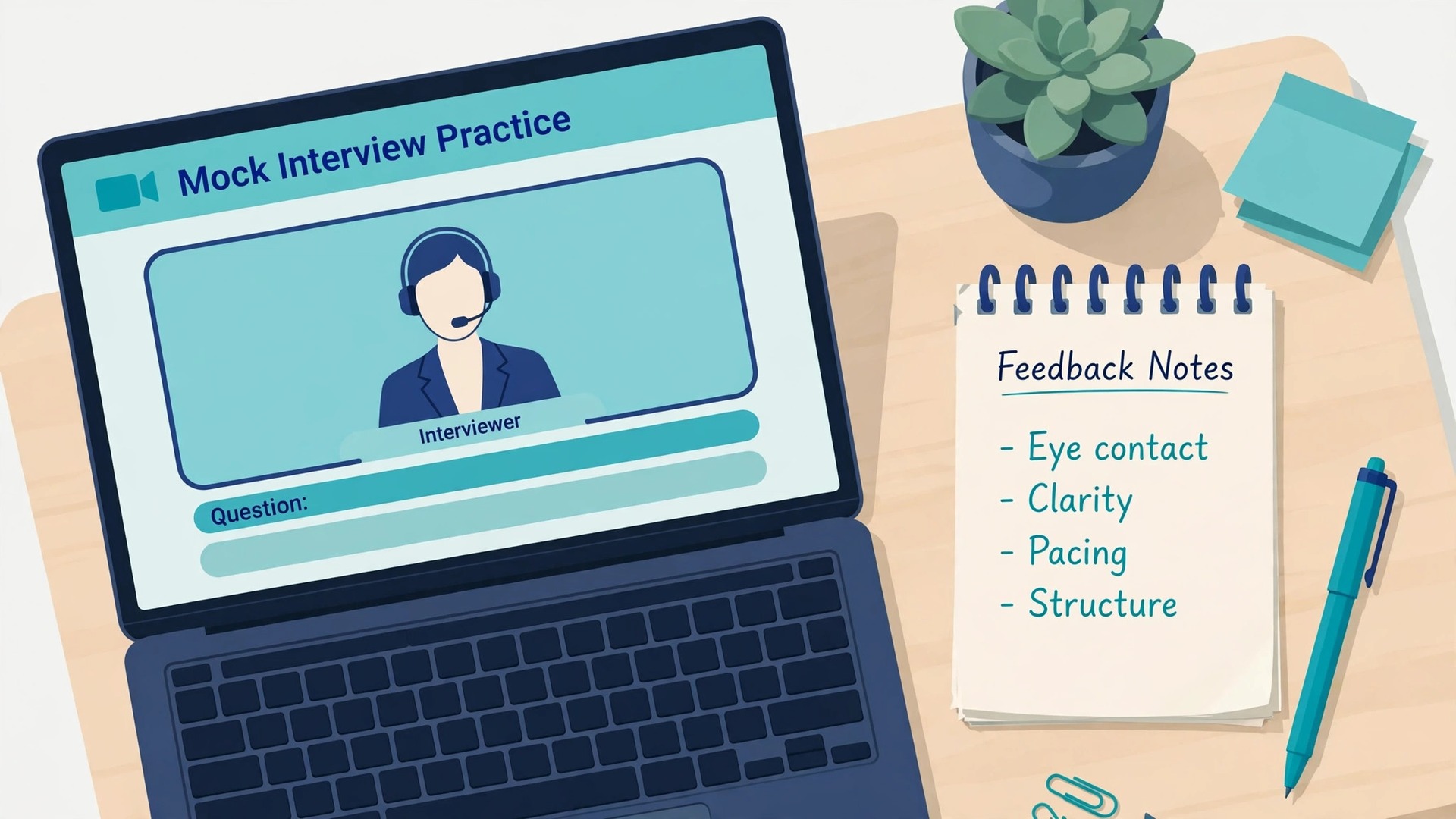
The product does two things. It runs AI mock interviews where the AI asks questions and grades your answers, and an Interview Copilot that listens during a real video interview and shows suggested answers on screen. The mock mode is the part worth paying for. It steadies nerves, structures rambling responses and drills the STAR framing most candidates fail at under pressure. The desktop app also covers coding and system design screens.
The free plan needs flagging. The pricing grid lists unlimited mock interviews on the free plan, but the FAQ says practice sessions require an active subscription, and testers could not reach practice on a free account. Treat the free plan as a trial of a few minutes, not as a working product. The live Copilot carries an ethics note too. Some employers consider live AI assistance cheating, so check the company’s stated policy first, because getting an offer revoked is not worth a marginal edge.
The verdict. The mock interviews genuinely help with structure under pressure, but the 150 dollar monthly plan is six times the yearly rate and cannot be refunded, and the free plan does not do what the grid implies. Buy the mocks for one month or one quarter, only when interviews are booked.
8. Google Interview Warmup
Google Interview Warmup is best for everyone, because it is free, structured and immediate. There is no paid tier and no account trick. You pick a field, including data analytics, IT support, project management, UX design and e-commerce, and it gives you practice questions with feedback on your answers, covering specifics, structure and the job-related terms you should be using.
Warmup works because it is boring in the right way. It asks one question at a time, lets you answer by voice or text, and shows you what your answer covered and what it missed. Ten sessions of this outperform most paid prep, and it pairs well with a voice-mode session in ChatGPT or Claude, where you can ask it to play hiring manager and critique your answers.
The honest limit is that Warmup gives you no real-time help during a live interview, which is mostly fine, because live help is the riskiest part of this category. It also gives you no company-specific questions, so pair it with Perplexity research before a final round.
The verdict. Free, unlimited and immediate, with feedback that names what to fix, and it pairs well with a voice chatbot. There is no live-interview help and no company-specific prep, so use it as the baseline before paying for anything else.
Stage 5: Research the Company, Then Name Your Price
The last stage decides whether the offer is good. Candidates who know the company’s business model and recent news sound like insiders, while candidates who name a salary without data leave money on the table. The two tools here cover both halves for 20 dollars a month at most.
9. Perplexity
Perplexity is best for pre-interview briefs in 10 minutes. The free tier is generous, with unlimited basic searches and a few Pro Searches a day. Sources differ on the exact free allowance, with one October 2026 check listing 3 Pro Searches a day and another listing 5, so take the lower number as the safe one.
Pro costs 20 dollars a month or 200 dollars a year, which works out to about 16.67 dollars a month, though some pages round the annual figure to 17 dollars a month. A Max plan at 200 dollars a month exists for heavy agent work and is not relevant to a job search. Students can get Education Pro for 10 dollars a month with SheerID verification.
Ask Perplexity to summarise a company’s business model, recent funding and news, and biggest challenges in 2026, and you get a cited brief, not vibes. Citations let you verify before you quote a number in the interview room, which is the whole point. Pro adds model choice, Deep Research, file uploads and image generation, and the paid allowances are unpublished and have been cut without a price change, so do not buy Pro for a number you cannot see.
The honest limit is verification. Perplexity still gets funding figures and executive facts wrong often enough that you should check anything you plan to say out loud against a primary source. Treat it as the fastest first draft of a company brief, never as the final word.
The verdict. Cited answers, fast, and the free tier suffices for most searches, with Deep Research on Pro genuinely useful for final rounds. Verify funding and executive facts on primary sources, and remember the paid allowances are unpublished.
10. ChatGPT
ChatGPT is best for negotiation prep and for interview role-play. The free tier is enough for most of this stage. Plus costs 20 dollars a month and adds faster responses, more capable models and voice mode. Claude Pro costs the same 20 dollars a month and works as a direct alternative, so pick whichever chatbot you already use.
The workflow has three steps. First, research the band. Ask Perplexity for the salary range for your role and city in 2026, then cross-check Levels.fyi, Glassdoor and Payscale, because salary data from any single AI can lag. Second, role-play. Paste the offer into ChatGPT and say, you are the recruiter, I will practise countering at this number, push back realistically, then coach me after. Third, draft the counter email. The AI writes the structure and you add the human specifics, the competing timeline and the project you are excited about.
The same tool doubles as interview practice. A voice-mode session where the chatbot plays hiring manager and critiques your answers is the cheapest mock interview that exists, and ten sessions of it, paired with Google Interview Warmup, outperform most paid prep.
The verdict. Free for the core use, and one hour of negotiation role-play is the highest-ROI hour of your entire search. Salary data can lag the market, so verify on dedicated salary sites before you name a number, and tell the chatbot to push back.
The Full Comparison Table
This table puts the 10 best ai tools for job seekers side by side, with the free tier, the honest paid price and the best fit at a glance. Prices were checked in October and November 2026.
| Tool | Stage | Free tier | Paid from | Best for |
|---|---|---|---|---|
| Simplify Copilot | Find roles | Full core free | Simplify+ varies | High-volume applicants |
| LinkedIn Premium Career | Find roles | Limited | 39.99 dollars a month | LinkedIn-centric fields |
| Rezi | Documents | 1 resume, 3 PDF downloads | 29 dollars a month | ATS-proof resumes |
| Kickresume | Documents | 4 basic templates | 24 dollars a month | Resume plus cover letter |
| Teal | Tracking | Unlimited tracking | 29 dollars a month | Most job seekers |
| Huntr | Tracking | 100 jobs, unlimited contacts | 40 dollars a month | Referral-driven searches |
| Final Round AI | Interview prep | Trial only in practice | 150 dollars a month | Nervous interviewees |
| Google Interview Warmup | Interview prep | Fully free | Free | Structured practice |
| Perplexity | Research | Generous | 20 dollars a month | Fast company briefs |
| ChatGPT | Negotiation | Free tier | 20 dollars a month | Scripts and role-play |
What a 90-Day Search Really Costs
The best ai tools for job seekers are cheap compared with a month of lost salary, but the bill still adds up if you buy everything monthly. These three stacks use real prices, and the 90-day window matches a realistic search length.
| Stack | What you buy | 90-day cost |
|---|---|---|
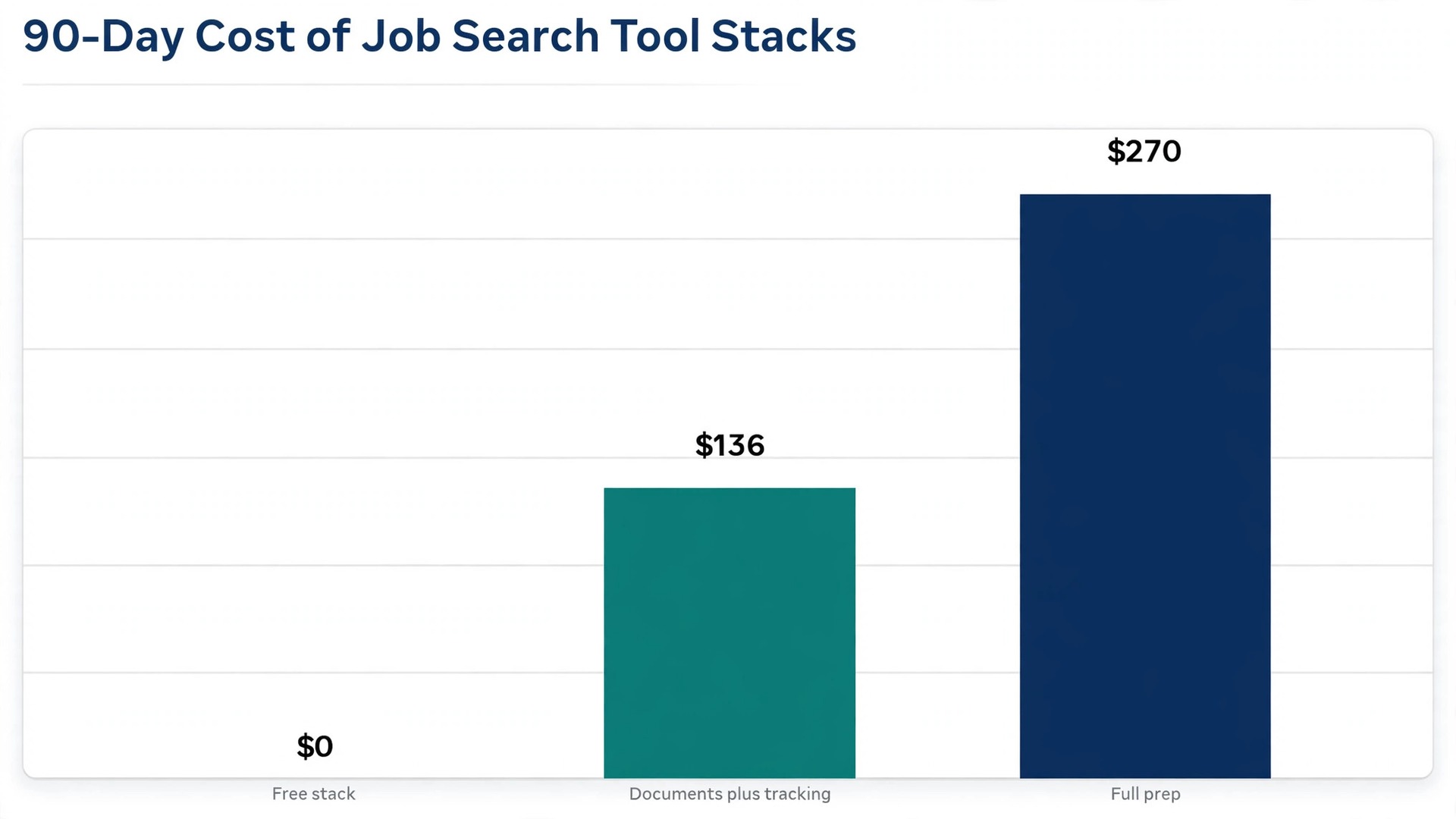
| Free stack | Simplify, Teal free, Perplexity free, Interview Warmup, ChatGPT free | 0 dollars |
| Documents plus tracking | Rezi Pro quarterly 57 dollars, Teal+ 90-day plan 79 dollars | 136 dollars |
| Full prep | Final Round AI one month 150 dollars, Perplexity Pro 3 months 60 dollars, ChatGPT Plus 3 months 60 dollars | 270 dollars |
The free stack is the honest default. It covers every stage for zero dollars, and most candidates should run it for the first month before spending anything. Add the documents stack when tailoring at volume, and full prep only when interviews are booked. The most expensive mistake is buying Final Round AI and LinkedIn Premium monthly and forgetting both.
The 30-Day Workflow
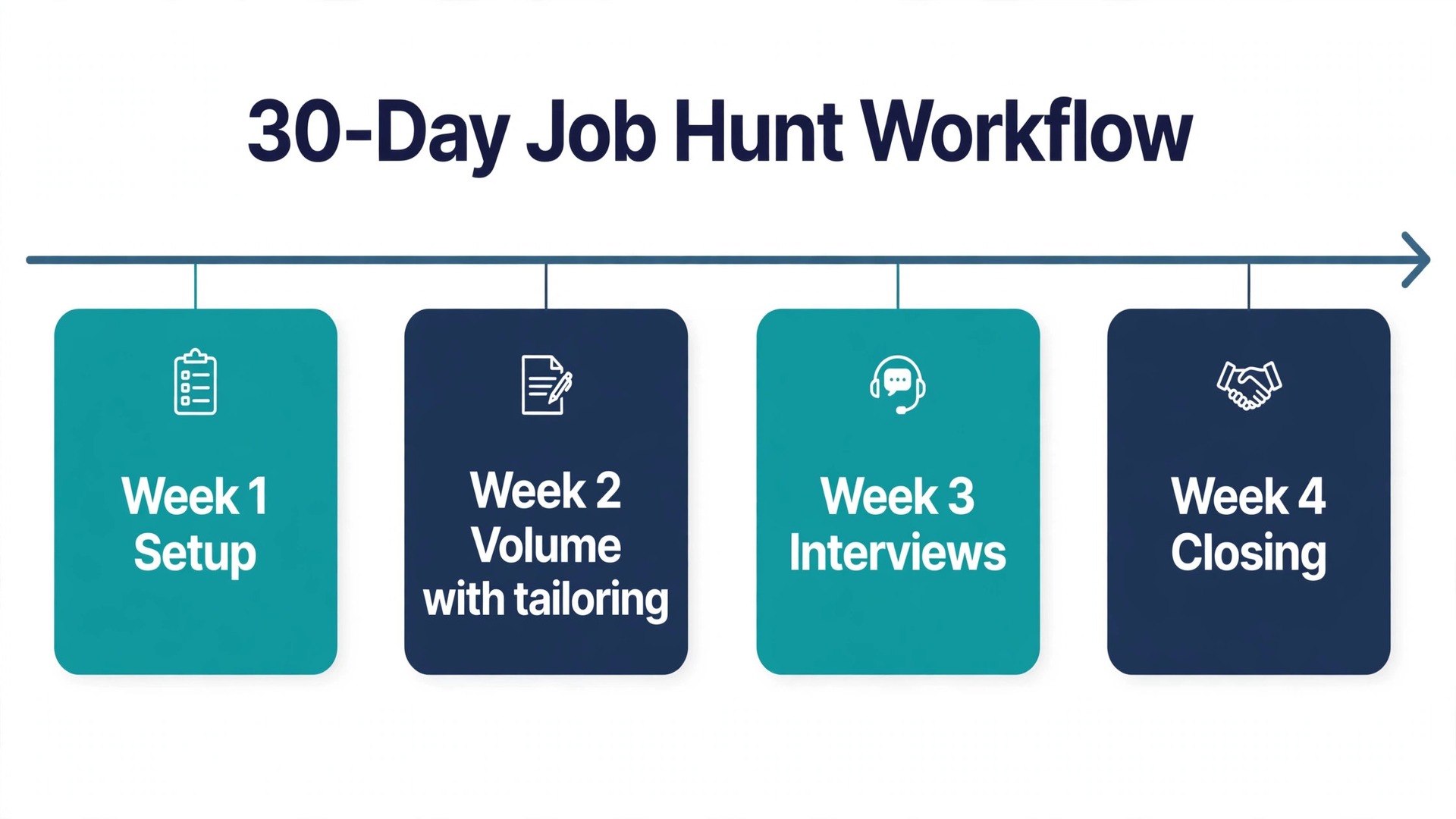
The best ai tools for job seekers only work as a system, so here is the month that puts them together, with each week named so there is nothing to guess.
Week 1 is setup. Install Simplify Copilot and save 20 roles that fit. Build your base resume in Rezi on the free plan, then tailor it for your 5 best-fit roles. Set up Teal and move every application onto the board. Research your top 3 companies in Perplexity.
Week 2 is volume with tailoring. Apply to 15 roles using Simplify autofill and Rezi tailoring, and log every one in Teal. Run one Google Interview Warmup session a day. Review your Teal board every evening and follow up on anything older than 7 days.
Week 3 is interviews. Book Final Round AI for one month only when the first interviews land, and practise the exact roles you are interviewing for. Keep applying to 10 fresh roles. Use Perplexity to brief every company that invites you, and rehearse one answer out loud per day.
Week 4 is closing. Role-play the offer in ChatGPT before you answer it, cross-check the salary band on Levels.fyi and Glassdoor, and draft the counter email before you send it yourself. Cancel every subscription the day the search ends, starting with the monthly ones.
How to Choose (and What to Skip)
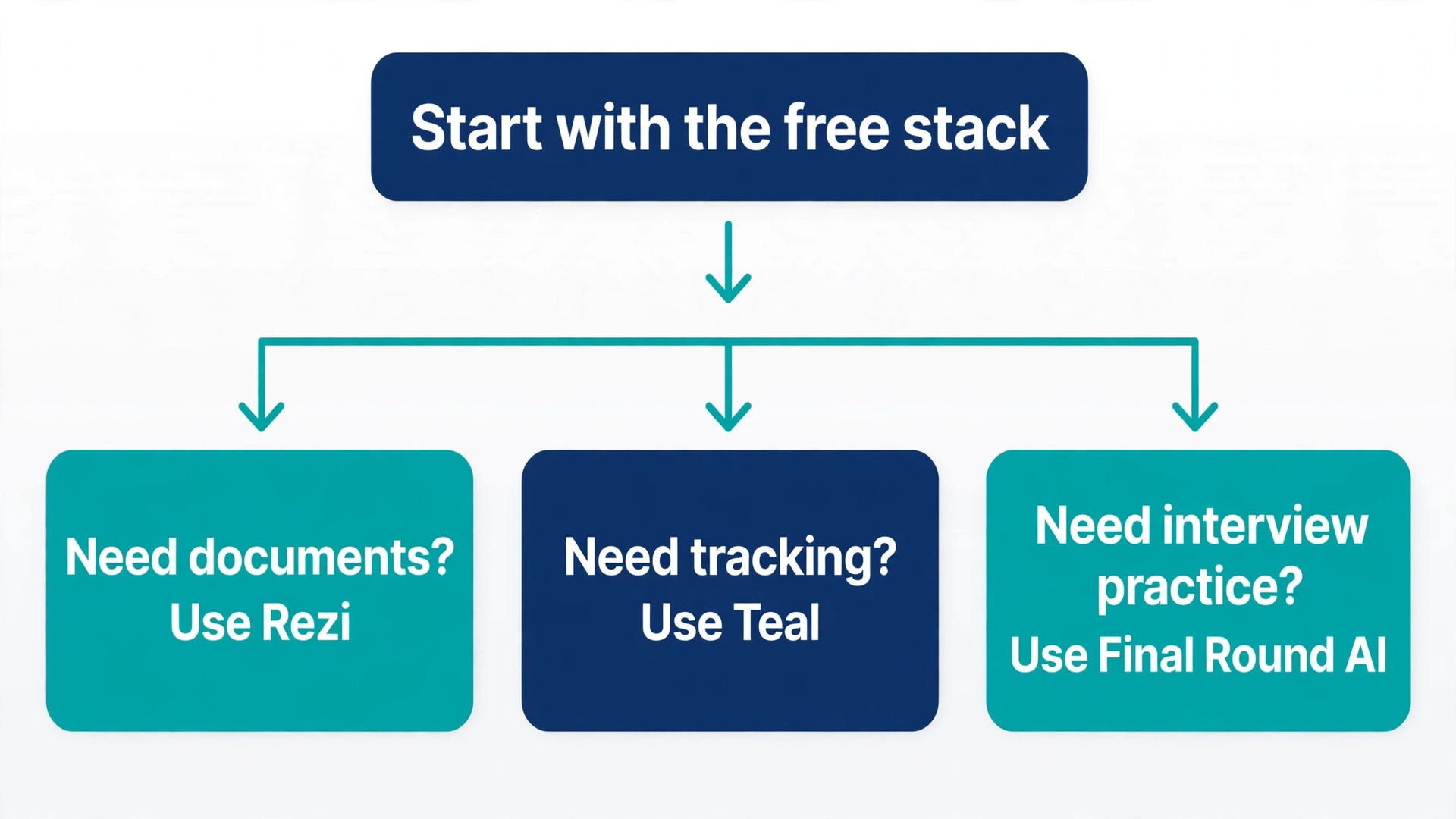
Choosing the best ai tools for job seekers for your situation is simpler than the price pages make it look. Start with the free stack and add one paid tool at a time, only when a specific stage is failing. If applications are slow, add Simplify. If callbacks are low, add Rezi. If the pipeline is chaos, add Teal+. If interviews are the problem, add Final Round AI for one month. Never buy for a stage you have not reached yet.
Skip three things. Skip Jobscan Premium, because the 5 free scans a month are enough for most people and the 49.95 dollar monthly price is the steepest here. Skip auto-apply bots, because callback data favours tailored applications. Skip any tool that bills weekly without a longer plan, because the weekly rate is priced to catch the desperate.
Watch for red flags in any job tool. Guaranteed-interview claims, beat-the-ATS score promises, and trials that silently convert to paid plans are all signs to walk away. Prices move by country, by promotion and by account, so the only number that counts is the one on your own checkout screen.
Frequently Asked Questions
What is the best AI tool for job seekers on a zero budget?
The free stack in this guide. Simplify Copilot for matching and autofill, Teal free for tracking, Perplexity free for research, Google Interview Warmup for practice, and ChatGPT free for negotiation scripts.
Do I need a paid tool at all?
Most candidates do not. Paid tiers buy speed and volume, not better outcomes. The first paid tool worth buying is Rezi Pro for one quarter, and only when you are tailoring applications at volume.
Which tool is best for salary negotiation?
ChatGPT Plus for one month. Research the band on Perplexity, cross-check Levels.fyi and Glassdoor, then role-play the counter with the chatbot pushing back before you draft the email.
Are AI interview copilots cheating?
Mock interview practice is unambiguously fine everywhere. Live AI assistance during a real interview is a grey area, and some employers explicitly forbid it. Check the company’s stated policy first, and never read suggested answers verbatim.
Should I pay for LinkedIn Premium while job hunting?
Buy one month when you are actively applying in a LinkedIn-centric field, then cancel. The 39.99 dollar monthly price is steep for a long search, and the value collapses if your field does not hire through LinkedIn.
Verdict
The best ai tools for job seekers in 2026 are the ones that remove work, not the ones that promise outcomes. Simplify removes form filling. Teal removes chaos. Rezi removes guesswork from documents. Perplexity removes blank-page research. Final Round AI and Interview Warmup remove the fear of the interview room. Start with the free stack, pay for one tool at a time when a stage fails, and cancel everything the day the search ends.