
Tip jar donation tool pricing for creators is a stack of small fees, and this guide prices the whole stack for 8 tools, so you can see what a tip is really worth before you pick a tip jar.
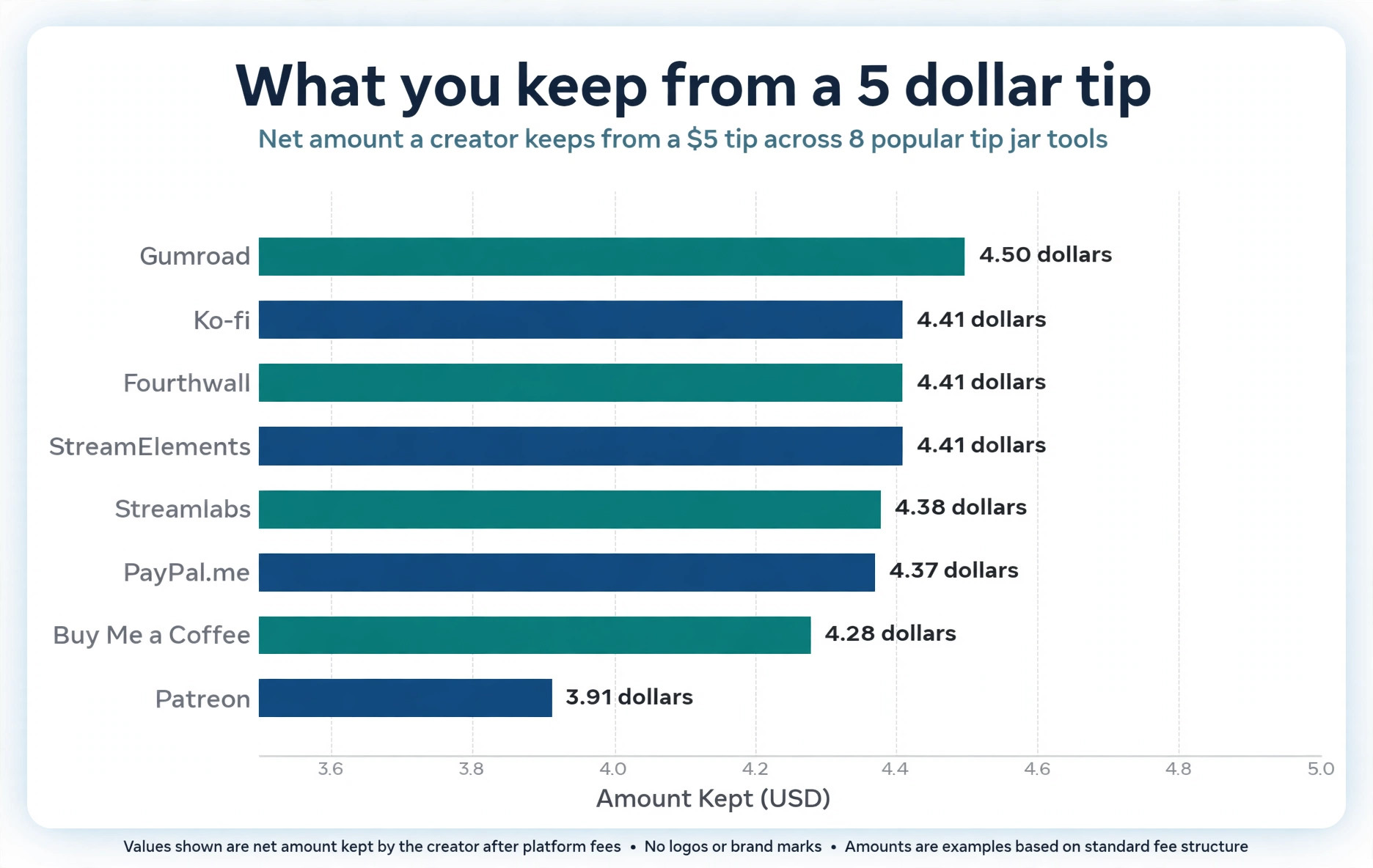
Ko-fi Free is the best tip jar for most creators, because it takes no platform fee, pays out instantly to PayPal or Stripe, and keeps about 4.41 dollars of a 5 dollar tip, the highest net of the 8 tools in this guide. Streamlabs is the better choice for streamers, because the tip jar is free and the alerts are built in. Patreon is the pick only when you run a real membership business with tiers and gated content, because the 10 percent fee only pays for itself there.
The headline fee is the lie most creators believe. A tool that advertises 0 percent takes nothing as a platform fee, but the card processor still takes about 2.9 percent plus 30 cents. A tool that advertises 5 percent also charges processing on top, plus a payout fee, plus a surcharge for international payments and another for subscriptions. A tool that advertises 10 percent with processing included can be cheaper than a tool that advertises 5 percent with processing on top. The only number that matters is the net amount in your bank account, and this guide works it out for a 5 dollar tip, a 10 dollar tip and 500 dollars a month in tips.
The second number that matters is when the money arrives. Ko-fi, Buy Me a Coffee, Streamlabs and PayPal.me pay instantly or within days, because the money goes straight to your PayPal or Stripe account. Patreon pays monthly, on the 5th of the next month. Gumroad pays weekly with a 7 day hold. Fourthwall pays monthly with a 25 dollar minimum. A creator who needs the money for rent cares about payout speed as much as about the fee, and a creator who earns 40 dollars a month cares about the minimum payout most of all.
How Tip Jar Pricing Works
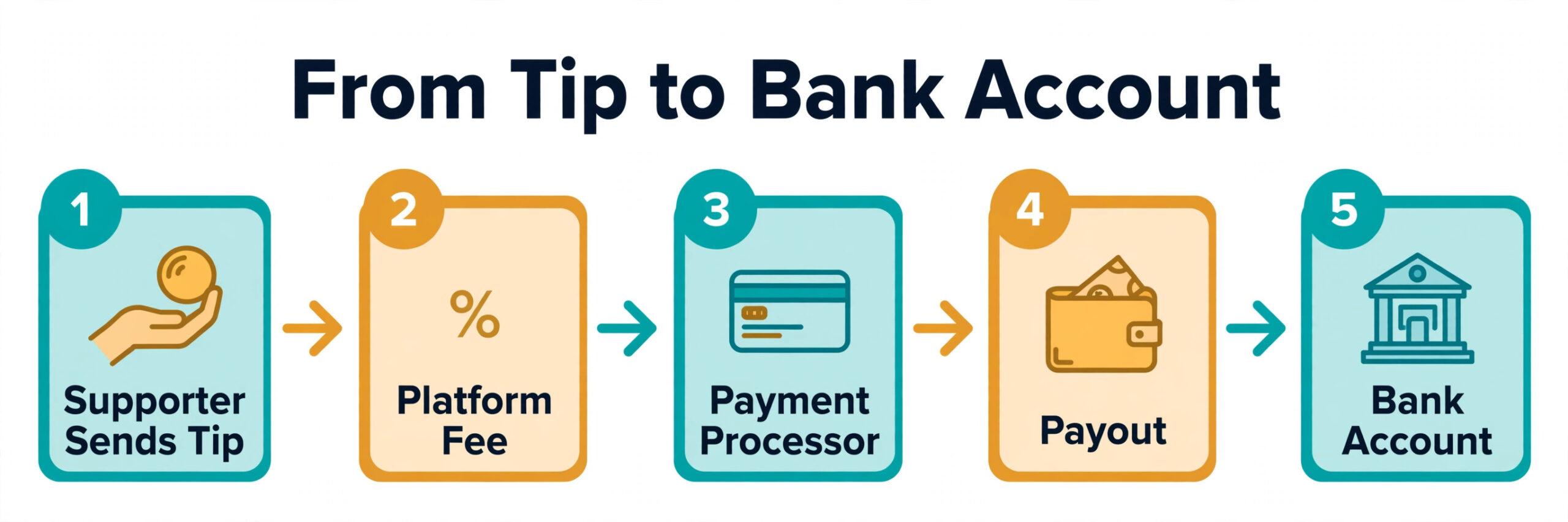
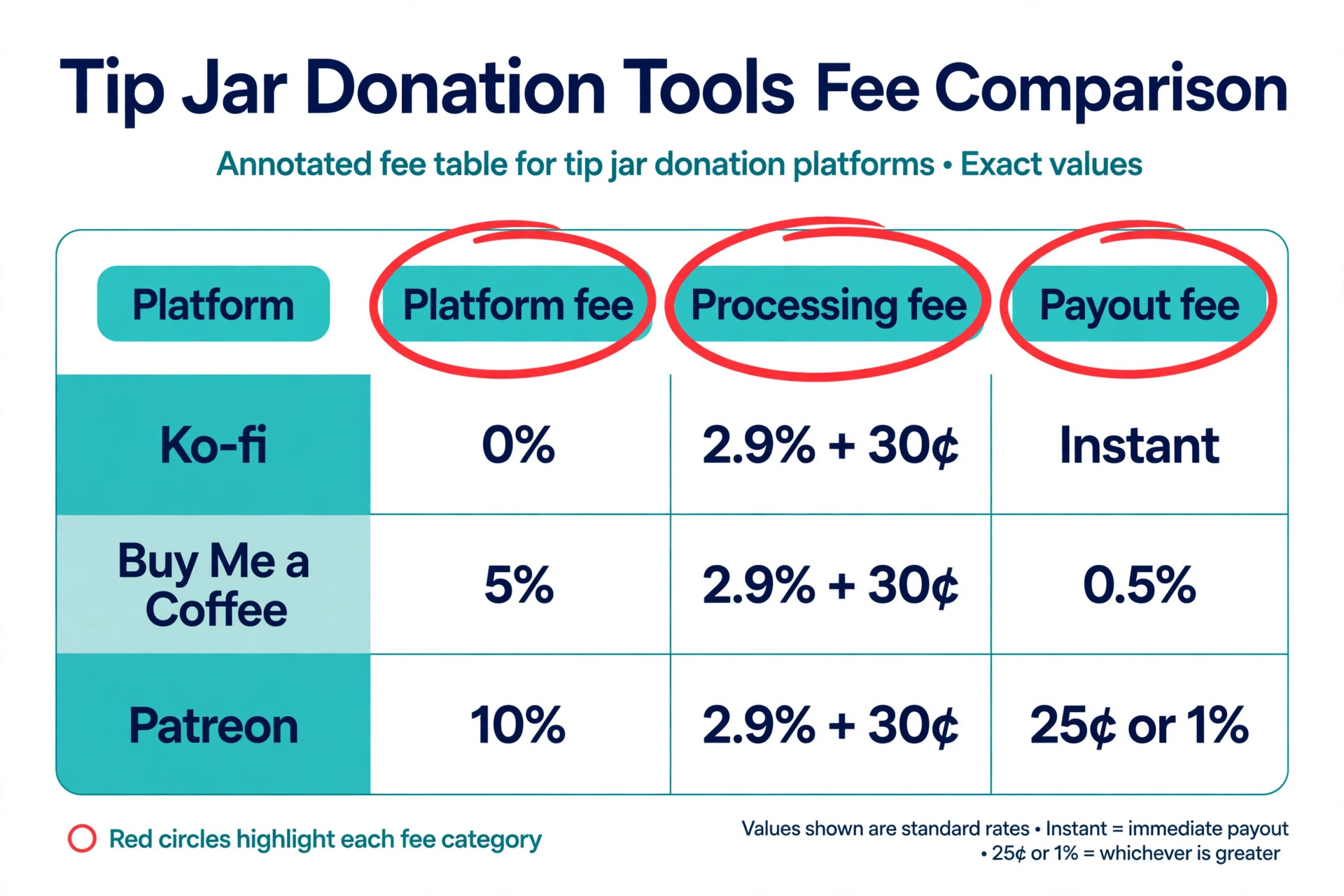
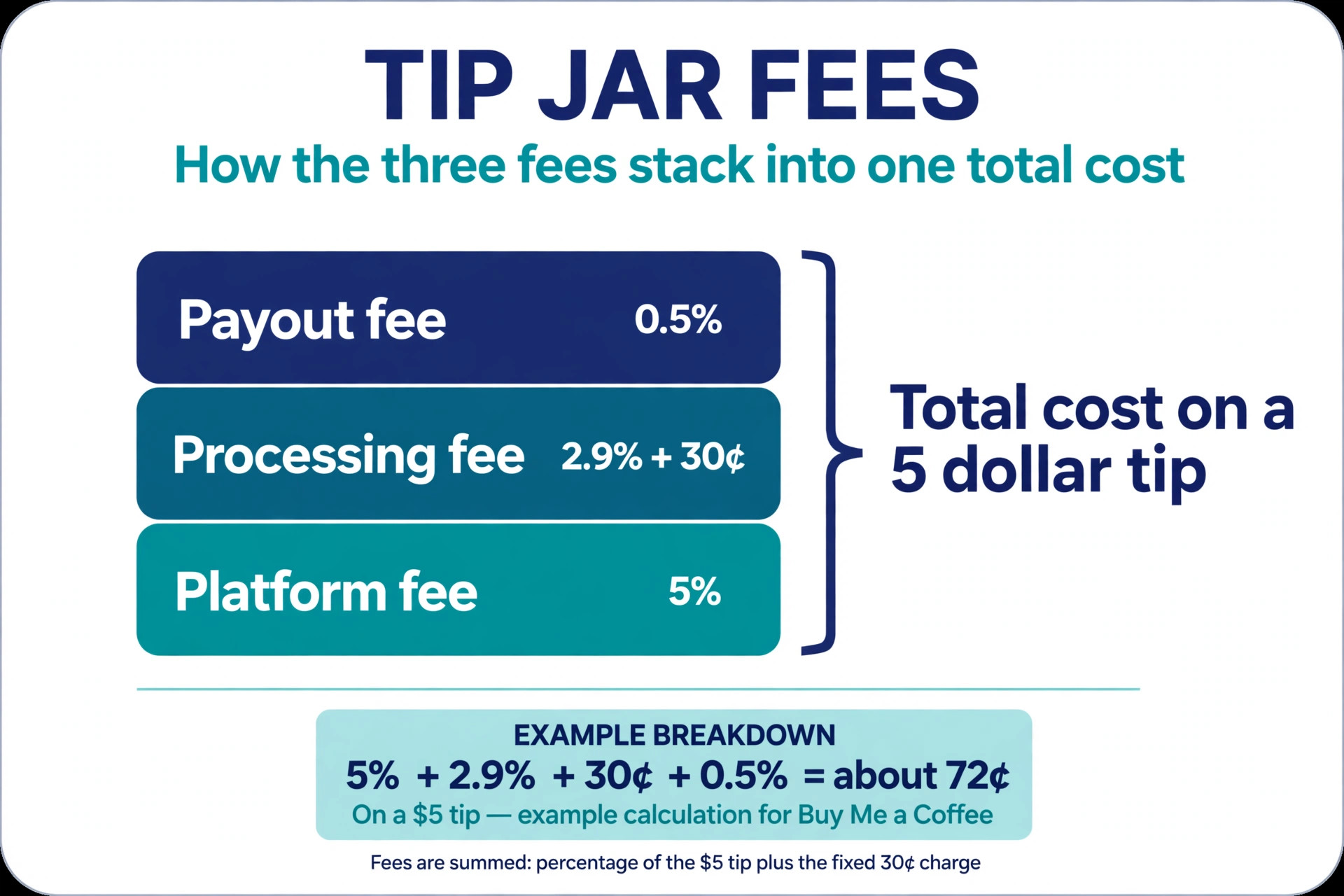
Every tip passes through three hands before it reaches you. The first hand is the platform, which charges a platform fee as a percentage of the tip, or a flat monthly subscription, or nothing at all. The second hand is the payment processor, usually Stripe or PayPal, which charges about 2.9 percent plus 30 cents per transaction in the United States. The third hand is the payout, which can carry its own fee, a percentage for a bank transfer, a flat fee for a PayPal withdrawal, or a minimum balance before anything moves.
The order matters. Some platforms charge their percentage first and then the processor charges on the full amount. Some charge the processor first and then take their percentage from what is left. The difference is a few cents per tip, but a creator who receives 100 tips a month loses a few dollars to the order alone. The surcharges matter more. Buy Me a Coffee adds 1 percent for an international transaction and 0.5 percent for a subscription payment. Streamlabs charges a 2 percent currency exchange fee when the donor pays in a different currency. Patreon adds 10 cents per pledge under 3 dollars on some plans.
The monthly subscription is the other model. Ko-fi Gold costs 12 dollars a month, or 8 dollars a month billed annually, and removes the platform fee on everything. Fourthwall Pro costs 19 dollars a month and drops the digital product fee to zero, while tips stay at zero on both plans. A subscription only saves money when the monthly revenue is high enough to cover it, and this guide works out the break even point for each one.
Fee Breakdown for a 5 Dollar Tip and 500 Dollars a Month
| Tool | Platform fee | Processing | Payout fee | You keep from a 5 dollar tip | You keep from 500 dollars a month |
|---|---|---|---|---|---|
| Ko-fi Free | 0 percent on tips | 2.9 percent plus 30 cents | None | 4.41 dollars | 470.50 dollars |
| Ko-fi Gold | 0 percent, 12 dollars a month | 2.9 percent plus 30 cents | None | 4.41 dollars | 458.50 dollars |
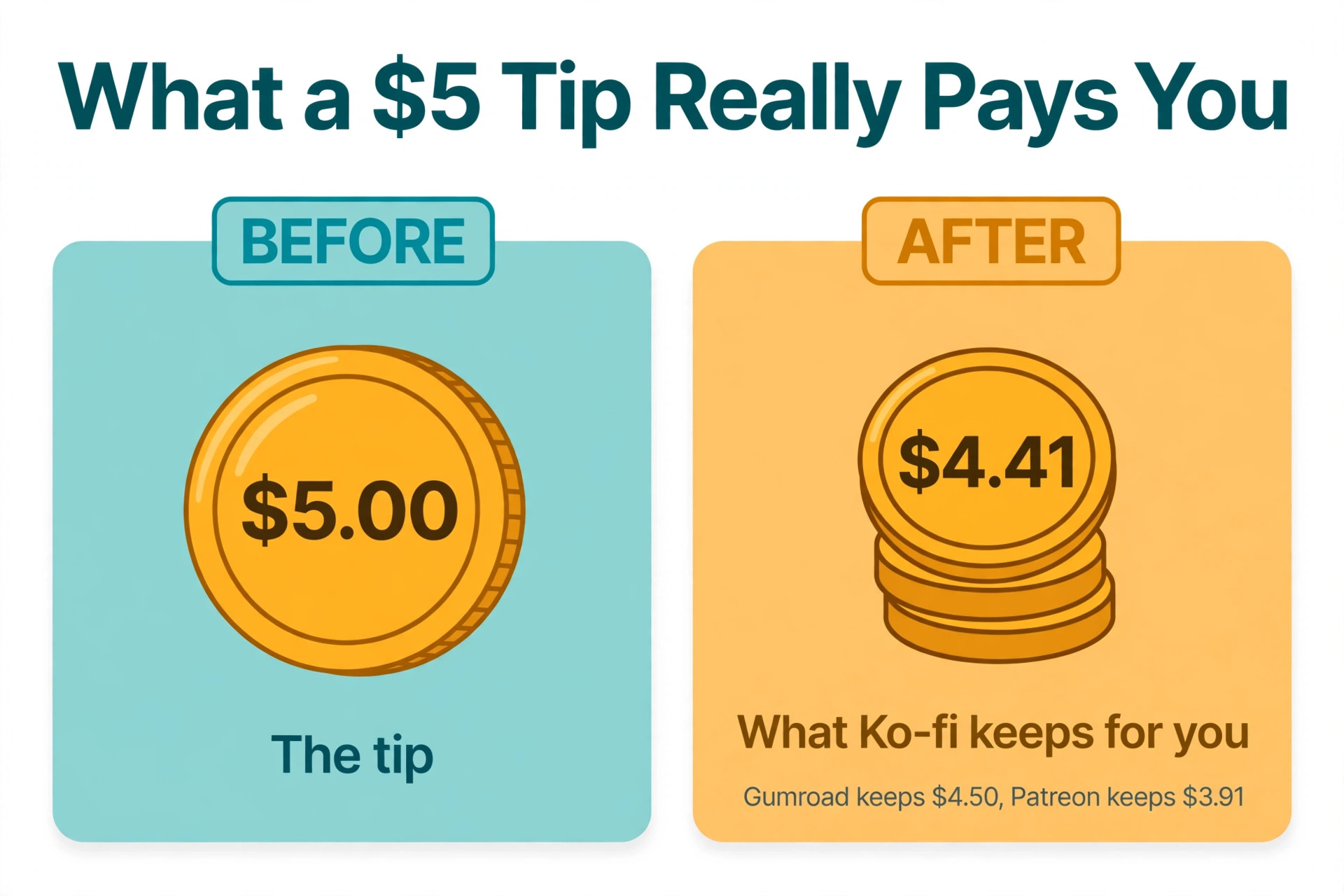
| Buy Me a Coffee | 5 percent | 2.9 percent plus 30 cents | 0.5 percent | 4.28 dollars | 445.50 dollars |
| Patreon standard | 10 percent | 2.9 percent plus 30 cents | 0.25 dollars per payout | 3.91 dollars | 425.50 dollars |
| Streamlabs | 0 percent | 2.9 percent plus 30 cents | 0.5 percent under 2,000 dollars | 4.38 dollars | 468.00 dollars |
| Gumroad | 10 percent, processing included | Included | None, 10 dollar minimum | 4.50 dollars | 450.00 dollars |
| Fourthwall Free | 0 percent on tips | 2.9 percent plus 30 cents | None, 25 dollar minimum | 4.41 dollars | 470.50 dollars |
| PayPal.me | 0 percent | 2.89 percent plus 49 cents | None | 4.37 dollars | 460.50 dollars |
Read the table in two ways. This is the core of tip jar donation tool pricing for creators, the net, not the headline. For a single small tip, Gumroad keeps the most, because 10 percent with processing included beats 5 percent plus processing on a 5 dollar payment, where the 30 cent fixed fee hurts most. For 500 dollars a month, Ko-fi Free and Fourthwall Free keep the most, because the 30 cent fee matters less on larger payments and the zero platform fee wins. Ko-fi Gold only beats Ko-fi Free when monthly revenue passes 240 dollars, because 12 dollars divided by 5 percent is 240 dollars. Below that, the free plan is cheaper.
The payout column is where small creators lose money they never see. Gumroad holds each sale for 7 days and pays weekly with a 10 dollar minimum. Patreon pays monthly, and a new creator can wait 30 to 60 days for the first payout while Patreon holds funds. Ko-fi, Buy Me a Coffee, Streamlabs and PayPal.me pay to your own PayPal or Stripe account, so the money is yours as soon as the processor clears it.
Tip Jar Donation Tool Pricing for Creators, Explained by Platform
The 8 tools below fall into three groups. The first group is tip first tools, built for one off tips and simple memberships. The second group is membership first tools, built for recurring monthly support with tiers and gated content. The third group is commerce and streaming tools, where the tip jar is one feature inside a larger shop or streaming setup.
1. Ko-fi
Ko-fi is the cheapest tip jar for most creators, and the reason is simple. The free plan charges 0 percent platform fee on one off tips, so the only cost is PayPal or Stripe processing at about 2.9 percent plus 30 cents. A 5 dollar tip nets about 4.41 dollars. A 10 dollar tip nets about 9.41 dollars. A creator earning 500 dollars a month in tips keeps about 470.50 dollars, which is more than any other tool on this list except Fourthwall, which matches it.
Ko-fi Gold costs 12 dollars a month, or 8 dollars a month billed annually, and removes the platform fee on everything, including memberships, shop sales and commissions, where the free plan charges 5 percent. The break even point is 240 dollars a month in revenue, because 12 dollars divided by 5 percent is 240 dollars. A creator earning less than that should stay on the free plan. A creator earning more should buy Gold and keep the 5 percent.
One warning matters. New Ko-fi accounts start with Contributor status switched on, which puts a 5 percent fee on tips until the creator finds the switch and turns it off. Payouts are instant to PayPal or Stripe, there is no minimum payout, and there is no monthly fee on the free plan.
2. Buy Me a Coffee
Buy Me a Coffee is the simplest all round tip jar, with one clean page for one off tips, memberships and digital goods in a single dashboard. Setup takes under ten minutes, supporters understand the coffee metaphor without explanation, and payouts go straight to a Stripe account, so the money arrives fast. For a creator who wants one page that does everything without configuration, this is the easiest tool on the list.
Pricing is a flat 5 percent platform fee on all transactions, plus Stripe processing at about 2.9 percent plus 30 cents, plus a 0.5 percent payout fee, plus 1 percent for international transactions and 0.5 percent for subscription payments. A 5 dollar tip from a supporter in the United States costs about 72 cents all in, which is 14.4 percent rather than 5 percent. A 5 dollar tip nets about 4.28 dollars. A creator earning 500 dollars a month keeps about 445.50 dollars, which is 25 dollars less than Ko-fi Free.
The trade off is that the 5 percent is unavoidable. There is no paid plan that removes it, no monthly subscription that replaces it, and no way to pass the fee to the supporter by default, because the setting that decides who pays the processing fee is switched to the creator on signup. Buy Me a Coffee is still a good tool, and the simplicity is real, but a creator who earns more than 240 dollars a month pays less on Ko-fi Gold.
3. Patreon
Patreon is the membership platform, and the most expensive tip jar on this list for one off tips. New pages pay a standard 10 percent platform fee, plus processing at 2.9 percent plus 30 cents for cards, and payout fees of 25 cents per direct deposit or 1 percent through PayPal. A 5 dollar tip nets about 3.91 dollars. A creator earning 500 dollars a month keeps about 425.50 dollars, which is 45 dollars less than Ko-fi Free. Older pages may keep legacy rates of 5 or 8 percent, so check the rate on your own page before you compare.
The reason creators still use Patreon is the membership tooling. Tiered subscriptions, gated content, free trials, special offers, merch for members and a built in audience that already expects to pay monthly are stronger here than on any other tool on this list. A creator who only wants a tip jar gets none of that value and pays the highest fee.
Payouts are monthly, on the 5th of the next month, and new creators can wait 30 to 60 days for the first payout while Patreon holds funds. The minimum payout is 1 to 25 dollars depending on the method. Use Patreon when the business is a membership with tiers and gated content. Use Ko-fi or Buy Me a Coffee when the business is a tip jar with occasional memberships.
4. Streamlabs
Streamlabs is the tip jar for streamers, built for Twitch, YouTube and Kick, with overlays, alerts, chatbots and donations in one place. A tip triggers an on screen alert, a sound and a chat message, which is the moment a viewer donates for, and no other tool on this list does the live show as well. Setup connects PayPal in one click, and credit card tips run through Stripe with no platform fee from Streamlabs itself.
Pricing is 0 percent platform fee on tips. Streamlabs takes no cut, and never has. The only costs are the card processor at 2.9 percent plus 30 cents, and a withdrawal fee of 0.5 percent under 2,000 dollars, or a flat 10 dollars above 2,000 dollars, capped at 10 dollars a month for multiple withdrawals. A 5 dollar tip nets about 4.38 dollars. A creator earning 500 dollars a month keeps about 468 dollars. Chargeback protection is optional, and a chargeback costs 15 dollars plus the original tip, which is the processor fee, not a Streamlabs fee.
The trade off is that Streamlabs is a streaming tool first and a tip jar second. A creator who does not stream live gets little value from the overlays and the alerts, and the tip page is simpler than Ko-fi or Buy Me a Coffee. A streamer who already runs Streamlabs for overlays should use its tip jar, because it is free and the alerts are built in.
5. Gumroad
Gumroad is the commerce tool that many creators use as a tip jar, through pay what you want pricing on a digital product. A creator lists a file, a template or a tip with a minimum price of zero, and supporters pay what they choose. The dashboard covers sales, email, discounts and a storefront, so a creator who sells files as well as taking tips gets both in one place.
Pricing is a flat 10 percent on every transaction, and that 10 percent includes payment processing, so there are no Stripe fees on top. A 5 dollar tip nets 4.50 dollars, which is the highest net on a small tip in this guide, because the fixed 30 cent processor fee hurts more than the extra 5 percent on a small payment. A 10 dollar tip nets 9 dollars. A creator earning 500 dollars a month keeps 450 dollars, which is less than Ko-fi Free at 470.50 dollars, because the 10 percent matters more on larger payments.
Payouts are weekly on Fridays with a 7 day hold on each sale, a 10 dollar minimum, and bank payouts that take 2 to 7 business days. PayPal payouts carry a 2 percent fee. Use Gumroad when the creator sells digital products and takes tips in the same store.
6. Fourthwall
Fourthwall is the all in one commerce layer for creators who already have an audience and want to sell merch, digital products, memberships and tips from one branded site. It runs print on demand merch with managed fulfilment, digital downloads, paid memberships and a tip jar, with native links to YouTube, TikTok, Twitch and Discord. A YouTuber with a merch shelf and a tip jar in one checkout will find Fourthwall complete.
Pricing is 0 percent on tips and on self shipped and catalog merch, where the creator keeps the price above the base production cost. Memberships cost 5 percent on the free plan, and digital products cost 5 percent on the free plan. The Pro plan costs 19 dollars a month, or 180 dollars a year, and drops digital products to 0 percent, while memberships stay at 5 percent. Card processing costs 2.9 percent plus 30 cents per transaction. A 5 dollar tip nets about 4.41 dollars, the same as Ko-fi Free.
Payouts are monthly, with earnings from the prior month paid by the 3rd business day through Stripe Connect, a 25 dollar minimum, and no early payouts. A creator earning 20 dollars a month sees nothing until the balance passes 25 dollars. Use Fourthwall when the creator sells merch and memberships alongside tips.
7. PayPal.me
PayPal.me is the simplest tip link in existence, and the pick for a creator who wants no dashboard at all. Create a PayPal.me link, drop it in a video description, a stream bio or a social profile, and supporters send money straight to the PayPal balance. There is no platform fee, no monthly fee, no setup and no learning curve. Everyone already trusts PayPal, and the link works in every country PayPal serves.
Pricing is 0 percent platform fee, with PayPal processing at about 2.89 percent plus 49 cents for domestic transactions, varying by country. A 5 dollar tip nets about 4.37 dollars. A creator earning 500 dollars a month keeps about 460.50 dollars. Payout is instant to the PayPal balance, with no minimum, and the money can be spent or withdrawn from there. The 49 cent fixed fee hurts small tips more than the 30 cent Stripe fee, so a 3 dollar tip nets less here than on Ko-fi.
The trade off is that there is nothing else. No tip page, no memberships, no shop, no alerts, no analytics and no automatic on stream notification, unless PayPal is connected to Streamlabs for the alert. A creator who wants a real tip jar with a page, a goal bar and a thank you message should use Ko-fi or Streamlabs.
8. StreamElements
StreamElements is the second streaming tip tool on this list, and the pick for a streamer who wants cloud based overlays, loyalty systems and tipping without installing software. The tipping page runs in the browser, the overlays run in the cloud, and the loyalty system rewards regular viewers with points they can spend on channel perks.
Pricing is 0 percent platform fee. Tips run through PayPal or through SE.Pay, with PayPal processing fees of about 2.9 percent plus 30 cents. A 5 dollar tip nets about 4.41 dollars through PayPal. Payouts are instant through PayPal, or weekly through SE.Pay. One warning matters. SE.Pay will stop operating on December 31, 2026, after which tips will need to run through PayPal, so a creator who relies on SE.Pay should move to PayPal before that date.
The trade off is the same as Streamlabs, with less polish. StreamElements is a strong streaming toolkit, but a non streamer gets little from it, and the tip page is simpler than Ko-fi. A streamer who already uses StreamElements for overlays and loyalty should use its tip jar.
How to Choose a Tip Jar
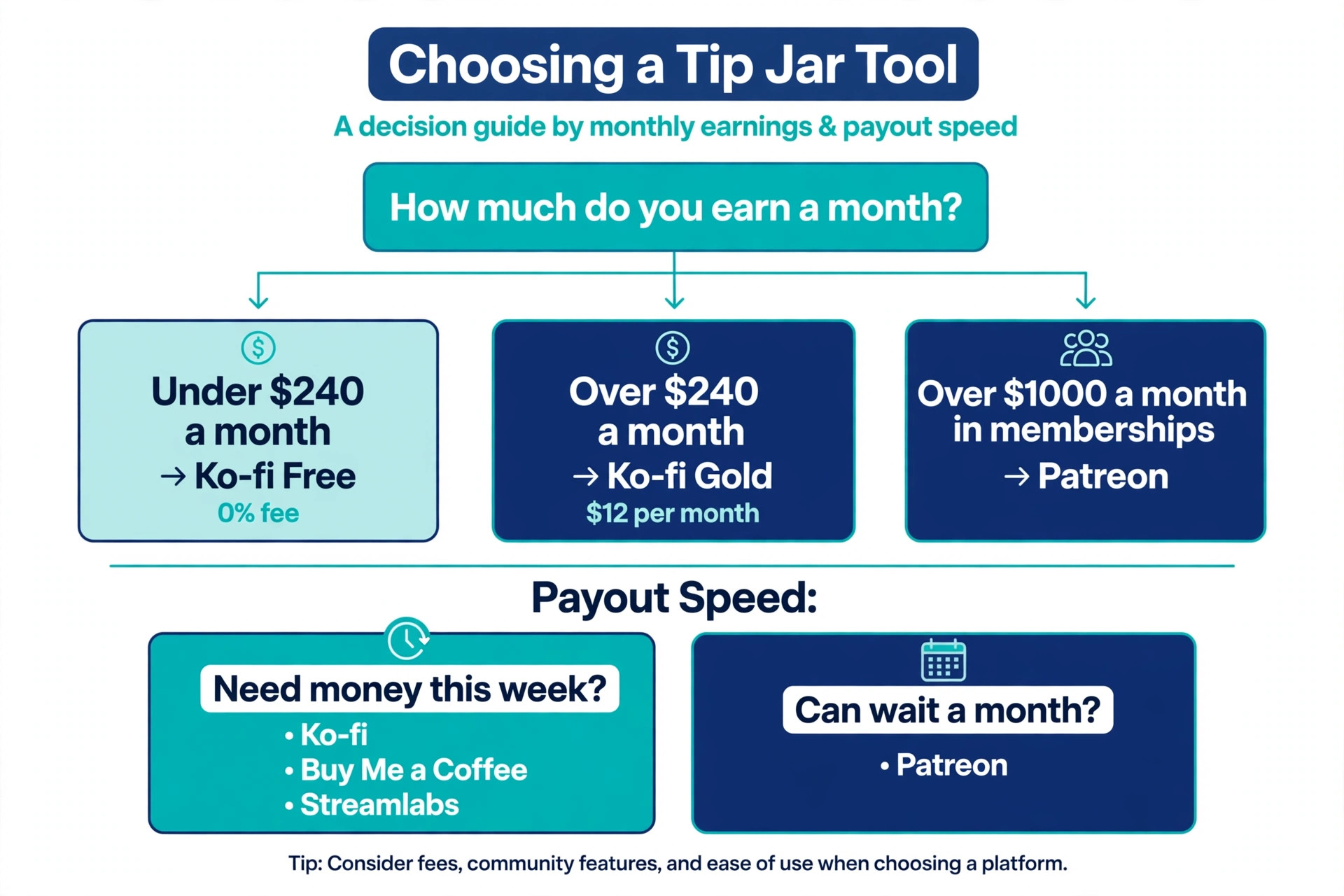
Tip jar donation tool pricing for creators only makes sense when it is matched to monthly earnings. Start with how much you earn. A creator earning under 240 dollars a month should use Ko-fi Free, because the 0 percent platform fee on tips beats every other tool and there is no subscription to cover. A creator earning over 240 dollars a month should buy Ko-fi Gold at 12 dollars a month, because the 5 percent saving on memberships and shop sales covers the subscription. A creator earning over 1,000 dollars a month in recurring memberships should look at Patreon, because the membership tooling earns the 10 percent fee back in retention.
Next, check the payout. A creator who needs the money this week should use Ko-fi, Buy Me a Coffee, Streamlabs, PayPal.me or StreamElements, because the money goes to your own PayPal or Stripe account. A creator who can wait a month can use Patreon or Fourthwall, but should check the minimum payout first. A creator earning 20 dollars a month on Fourthwall sees nothing until the balance passes 25 dollars, and a creator earning 8 dollars a month on Gumroad sees nothing until the balance passes 10 dollars.
Then check the job beyond the tip. A streamer needs alerts, which points to Streamlabs or StreamElements. A seller needs a shop, which points to Gumroad or Fourthwall. A membership business needs tiers and gated content, which points to Patreon. A creator who only needs a tip jar should pick the cheapest tip jar, which is Ko-fi Free, and spend the time saved on making the work supporters want to tip for.
Finally, check the switch that costs money silently. New Ko-fi accounts start with Contributor status on, which puts 5 percent on tips until the creator turns it off. Buy Me a Coffee defaults the processing fee to the creator. Patreon pages published after August 2025 pay the standard 10 percent, while older pages may keep a lower legacy rate. Read your own settings page before you publish the tip link, because the default is rarely the cheapest.
Mistakes That Waste Money
The most common mistake is believing the headline fee, and it is the first trap in tip jar donation tool pricing for creators. A tool that advertises 5 percent can cost 14.4 percent on a 5 dollar tip once processing, payout and international surcharges are added, while a tool that advertises 10 percent with processing included can cost exactly 10 percent. Work out the net on a 5 dollar tip and on 500 dollars a month before you pick, because the two numbers rank the tools differently.
The second mistake is paying a subscription before the revenue covers it. Ko-fi Gold at 12 dollars a month saves money only above 240 dollars a month in revenue. Fourthwall Pro at 19 dollars a month saves money only when digital product sales pass 380 dollars a month, because 19 dollars divided by 5 percent is 380 dollars. Buy the subscription when the maths says so, not when the feature list tempts you.
The third mistake is choosing a monthly payout tool when the earnings are small. A creator earning 20 dollars a month on Fourthwall waits two months to see any money, and a creator earning 8 dollars a month on Gumroad waits two months as well. A creator earning 40 dollars a month on Patreon waits until the 5th of next month, and a new creator can wait 60 days for the first payout. Pick an instant payout tool until the monthly earnings pass 100 dollars, then the payout timing matters less.
- Work out the net on a 5 dollar tip before you pick a tool.
- Work out the net on 500 dollars a month before you pick a tool.
- Check the payout speed and the minimum payout for your earnings.
- Turn off Ko-fi Contributor status on day one if you want the 0 percent tip rate.
- Buy a subscription only when the monthly revenue covers it.
Our Verdict
Ko-fi Free is the pick for most creators among the tools in this guide, because the 0 percent platform fee on tips, the instant payout to PayPal or Stripe, and the absence of a minimum payout make it the cheapest and the fastest tip jar for a creator earning under 1,000 dollars a month. On tip jar donation tool pricing for creators, Ko-fi Free wins on the two numbers that matter, the net per tip and the payout speed. A 5 dollar tip nets about 4.41 dollars, and 500 dollars a month in tips nets about 470.50 dollars.
Ko-fi Gold at 12 dollars a month is the pick when monthly revenue passes 240 dollars, because the 5 percent saving on memberships and shop sales covers the subscription.
Streamlabs is the pick for streamers, because the tip jar is free, the alerts are built in, and the money goes to PayPal or Stripe without a platform fee. Fourthwall is the pick for creators who sell merch and memberships alongside tips, because the tip fee is zero and the shop is complete. Patreon is the pick for a real membership business with tiers and gated content, because the tooling earns the 10 percent fee back, and Gumroad is the pick for a creator who sells digital products, because the 10 percent fee includes processing and the small tip nets the most.
The cheapest tip jar is the one whose fee stack is smallest on your tip size, whose payout arrives when you need it, and whose settings you actually checked before you published the link.
Frequently Asked Questions
What is the cheapest tip jar donation tool pricing for creators?
Ko-fi Free is the cheapest for most creators, because it charges 0 percent platform fee on one off tips, so the only cost is PayPal or Stripe processing at about 2.9 percent plus 30 cents. That is the starting point for tip jar donation tool pricing for creators in most comparisons. A 5 dollar tip nets about 4.41 dollars, and 500 dollars a month in tips nets about 470.50 dollars. Fourthwall Free matches Ko-fi on tips at 0 percent, but pays monthly with a 25 dollar minimum, while Ko-fi pays instantly with no minimum. Streamlabs also charges 0 percent, with a small withdrawal fee under 2,000 dollars.
How much does Buy Me a Coffee really cost on a 5 dollar tip?
Buy Me a Coffee charges a 5 percent platform fee, plus Stripe processing at about 2.9 percent plus 30 cents, plus a 0.5 percent payout fee, which totals about 72 cents on a 5 dollar tip from a supporter in the United States, or 14.4 percent rather than 5 percent. A 5 dollar tip nets about 4.28 dollars. An international supporter adds about 1 percent more, and a subscription payment adds 0.5 percent more. The 5 percent headline is the platform fee only, not the total cost.
Should a creator use Patreon or Ko-fi for tips?
A creator who only takes tips should use Ko-fi, because the platform fee is 0 percent on tips and the payout is instant, against Patreon at a standard 10 percent platform fee plus processing and a monthly payout. A creator who runs a membership business with tiers, gated content, free trials and merch should use Patreon, because the membership tooling is stronger and the 10 percent fee buys discovery and retention tools that Ko-fi does not offer. The right tool follows the business, not the fee alone.
Does Ko-fi really charge 0 percent on tips?
Yes, Ko-fi charges 0 percent platform fee on one off tips on the free plan, and the only cost is PayPal or Stripe processing. Two catches matter. New accounts start with Contributor status switched on, which puts a 5 percent fee on tips until the creator turns it off, so check the setting on day one. The free plan charges 5 percent on memberships, shop sales and commissions, so a creator who earns from those should buy Ko-fi Gold at 12 dollars a month, which removes the fee on everything.
How fast do tip jar payouts arrive?
Ko-fi, Buy Me a Coffee, Streamlabs, PayPal.me and StreamElements pay instantly or within days, because the money goes straight to your PayPal or Stripe account. Gumroad pays weekly on Fridays with a 7 day hold and a 10 dollar minimum. Patreon pays monthly on the 5th of the next month, with new creators waiting 30 to 60 days for the first payout. Fourthwall pays monthly by the 3rd business day with a 25 dollar minimum. A creator who needs the money this week should pick an instant payout tool.
Is Gumroad or Buy Me a Coffee better for a 5 dollar tip?
Gumroad is better for a single 5 dollar tip, because its flat 10 percent fee includes processing, so a 5 dollar tip nets 4.50 dollars, against about 4.28 dollars on Buy Me a Coffee, where the 5 percent platform fee sits on top of processing and a payout fee. Buy Me a Coffee is better at higher volume, because 5 percent plus processing beats a flat 10 percent once the tip size grows and the fixed 30 cent fee matters less. A creator earning 500 dollars a month keeps about 450 dollars on Gumroad and about 445.50 dollars on Buy Me a Coffee, so the gap is small at volume and large on small tips.
A tip jar earns its keep in cents, not in percentages. Work out the net on your tip size, check the payout speed and the minimum, turn off the default fee switch, and pick the tool whose stack is smallest for the way your supporters actually pay.