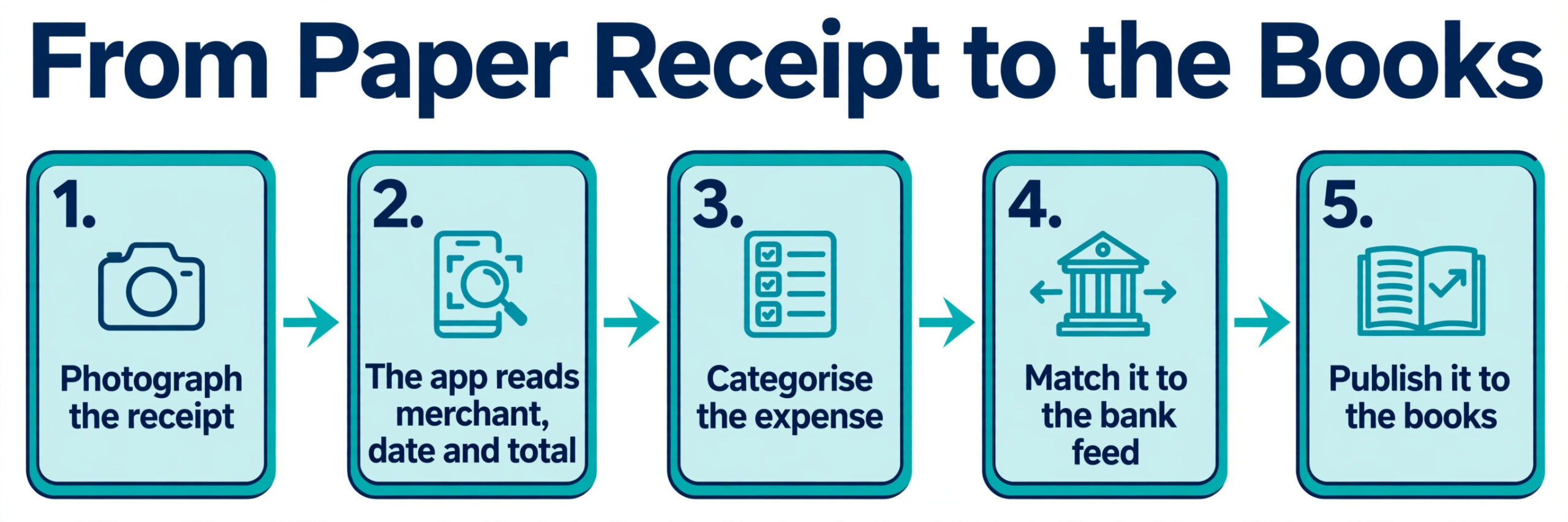
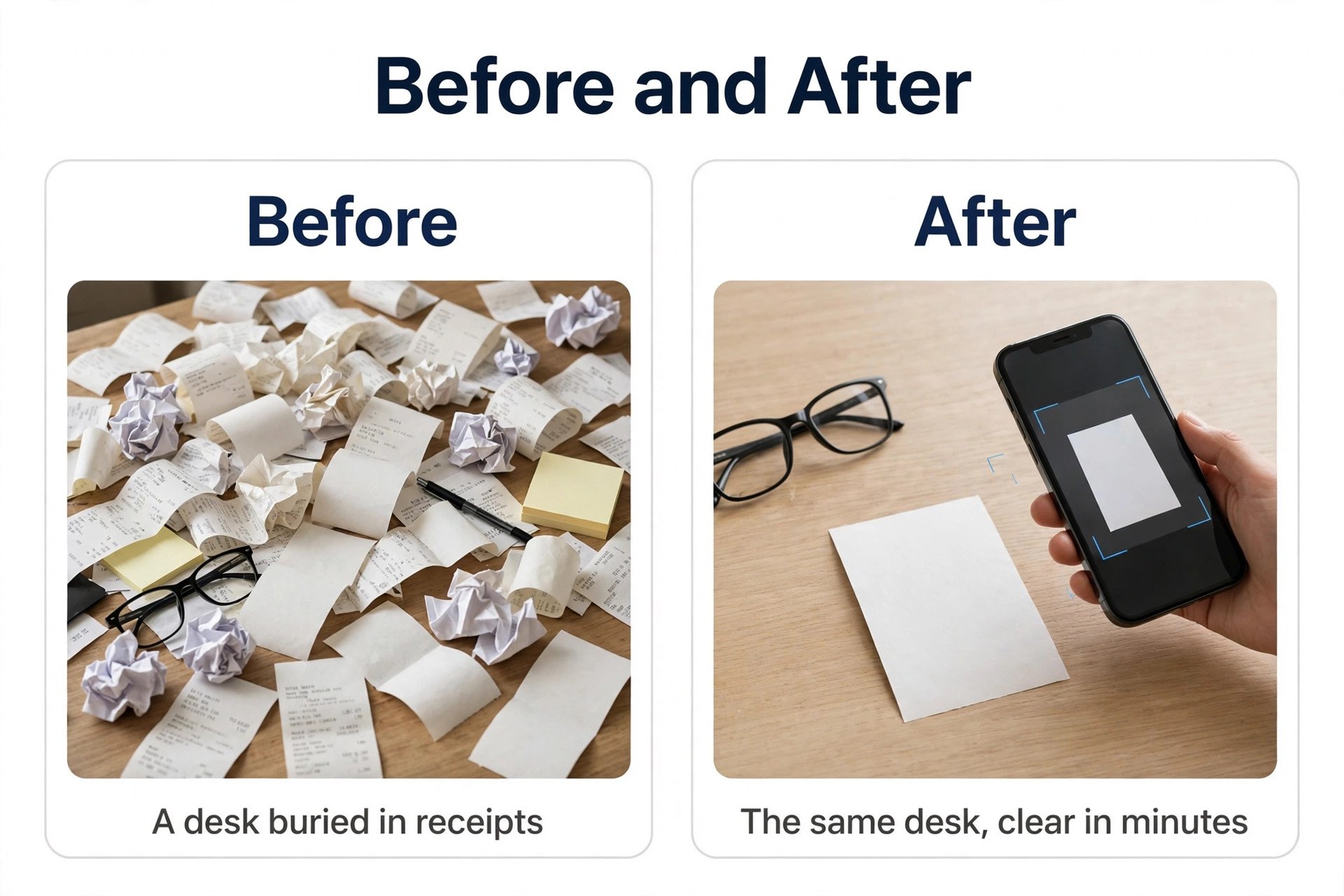
The shoebox is full again, the glove box has three months of fuel receipts in it, and tax time is six weeks away. Every small business owner knows this moment, and every year it costs hours of sorting, typing, and guessing which faded slip belongs to which expense. The best receipt scanner apps for small business end that ritual, because a phone photo becomes a categorized transaction in your books within seconds, with the original image attached as proof.
This guide compares 10 receipt scanner apps on the numbers that decide real cost and real accuracy, the entry price, the scan limit, line item extraction, and how cleanly the data flows into QuickBooks, Xero, or Sage. Prices were checked against vendor pricing pages and current 2026 roundups in November 2026. Receipt app pricing changes often and several vendors show different prices by region, so confirm the price on the checkout page before you pay.
How We Tested 10 Receipt Apps
We scored each app on five points, because the best receipt scanner apps for small business win on accuracy and workflow, not on the prettiest camera screen. Capture accuracy covered how reliably the app reads the merchant, date, total, and tax from a real receipt, including crumpled paper and faded prints. Line item extraction covered whether the app pulls individual items off a receipt or only the total, since line items matter for inventory and for client billing.
Capture routes covered the ways receipts arrive, by phone photo, email forwarding, file upload, and supplier fetch, because a business that only scans paper needs a different app from one that receives most receipts by email. Accounting sync covered direct publishing to QuickBooks Online, Xero, and Sage, plus export to CSV and Excel, since a scanner that cannot reach your books is just a photo album. Price covered the true monthly cost at a realistic volume of 50 to 100 receipts a month, including scan limits and per user charges.
We also separated apps by buyer. A solo freelancer needs a cheap scanner that feeds free accounting. A team needs approvals and card matching. An accountant needs multi client handling and supplier rules. The ranking below keeps those differences visible, so a freelancer and a bookkeeper do not end up with the same pick.
The Best Pick for Each Job
| Job | Pick | Why it wins |
|---|---|---|
| Best all round for a team | Expensify | Unlimited SmartScans plus card matching at 5 dollars a member |
| Best for an accountant | Dext | Line items, supplier fetch, and multi client handling |
| Best free start for a small team | Zoho Expense | Free for up to 3 users, paid from 4 dollars a user |
| Best for a box of paper | Shoeboxed | Mail in Magic Envelope plus phone scans |
| Best for a freelancer | SparkReceipt | 5.75 dollars a month, no per user pricing |
| Best for Xero users | Hubdoc | Included with Xero plans at no extra cost |
| Best for Wave users | Wave | Free accounting with a receipts add on |
| Best for developers | Veryfi | API first extraction with line item accuracy |
Use this table as a shortcut, then read the full section for the app you are leaning toward. The cheapest monthly price is rarely the cheapest app once scan limits and per user charges are counted, so work out the cost at your real monthly receipt volume before you commit.
The Best Receipt Scanner Apps for Small Business in 2026, Ranked
The 10 apps below fall into three groups. The first group serves teams and accountants who process receipts every day. The second group serves freelancers and very small businesses that want a cheap, simple scanner. The third group serves specialists, including paper backlogs, developers, and businesses tied to one accounting platform.
1. Expensify
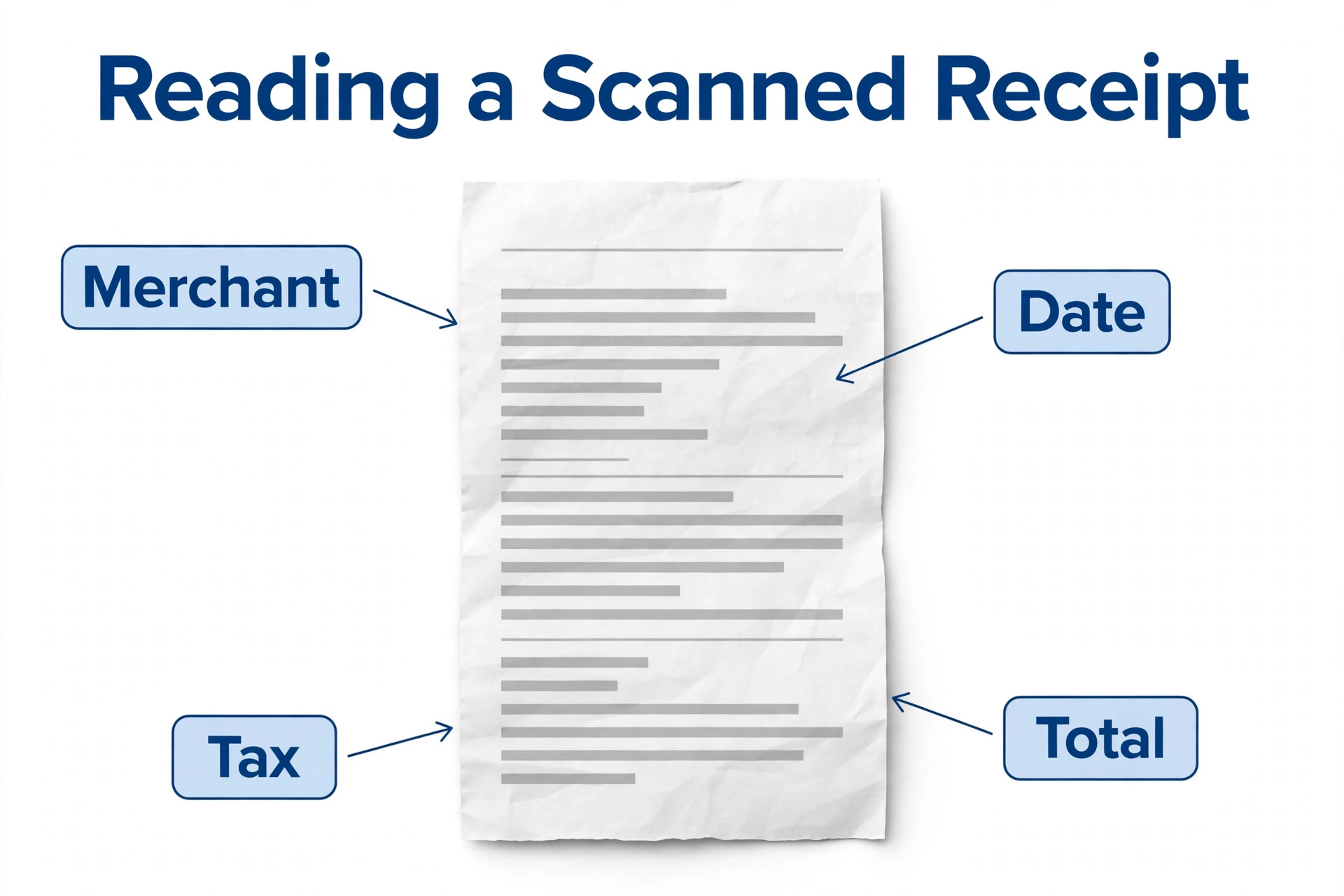
Expensify is the closest thing the category has to a default, and it earns the top spot for most small businesses with a team. Its SmartScan reads a photographed receipt and pulls out the merchant, date, and amount with very little correction needed, and for teams it matches the receipt to the right card transaction so nothing gets double counted. The app also handles approval workflows, expense reports, and accounting integrations, so the receipt is only the first step in a full expense process.
Pricing is per member per month. Collect costs 5 dollars per member a month with unlimited scans, and Control starts from 9 dollars per member a month on annual billing, adding policy controls and deeper approvals. Individuals can use SmartScan free for personal receipts, with 25 free SmartScans a month on the free plan. Some guides list Control at 18 dollars a month, but the more recent October 2026 roundups list Control from 9 dollars, so confirm the current tier price before you budget. Expensify is the right pick when more than one person submits expenses.
2. Dext
Dext, formerly Receipt Bank, is built for the accountant and client workflow, and it is the strongest app here for high volume and high accuracy. The company claims extraction accuracy near 99 percent, it fetches invoices from suppliers automatically, and it pushes clean, coded data into QuickBooks, Xero, or Sage. Line item extraction is included on higher tiers, which matters when a receipt carries dozens of items that need separate categories.
Pricing is per business per month, starting at 25.21 dollars a month billed annually for 250 documents and five users, or 302.50 dollars a year. Other sources list entry prices of 27, 30, and 31.50 dollars a month, and the spread reflects different billing sliders and regional pricing, so treat 25.21 dollars as the lowest published annual figure and confirm the price for your volume. Dext costs more than the consumer apps because the buyer is usually a bookkeeper processing many clients, and for that buyer the accuracy pays for itself in saved correction time.
3. Zoho Expense
Zoho Expense is the lowest cost option for a small team, and it is the best pick when the budget is tight but the team still needs real expense reports. The free plan covers up to three users with 20 autoscans each a month, which is enough for a very small team to run properly, and the paid Standard plan starts at 4 dollars per user a month billed annually, with Premium at 7 dollars a user a month adding more controls.
The app covers receipt capture by phone photo and email forwarding, auto categorization, card feeds, and approval workflows, and it connects to Zoho Books and other accounting tools. Some older guides list the Standard plan at 3 dollars a user a month, but the current published price is 4 dollars, so budget on the newer figure. Zoho Expense is the right choice for a team of three to 10 people that wants a free start and a cheap upgrade path, and it is the only app here that gives a real free tier to a whole team rather than to one person.
4. Shoeboxed
Shoeboxed solves a problem other apps ignore, which is a box of paper receipts. Users stuff receipts into a Magic Envelope, mail it in, and receive scanned, categorized data back, and the app also reads receipts from the phone camera, email, and a synced Gmail account on Pro. Mileage tracking is included, which suits owners who drive for work and need both receipts and miles in one place.
Pricing starts at 9 dollars a month for Starter, with 50 digital scans a month and 20 paper scans a year, then 29 dollars a month for Pro with 250 digital and 50 paper scans a month plus Gmail sync, 79 dollars a month for Plus, and 179 dollars a month for Paper Plus. There is no permanent free plan, and mailed receipts take longer than a phone scan, so Shoeboxed is not the fastest option. It is the best option when the backlog is physical, and no other app on this list will take a box of paper off your desk.
5. Veryfi
Veryfi is the accuracy leader for teams that need receipt data inside their own software. Its OCR extracts merchant, date, totals, tax, and line items, and an API lets developers build capture into apps, portals, and workflows. The company reports field level accuracy around 98.7 percent and line item accuracy near 99.6 percent, with response times under three seconds, and those figures come from its own benchmarks rather than independent tests.
Pricing is the reason Veryfi sits lower in this ranking for small businesses. The API offers a free starter tier up to 100 documents a month, but paid use starts at a 500 dollar a month minimum for about 5,000 documents, which is enterprise pricing. Veryfi is the right pick for a software team embedding extraction in a product, and the wrong pick for a shop owner who just wants to photograph receipts. Include it here because it sets the accuracy standard the other apps are measured against.
6. SparkReceipt
SparkReceipt is the best pick for freelancers and solo owners who want receipt capture without per user pricing. It catches receipts wherever they arrive, by app, upload, email forwarding, and a connected inbox, and sends them to the books without retyping. Line item extraction is included on the Elite tier, and the app covers statement extraction, mileage, and publishing to QuickBooks Online and Xero.
Pricing is simple and cheap. Pro costs 5.75 dollars a month billed annually, or 69 dollars a year, with 50 documents a month, one connected inbox, and one live bank feed in the United States. Elite costs 10.75 dollars a month billed annually and adds more documents and line items. There is a 7 day trial and no permanent free plan. SparkReceipt is the right choice for a solo owner processing under 50 receipts a month who wants one flat price and no per user math.
7. Hubdoc
Hubdoc is the cheapest option of all for Xero users, because it is included with Xero business edition subscriptions at no additional cost. It captures bills and receipts, extracts the supplier name, amount, invoice number, and due date, then creates a draft transaction in Xero with the original document attached. Supplier fetch pulls invoices from online accounts automatically, which removes the manual step of forwarding emailed bills.
For QuickBooks Online users, Hubdoc costs 12 dollars a month as a standalone subscription after a 30 day trial. The app is Xero owned and Xero focused, so a business that runs QuickBooks gets a thinner experience and should compare Dext or Expensify instead. Hubdoc is the right pick for a Xero shop with a clean document mix, and it is hard to beat a price of zero when the accounting subscription already covers it.
8. Wave
Wave suits freelancers who want free accounting with invoicing and bank connections, and receipt capture as an add on. The core accounting product is free, which keeps costs low for a new business, and the receipts add on costs 11 dollars a month according to the most recent October 2026 roundup, though some older sources list 8 dollars. Confirm the current add on price before relying on it, because Wave has changed the receipts pricing more than once.
The trade off is depth. Wave Receipts reads a photographed receipt and attaches it to a transaction, but it lacks the approval workflows, policy controls, and line item extraction of the business tools. There is no advanced feature set for teams, no multi client view, and limited integrations. Wave is the right choice for a freelancer who already uses Wave for invoicing and wants receipts in the same place for free or nearly free, and the wrong choice for a team of five.
9. AutoEntry by Sage
AutoEntry by Sage is the natural pick for businesses that run Sage accounting. It is credit based rather than subscription based, which suits variable volume, because a quiet month costs less than a busy one. The app reads receipts, invoices, and bank statements, extracts line items, and pushes the data into Sage, QuickBooks, and Xero, with supplier rules that learn how each vendor should be coded.
Pricing starts from about 13 dollars a month for a small credit bundle, and the per document cost falls as volume rises. The credit model is predictable for a business whose receipt volume swings month to month, such as a seasonal shop or a project based service. AutoEntry is the wrong pick for a business that wants a flat monthly fee and never wants to think about credits, but it is the strongest option here for a Sage shop that values line items and bank statement extraction in one tool.
10. WellyBox
WellyBox is the specialist for receipts that arrive by email. It scans Gmail, Outlook, and iCloud inboxes, plus WhatsApp and file uploads, and pulls receipts out of the inbox automatically, which suits a business that receives most expenses by email rather than on paper. The app also syncs to Excel and Google Drive, so the data lands in a spreadsheet without manual export.
Pricing is 19 dollars a month billed annually for the Basic plan with 50 documents a month, and there is a free trial but no permanent free plan. The limit is accounting depth, because WellyBox does not publish direct sync to QuickBooks or Xero in the same way Dext or Expensify do, so the data usually travels through a spreadsheet first. WellyBox is the right pick for an owner whose inbox is the real shoebox, and the wrong pick for a business that needs receipts to flow straight into the books.
How to Choose the Right Receipt App
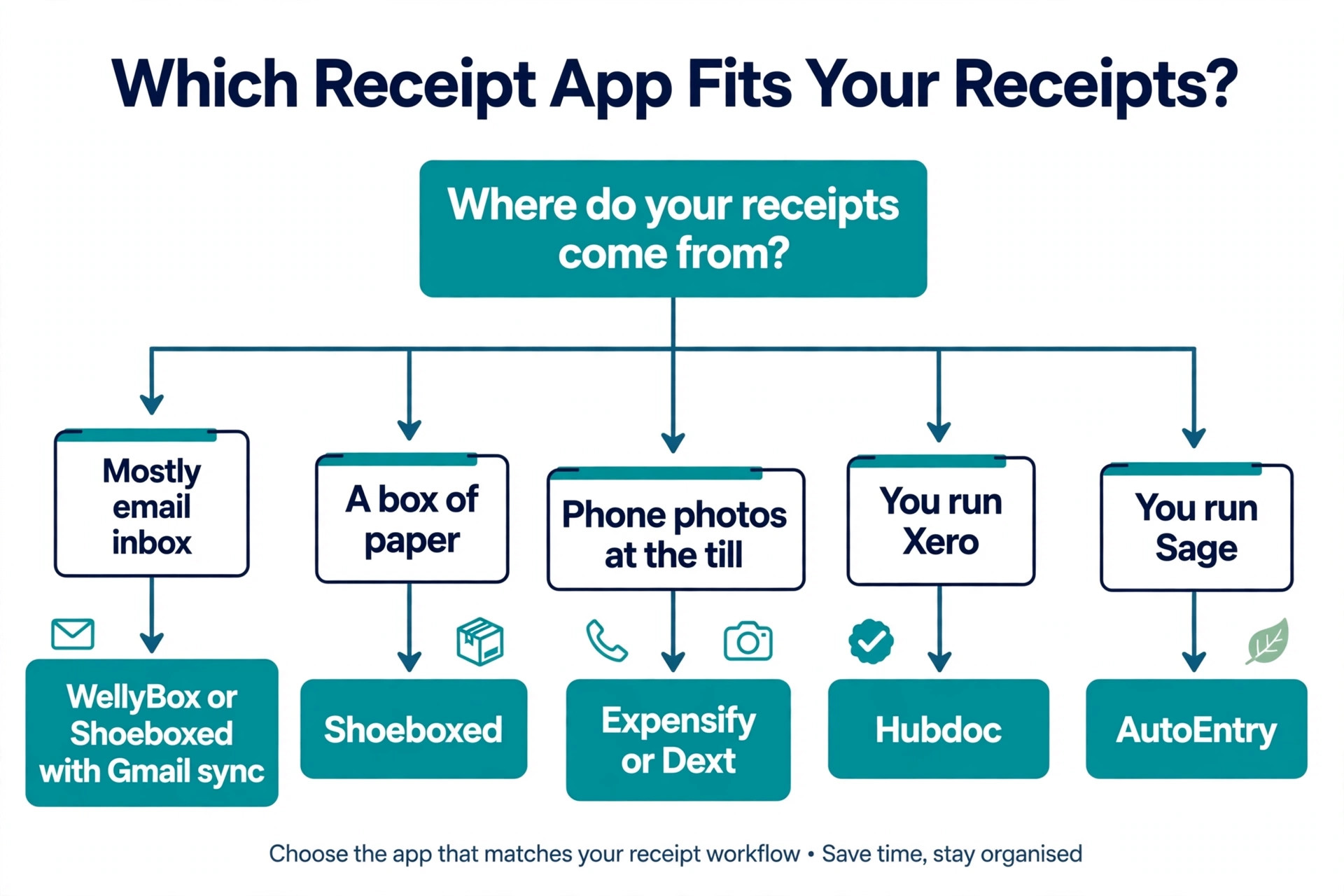
Start with where your receipts actually come from. A business that receives most receipts by email needs inbox capture, so WellyBox or Shoeboxed with Gmail sync fits. A business with a box of paper needs mail in scanning, so Shoeboxed fits. A business that photographs receipts at the till needs a fast phone app with good accuracy on crumpled paper, so Expensify or Dext fits. A business that runs Xero needs Hubdoc, and a business that runs Sage needs AutoEntry. Match the app to the receipt source before you compare prices, because the wrong capture route means half your receipts never get scanned.
Next, work out the true cost at your real volume. A per user price looks cheap for a solo owner and expensive for a team of 10, while a per document price looks cheap at 30 receipts a month and expensive at 300. Take your monthly receipt count, multiply by the per user or per document charge, and add the base fee, then compare that total across the shortlist. A freelancer scanning 40 receipts a month pays 5.75 dollars on SparkReceipt, while a team of five scanning 200 receipts pays 25 dollars on Expensify Collect, and both are right for their volume.
Then check the accounting sync, because a scanner that cannot reach your books is just a photo album. Confirm the app publishes directly to your exact accounting platform and version, not just to the category, and check whether it creates draft transactions, matches bank feeds, and attaches the original image. The best receipt scanner apps for small business make the receipt disappear into the books without retyping, and an app that only exports a CSV will cost you an hour a week in manual import.
Finally, test accuracy on your own receipts before you pay. Photograph 10 of your worst receipts, the faded ones, the crumpled ones, and the long ones from the supermarket, and see how many fields the app gets right without correction. An app that reads clean printed receipts at 99 percent and crumpled ones at 80 percent will still waste your time if most of your receipts are crumpled. The free trial exists for this test, so use it on real receipts, not on the sample images in the marketing.
What to Check Before You Pay
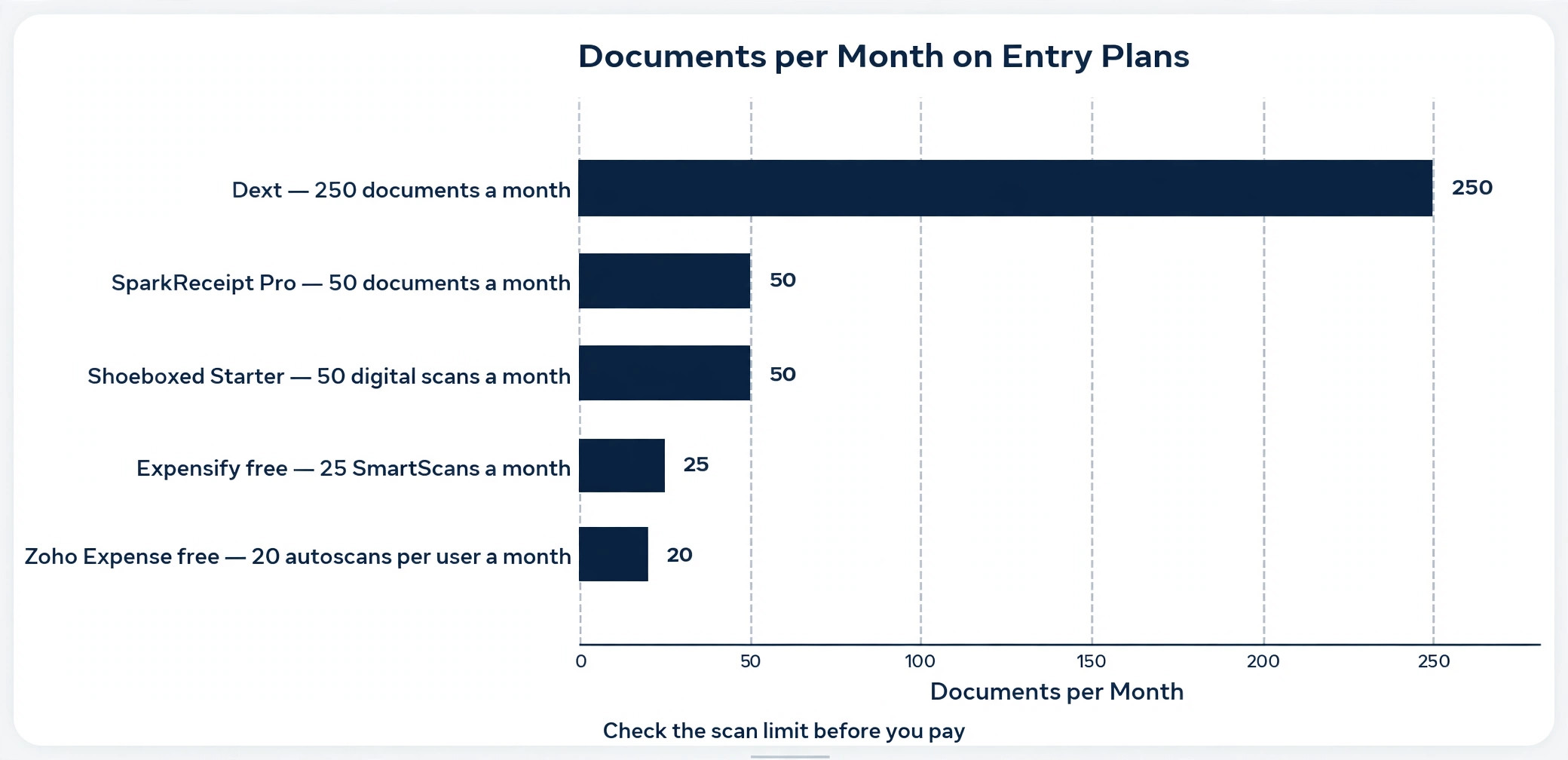
Check the scan limit first, because it decides the real monthly cost. A plan that covers 50 documents a month is enough for a freelancer and far too little for a shop that takes 200 receipts a month, and overage charges or forced upgrades can double the bill. Dext covers 250 documents on its entry plan, Shoeboxed Starter covers 50, and SparkReceipt Pro covers 50, so match the limit to your count with room to grow.
Check line item extraction next, because it is the feature most often missing from the entry tier. An app that only reads the total cannot split a supermarket receipt across categories, and it cannot hand a bookkeeper the detail needed for client billing. Dext and Veryfi lead on line items, Expensify covers the header fields well, and several cheaper apps charge extra for line items or skip them entirely. If your receipts carry many items, confirm line items are included before you commit.
Check the export and data ownership terms as well. Confirm you can export your receipts and your data as CSV, Excel, or PDF, and that the original images stay attached to the transactions in your accounting tool. An app that locks your receipt history behind a subscription is a problem when you cancel, so test the export during the trial and keep a local backup of the images.
- Confirm the scan limit covers your monthly receipt count with room to grow.
- Confirm line item extraction is included if your receipts carry many items.
- Confirm direct sync to your exact accounting platform and version.
- Confirm you can export receipts and data if you cancel.
- Confirm the free trial covers enough scans to test real receipts.
Mistakes That Waste Money
The most common mistake is buying a team plan for a solo job. A freelancer pays 5 dollars a member a month on Expensify Collect and uses one seat, while SparkReceipt at 5.75 dollars a month covers the same receipts with no per user math, and Hubdoc costs nothing at all for a Xero user. Match the pricing model to the team size before you buy, because per user pricing punishes growth and per document pricing punishes volume, and the wrong model costs more every month.
The second mistake is ignoring the scan limit until the bill arrives. A business signs up for a 50 document plan, scans 200 receipts in the first month, and gets an overage charge or a forced upgrade it did not budget for. Count your receipts for a month before you choose a plan, using the paper in the shoebox and the inbox as the measure, and pick a tier with at least 20 percent headroom. The best receipt scanner apps for small business publish their limits clearly, so there is no excuse for guessing.
The third mistake is scanning receipts and never reconciling them. A photo in the app is not a transaction in the books until it is matched, categorized, and published, and a backlog of unscanned or unmatched receipts is just a digital shoebox. Set a weekly routine, 15 minutes every Friday, to review unmatched receipts, fix the miscategorized ones, and publish the week to the books. The app saves time only when the routine exists.
Our Verdict
Expensify is the pick for most small businesses with a team, because Collect at 5 dollars a member a month gives unlimited SmartScans, card matching, and approval workflows in one place, and the free personal tier lets a solo owner test the capture before paying. The 25 free SmartScans a month on the free plan are enough to prove the accuracy on your own receipts before you commit.
Dext is the pick for accountants and high volume businesses that need line items and supplier fetch, at 25.21 dollars a month billed annually for 250 documents. Zoho Expense is the pick for a small team on a tight budget, because the free plan covers three users and Standard costs 4 dollars a user a month. SparkReceipt is the pick for a freelancer who wants one flat price, and Hubdoc is the pick for any Xero user, because it is already included. Start with the app that matches your accounting platform and your receipt source, test it on your worst receipts, and let the accuracy decide.
Frequently Asked Questions
Which of the best receipt scanner apps for small business is the cheapest?
Hubdoc is the cheapest for Xero users, because it is included with Xero business plans at no extra cost. For everyone else, Zoho Expense is the cheapest team option, with a free plan for up to three users and paid plans from 4 dollars a user a month, while SparkReceipt at 5.75 dollars a month is the cheapest flat price for a solo owner. Among the best receipt scanner apps for small business, the cheapest monthly fee is not always the cheapest app, because scan limits and per user charges change the total, so work out the cost at your real monthly volume.
How accurate are receipt scanner apps?
The mainstream apps read clean printed receipts above 95 percent on the header fields, such as merchant, date, and total, and the best apps claim 98 to 99 percent on those fields. Accuracy drops on crumpled paper, faded prints, and handwritten notes, which is why Dext and Veryfi publish high accuracy figures and still use human review as a backstop on low confidence reads. The honest test is your own receipts, so photograph 10 of your worst receipts during the free trial and count how many fields need correction before you pay.
Do receipt scanner apps work with QuickBooks and Xero?
Yes, most of the apps on this list sync directly to QuickBooks Online and Xero, including Expensify, Dext, SparkReceipt, and AutoEntry, and Hubdoc is built for Xero. The sync usually creates a draft transaction with the receipt image attached, then matches it to the bank feed so nothing gets double counted. Confirm the sync works with your exact plan and version before you commit, because some integrations are limited to certain tiers, and keep a local backup of the images in case you change tools later.
Can I scan old paper receipts in bulk?
Yes, and Shoeboxed is the best tool for it, because the Magic Envelope lets you mail a stack of paper receipts in and receive scanned, categorized data back. The other apps handle bulk scanning by photographing one receipt at a time, which works for a small backlog but is slow for a box of 500 receipts. For a large backlog, mail the box to Shoeboxed on the Pro or Plus plan, or scan in batches of 20 a day while the current receipts flow through the app, so the backlog shrinks without stopping the daily work.
What is the difference between Dext and Expensify?
Dext is built for accountants and high volume capture, with line item extraction, supplier fetch, and multi client handling, priced per business from 25.21 dollars a month. Expensify is built for teams submitting expenses, with SmartScan capture, card matching, approval workflows, and expense reports, priced per member from 5 dollars a month. A bookkeeper processing many clients should choose Dext, while a business whose own team submits expenses should choose Expensify, and a business that needs both should run Dext for the books and Expensify for the team.
Is there a free receipt scanner app for small business?
Yes, several. Hubdoc is free with Xero business plans, Zoho Expense is free for up to three users with 20 autoscans each a month, Wave offers free accounting with a paid receipts add on, and Expensify gives individuals 25 free SmartScans a month. Veryfi offers 100 free documents a month through its API. A free plan is enough to test accuracy and to run a very small business, but a team scanning more than 50 receipts a month will usually need a paid plan, so treat the free tier as a trial rather than a permanent home.